


Copy link to clipboard
Copied
My process should work but everything is out of sync what is the best workflow to grab multifple clips from each camera and sync them into one long Mulit camera sequence.
1. I grab all the clib in that bin for that camera
2. I make a new sequence from those clips
3. I move that sequecne into a new bin
4. I create an in points where the clap mark is for that camera sequence
5. I then do a multi camera sync with those in points.
6. everything is out of sync with the new multi camera sequence.
What is thebest workflow to get all cameras on one sequence? 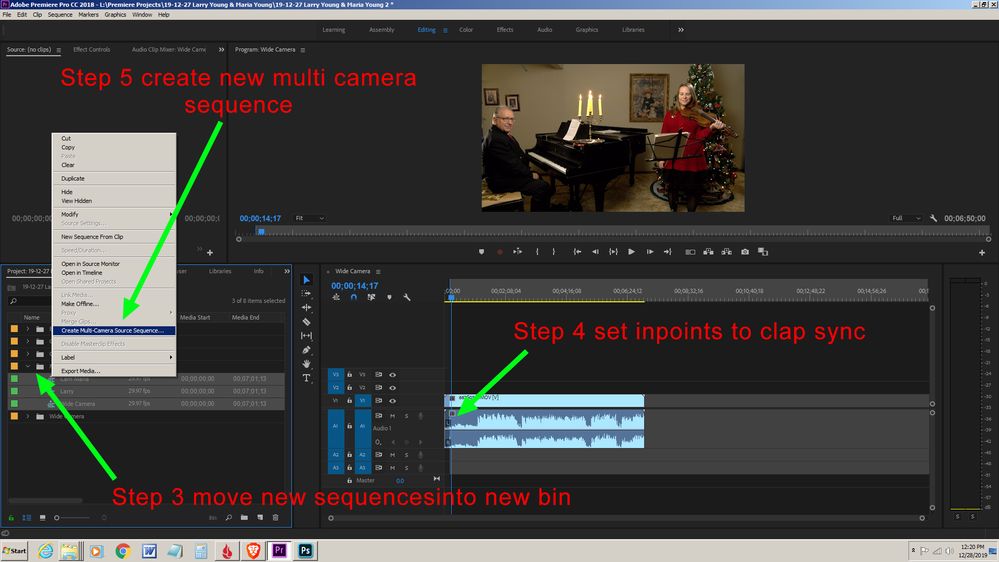

Windows 10 64-bit
Gigabyte Z490 AORUS Ultra Intel
LGA 1200 ATX Motherboard
Intel I9-10900K CPU@3.70GHz
RAM 16GB
NVIDIA GeForce RTX 2070 Super
& NVIDIA GeForce GTX 1650


 1 Correct answer
Further research I found this is a good work flow. Problem I was having was:
- Setting the in points in the original clip not in the timeline.
- Make sure the sequence of clips is moved over to the beginning of the timeline so they sync.
I made this video to help
https://www.youtube.com/watch?v=12HCPnYZdrQ&feature=youtu.be

 3
Replies
3
3
Replies
3


Copy link to clipboard
Copied
My workflow for this, if all of the cameras have audio, is to select the footage with the best audio first, then select the other clips (not sequences.) Right click on any of the selected clips and create mulitcamera sequence, in the next menu sync by audio. I would also have the allow layers button turned off and press the plus sign on the program monitor, drage the multicamera button (5 squares) to the other buttons and press ok. I'd clear any sequences out of the timeline area and drag the multicamera sequence in to the timeline area. If you then press the multicamera button you should see all of the cameras and they should be in sync. You could then play the footage through and click on the cameras that you'd like while the footage is playing.
Hope that this helps.
Copy link to clipboard
Copied
yes but all cameras DO not have good audio and sycning this way does not line up the video correctly.
Windows 10 64-bit
Gigabyte Z490 AORUS Ultra Intel
LGA 1200 ATX Motherboard
Intel I9-10900K CPU@3.70GHz
RAM 16GB
NVIDIA GeForce RTX 2070 Super
& NVIDIA GeForce GTX 1650
Correct answer by
RonaldCz
AUTHOR
Copy link to clipboard
Copied
Further research I found this is a good work flow. Problem I was having was:
- Setting the in points in the original clip not in the timeline.
- Make sure the sequence of clips is moved over to the beginning of the timeline so they sync.
I made this video to help
https://www.youtube.com/watch?v=12HCPnYZdrQ&feature=youtu.be
Windows 10 64-bit
Gigabyte Z490 AORUS Ultra Intel
LGA 1200 ATX Motherboard
Intel I9-10900K CPU@3.70GHz
RAM 16GB
NVIDIA GeForce RTX 2070 Super
& NVIDIA GeForce GTX 1650


Get ready! An upgraded Adobe Community experience is coming in January.
Learn more
 AdChoices