


Participating Frequently
February 20, 2018
Answered

Nvidia OpenGL Driver crash on startup

  • February 20, 2018
  • 17 replies
  • 36477 views

Hi, I am having a really annoying issue with Premiere Pro CC 2018.

Ever since the latest Windows 10 Creators Update Premiere consistently causes the Nvidia OpenGL Driver to crash upon loading a project. Specifically, it crashes once Premiere tries to load the first videoclip into the preview monitor. Opening JUST the program works fine.
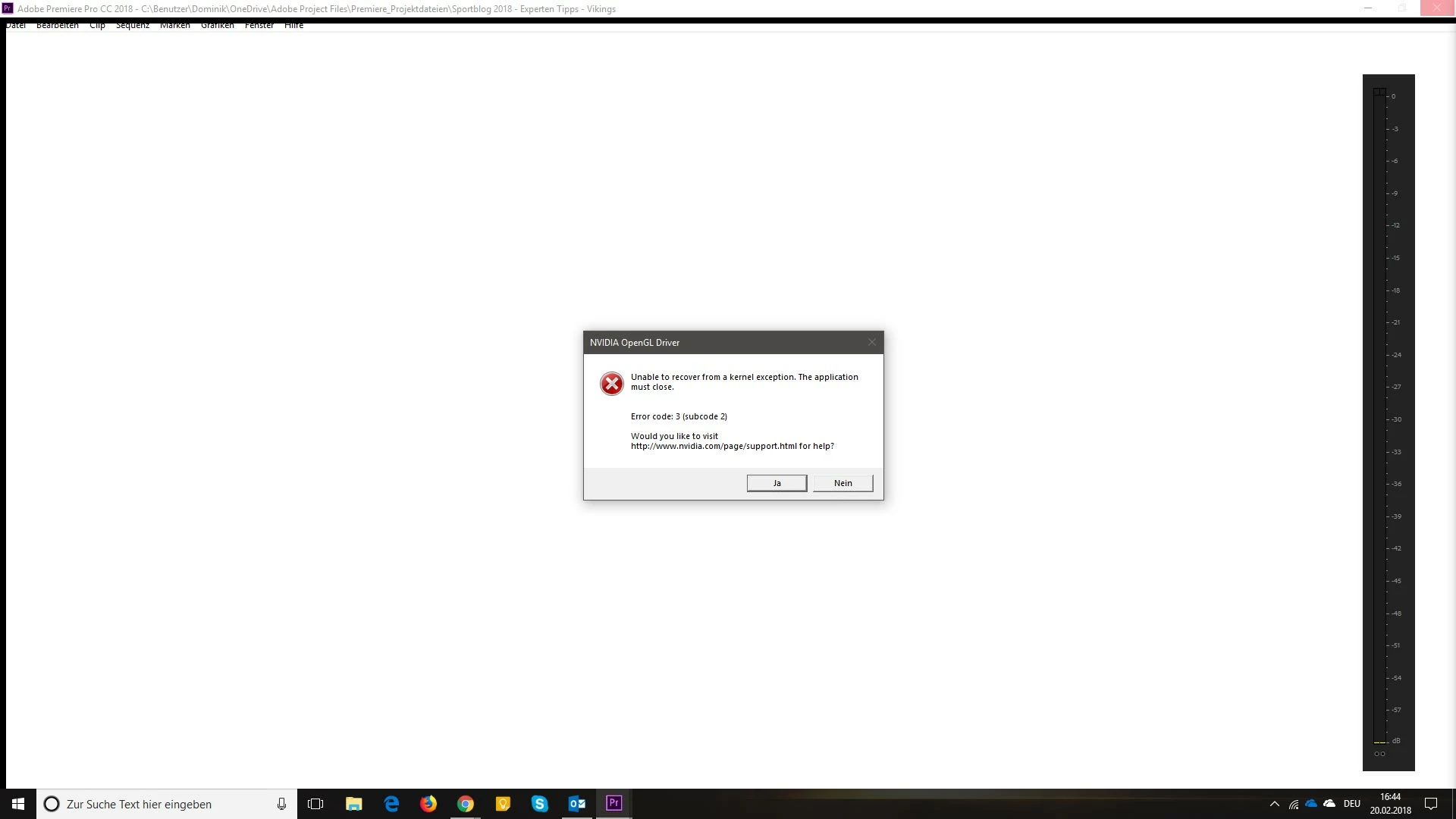
Windows gives these error reports (sorry, they are in German):

Quelle

Adobe Premiere Pro CC 2018

Zusammenfassung

Nicht mehr funktionsfähig

Datum

‎20.‎02.‎2018 16:44

Status

Der Bericht wurde gesendet.

Beschreibung

Pfad der fehlerhaften Anwendung: C:\Program Files\Adobe\Adobe Premiere Pro CC 2018\Adobe Premiere Pro.exe

Problemsignatur

Problemereignisame: BEX64

Anwendungsname: Adobe Premiere Pro.exe

Anwendungsversion: 12.0.1.69

Anwendungszeitstempel: 5a4defd6

Fehlermodulname: nvoglv64.dll

Fehlermodulversion: 23.21.13.9077

Fehlermodulzeitstempel: 5a67b485

Ausnahmeoffset: 0000000000fde979

Ausnahmecode: c0000409

Ausnahmedaten: 0000000000000007

Betriebsystemversion: 10.0.16299.2.0.0.768.101

Gebietsschema-ID: 3079

Zusatzinformation 1: 7a26

Zusatzinformation 2: 7a26cd0dd2f7883f2e807cfd8dcb829c

Zusatzinformation 3: 5e40

Zusatzinformation 4: 5e400ab0022931b1faaca398e3eb9b37

Weitere Informationen über das Problem

Bucket-ID: 381734f7dec2a3b7b000a7843b520698 (1153105690979600024)

------------------------------------

Unable to recover from a kernel exception. The application must close.

Error code: 3 (subcode 2)

(pid=4740 tid=2144 adobe premiere pro.exe 64bit)

-------------------------------------

I am using a Quadro M4000 with the latest ODE-Driver 390.77.

Funny enough, if I open Premiere right after booting my machine, it usually opens fine and I can work with it for as long as I want without any errors. Only when I open other programs like my browser or my mail client, sometimes even just browsing folders, causes Premiere to crash the OpenGL driver upon launching later on.

I already talked to a Nvidia support member, they made me try different power settings on my machine and in the Nvidia Control panel, but that didn't change anything. So they told me to report this problem here as well to see if there are any known issues or solutions to that problem.

Some ideas what's happening here? Thanks in advance!
This topic has been closed for replies.
Correct answer Lomarx

Today when switching between youtube and premiere i got the error with 391.03.

What is the visual simulation that you talking about?

Best.


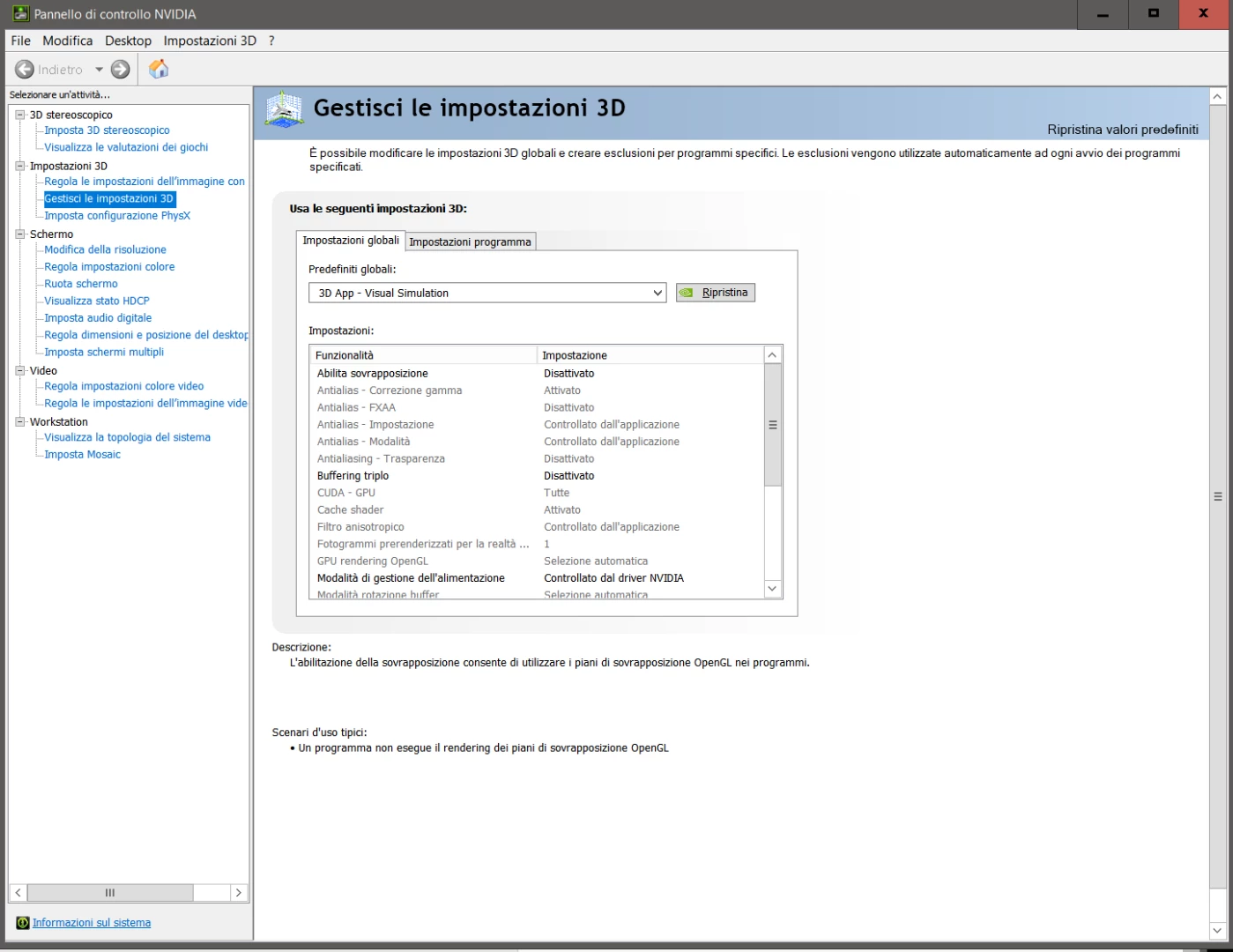
You can find it in the NVIDIA Control panel, this is in italian but i hope you can understand where it is:

and, yes, with this setting seems there is no more OpenGL error.

Alex

17 replies

Participant
March 26, 2024

Добрый день! У меня была аналогичная проблема. Единственное, что мне помогло, так это откат версии драйвера. Я просто установил версию, которая полтора-два года назад стояла и у меня не было никаких проблем. Надеюсь это решение поможет.

Flamboyant_painter98BC
Participant
July 29, 2019

In the NVIDIA Control Panel, go to 'Manage 3D Settings'. Change 'OpenGL rendering GPU' to your NVIDIA Graphics card (Quadro K22200 for example). Worked for me.

Denzillionairé
Participant
April 17, 2019

Hi there u/jho678 and everyone!

I am posting because I believe that I have just solved this issue for myself. I just started a new job about 2 weeks ago, which is PC based, and I've been having severe glitching and media issues from day 1. With some lengthy research and troubleshooting, I believe this is a quick and easy fix. For me, it was simply a graphics card issue, specifically with my NVIDIA Quadro K620.

TO FIX:

1) go to the NVIDIA Control Panel

2) Navigate to: "3D Settings" > "Manage 3D settings" in the tab on the left

3) Within the "Manage 3D settings" window, you will see "I would like to use the following 3D settings:" and then two tabs, one for "Global Settings" and one for "Program Settings". In "Global Settings" (most "Program Settings" will default to use global settings), select the option "3D App - Visual Simulation"

4) Hit "Apply"

And that should be it!

Cheers, and good luck!

D.

***03 JUNE 2019 - UPDATE***

Just wanted to update and let everyone know that while this issue still seems resolved with this setting, I have noticed a consistent and automatic weekly "re-setting" of this configuration, most likely as a product of some auto-updates, with seemingly no way to keep it from reverting. You just have to keep your eye on it, and if your PC is acting funny while using PremierePro, this configuration has most likely reset on you. The same could be said for disabling CUDA within Premiere Pro (sometimes automatically kicks CUDA back on...), so keep your eye on your PP settings as well. Cheers!

Participant
March 14, 2019

I've been having this exact same bug since late 2017 when I had an Nvidia Quadro M2000 graphics card in my machine. I contacted Nvidia support, and they suspected a faulty card, so they arranged a swap and I got the Quadro P2000 instead since the M2000 was discontinued. I also tried new RAM mopdules since my dealer said ity could be faulty RAM: Didn't help. So I tried reinstalling Windows 10, all drivers etc, but that didn't help either. Fast forward to now when I have a completely new build (with a fresh Windows 10), with all the hardware changed except the Quadro P2000 (I have an Eizo CG277 monitor and need a card with 10 bit color), and I still have the same issue. I have this in both Photoshop and Premiere Pro. In the Photoshop settings someone adviced my to turn off the "30 bit color" functionality, but it didn't help. I've also tried turning off the vertical sync in the Nvidia card settings. After googling some more today, I found this thread today, and I will definetely try to set the Base Profile to 3D App-Visual Simulation like suggested here. Crossing my fingers...

Cheers,

Eivind Rohne

Participant
March 14, 2019

You seem to have the exact seem issue. About 99% sure, that will fix it. Even I all hardware works. This software change could ruin it all on quadros.

Participant
March 14, 2019

I'll test it for a couple of weeks and post back here how it goes!

Cheers,

Eivind

Participant
November 16, 2018

I'm having the same issue. Quadro M4000, on a brand new Windows 10 instalation.I tried differents workarounds but nothing seems to work.. SOLUTIONS PLEASE!!!!

Participant
November 1, 2018

I have 2 high end edit stations, one with Quadro K6000, the other with an NVIDIA Titan 1080 series. Both AFX and Premiere CC2019 crash the video driver. Sometimes it works, but when it crashes the screen goes black for a couple seconds and I get the NVIDIA Driver Error. I have gone forward and backward with drivers, cleared cache, reset prefs. NOTHING fixes this. I hope Adobe/Nvidia can resolve this issue, it has caused me to miss deadline. There seem to be no way to open my CC2019 project/timelines in CC2018.

If you can read this Adobe, this is real issue that is costing us professionals real money.

Participating Frequently
September 24, 2018

Same issue on my pc, Open GL error started happening within the past few weeks and causes PPro CC to lock up and crash when starting the program. Running a Quadro M4000 with the 391.89 driver.

Using Lomarx's suggestion, changing Manage 3d Settings from Base Profile to 3D App-Visual Simulation on the Global Settings tab in the NVIDIA Control Panel fixed this for me. Thank you!

Participant
October 3, 2018

Thanks Steve, that's worked for me too!

Participating Frequently
October 3, 2018

Glad to hear it worked, Lomarx gets the credit here.

And I should clarify my original post on this. PPro CC started up properly. The crash/lockup was happening when I would try to open a project. And Lomarx's suggested fix for this is still working perfectly for me.

Tawfiqin
Participant
May 29, 2018

I have same issue on two mahcines

with Quadro K600 and Quadro K620

windows 10

adobe premiere latest version

Participant
May 11, 2018

Been having the same issue for a couple months, earlier this week I enbabled video editing mode and it seems to have resolved the crash... maybe it will work for you too, maybe not, but thought it would be worth sharing:

NVIDIA -> Destop -> Enable Video Editing Mode

Known Participant
May 4, 2018

I'm having this problem, too (Nvidia OpenGL Driver crash on startup). If I boot up and go into Premiere Pro, I work with no issues.

If I am working on something else, then open PPro, I get this error and my screens go black after closing the error message dialog.

I rebooted the first time this happened. But, I waited it out and the screens eventually came back in a couple minutes.I did Ctl-Alt-Del to go to task manager during that time, but I don't know if that made any difference on whether the screen came back or not.

I was not having this problem with my GTX770. Only with my new Quadro P4000

SIDE NOTE: To make matters worse, I got this $800 video card to increase my ability to play back 4K Raw files on my i7700 44.2Ghz PC with 64GB Ram, SSD'd etc. But, zero difference.

I realized neither the GeForce GTX770 NOR the Quadro P4000 are used much at all during playback on the time-line. I almost sent the ish back, but having more than one  DisplayPort output is something I miht want to keep.

I don't play games much, but did see about 33% GPU Usage there. I only got 5-10% GPU usage during playback of PP Timeline using both the 770 and the P4000

May 4, 2018

Yes, it seems to be a wide issue (having it too here)

The only thing that prevents crash at startup is to set 3D

settings to "3D App - Visual Simulation" in nVidia control panel.

@Adobe.. could you please take a look, this is a long standing bug!