Copy link to clipboard
Copied
Hi all,
I'm having a very puzzling issue with Premiere Pro CC. I have created a brand new project. The project itself, and every scratch disk in the Project Settings > Scratch Disks menu, are set to my D drive. Despite this, whenever I import a clip, Premiere is creating a CFA cache file for it on my C drive. This can't continue because my C drive is a very small SSD only used for my OS. I can't figure out why this is happening, especially when all of my settings show that cache files should be going to my D drive. Any help appreciated!

Any help appreciated!
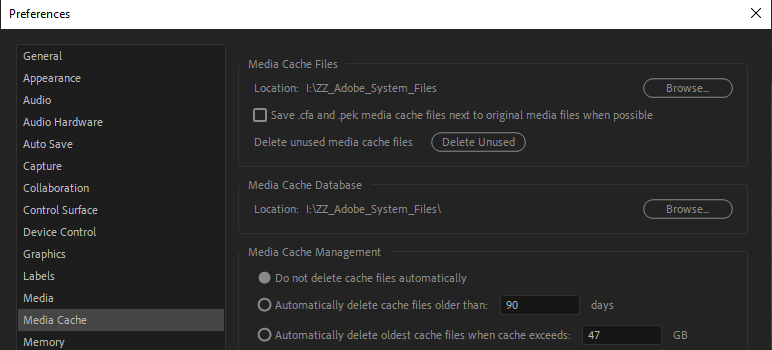
If Jims solution doesn´t work, go to Edit > Preferences > Media Cache and make sure that Media Cache Files and Media Cache Database points to your D drive.
For some reason Premiere Pro from time to time resets the Preferences on shut down and when it does it starts to place the files on the C drive again.

Copy link to clipboard
Copied
Manually delete the files on C:.
Do they come back?
Copy link to clipboard
Copied
Any help appreciated!
If Jims solution doesn´t work, go to Edit > Preferences > Media Cache and make sure that Media Cache Files and Media Cache Database points to your D drive.
For some reason Premiere Pro from time to time resets the Preferences on shut down and when it does it starts to place the files on the C drive again.

Copy link to clipboard
Copied
We haven't heard back from you, JosiahClark? What's going on?
Thanks,
Kevin
Get ready! An upgraded Adobe Community experience is coming in January.
Learn more