
Premiere Pro 2021 update - Hindi subtitles no longer working
Hi there,
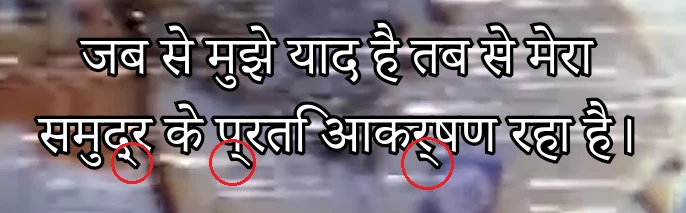
The most recent version of Premiere Pro has completely altered how subtitles are handled. As a result, Hindi text no longer displays or renders correctly, showing strange lines beneath the text, although it still appears correctly in the text editing panel.
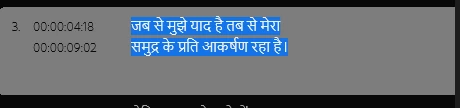
Image 1. This is how a Hindi .SRT file appears in the editing panel, as open captions (no strange lines):
Imagine 2. This is how it appears in the preview panel and when rendered (I've drawn red cirlces around the lines):
I'm a UK-based Windows 10 user. My team member in the US is a Mac user and has the same issue. We've tried changing Premiere's language settings in Preferences>Graphics, changing our computers' language settings, clearing the cache, importing sequences into new projects, and I've tried every single Hindi-compatible font in Adobe's library. Nothing has worked and we're out of ideas. It's looking like our only option will be to revert to the 2020 version of Premiere.
Any advice or assistance gratefully received.
In kindness,
Chris.
 AdChoices