Participant
December 4, 2019
Question

System Out of Memory - Premiere Pro 2020

  • December 4, 2019
  • 3 replies
  • 2337 views

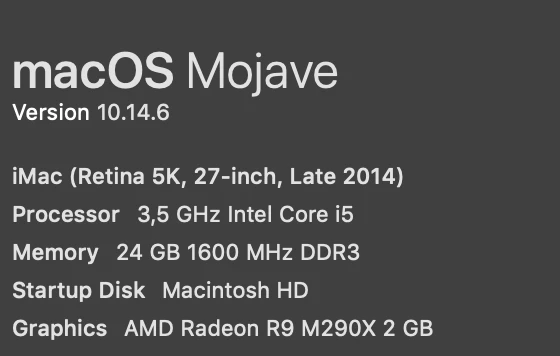
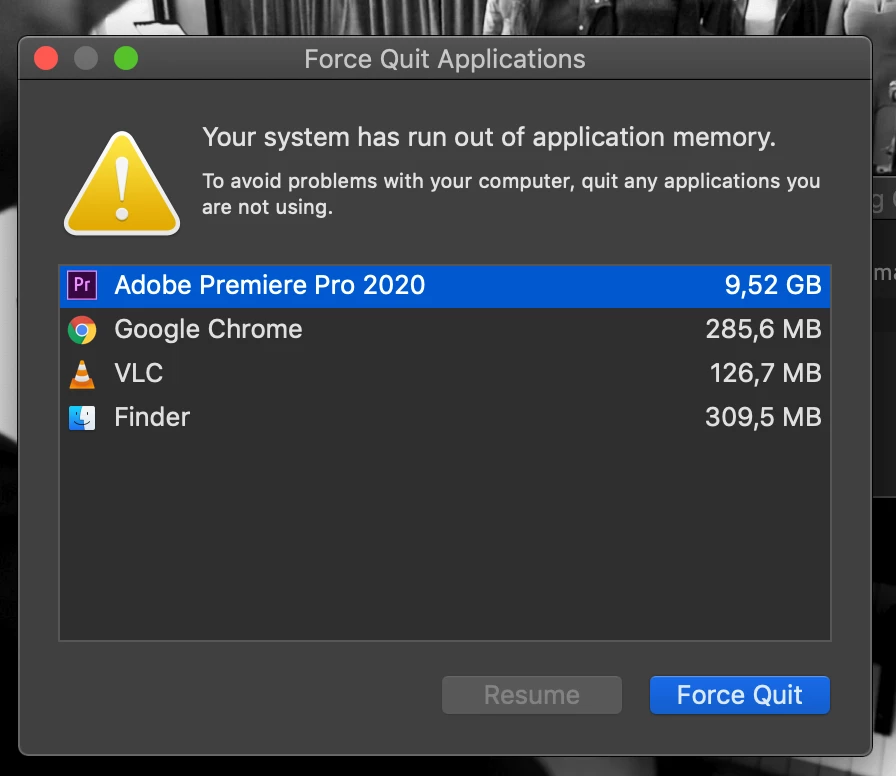
Keep getting this pop up on my system using PP 2019 and 2020. Working on an iMac with 24gigs of RAM, and even when Premeire is only using 9gigs this continually pops up. Premier doesn't crash, so I've evenutally just had to drag the dialogue box off to the side to prevent it popping into the center of screen all the time. Anyone else having this issue, or has a fix? Is it an OS issue, or Adobe issue? 
 

This topic has been closed for replies.

3 replies

Community Expert
December 10, 2019

80 gigs is not a lot of free space for your startup drive.  My understanding is that you should leave at least 20% free space on your startup drive (you dind't say how large your startup drive is) and 10% on other drives.  

Community Expert
December 4, 2019

used to get this sort of message in fcp7 working with certain file types such as cmyk graphic images.  Haven't seen it happen with Premiere but it's a place to start.  What are your sources and what are your sequence settings?  Do you have plenty of space on your boot drive (at least 20%)?  Just guessing at this point...

Participant
December 10, 2019

Hey. 


It's happening on various projects - Ones with 4k MXF/PGN/PSD files, ones with ProRes 422/PNG/PSD files. Nothing I would think is a problematic file type. 


Boot Drive has 80gigs free - which I assume is plenty. 


Adobe rep had me reset my preferences by renaming all the preference folders, which seemed to work for a day or two, but now it's started again. 

December 4, 2019

Moving to the Premiere Pro forum from Get Started