
Participating Frequently
May 13, 2019
Question

Trouble centering text in a title graphic

  • May 13, 2019
  • 5 replies
  • 5028 views

Hello,

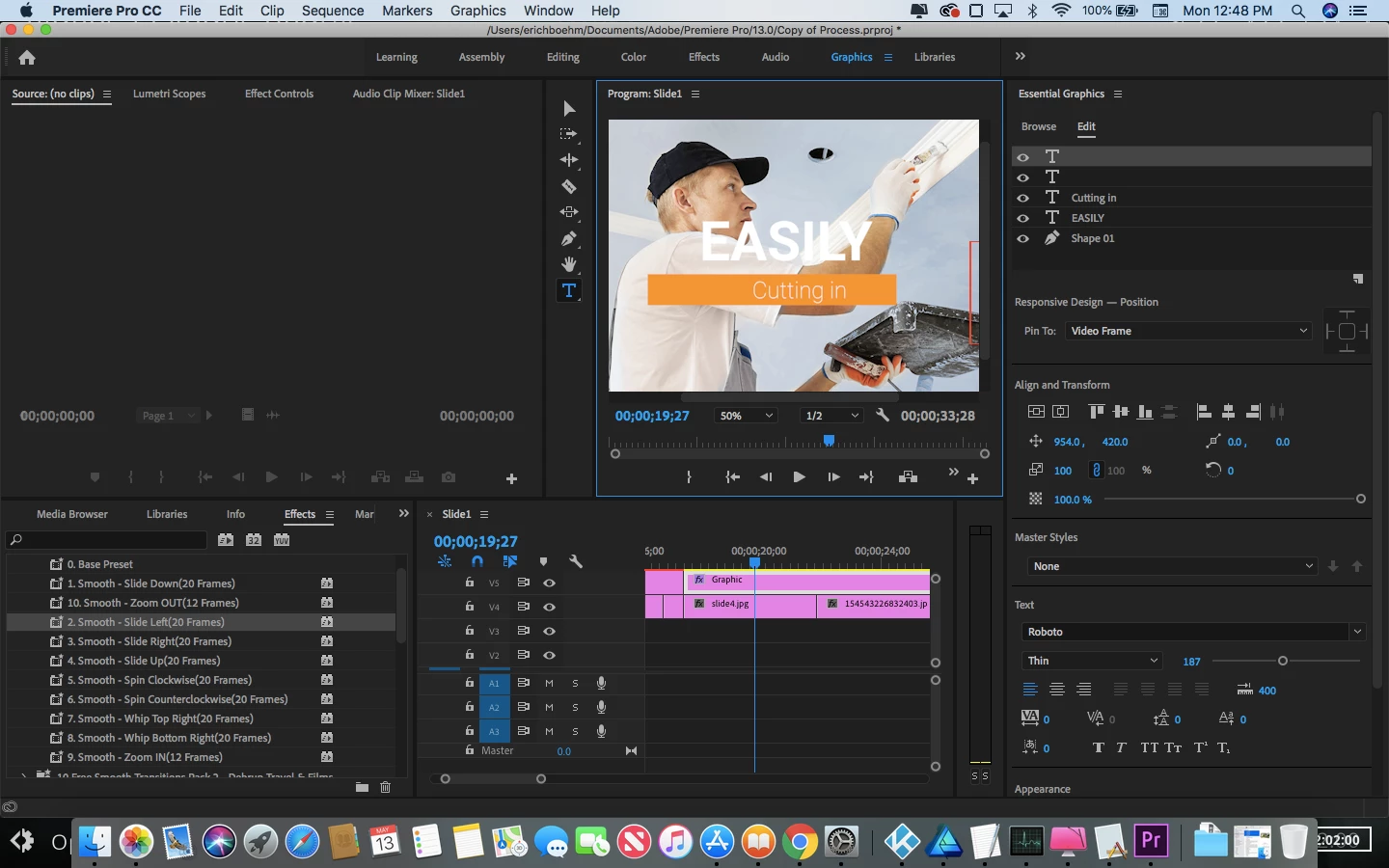
I am having quite the puzzling issue with Premier.  For the last half an hour, I have been looking at the "essential graphics" panel tying to see what I am missing.   I downloaded some title templates off, and the placeholder text in them is already centered, but when I replace it with mine, it becomes off center.  So, I click on the "center horizontally" button under align and transform and the results are completely off.  Instead of centering properly, it shifts the text far over to the right side of the graphic. It's almost like it's being centered relative to another element rather than the graphic.    Not to mention, when I scrub through the video the text moves from it's the previous position to the now "centered" position as if I have unknowingly created a keyframe.  Why, premier?  All I want to do is center my title and have it stay in place for the duration of the clip. Here is a screenshot of what happens when I try to center.   The "cutting in" text is what I am having trouble with the title above
that has the same problem as well.  Any tips would be much appreciated.
This topic has been closed for replies.

5 replies

Community Expert
May 14, 2019

I even corrected the mask of the text above so that if you

insert another text it won't get cropped, so please ignore the

first file and work on this one: Dropbox - Orange 83.mogrt - Simplify your life

sorry for this but I was working at midnight after a full day loaded with work,

let me know how it goes please

MyerPj
Community Expert
Community Expert
May 14, 2019

What does it look like if you select "Fit" in the program monitor "Zoom Level" (currently set to 50%)

Community Expert
May 14, 2019

MyerPj​ that should be set to fit, but that is not the problem,

the issue is that when he replaces the text he looses the proper

alignment, and the text holder is not responsive, so if he inserts

a longer text the holder will preserve its scale and position, so

adjusting any of those will ruin any keyframed properties.

Also there are masks being animated, which add to the complexity

of trying to customize it. That in the old mogrt, but I guess it should

be good to go after I recreated most of it.

Participating Frequently
May 16, 2019

Tried out the new template and it worked like a charm!  Alignment and animation are looking perfect!  Thank you, Carlos!

Community Expert
May 13, 2019
Participating Frequently
May 13, 2019
R Neil Haugen
Legend
May 13, 2019

You have to first center the text in the text box, then center the text box. Fix that, your problem is fixed.

Yea, it's weird behavior but I deal with it tons of times a day.

Neil

Everyone's mileage always varies ...
R Neil Haugen
Legend
May 13, 2019

The problem is the text isn't centered in the text block ... as in below ..

Click the align: center icon in blue here, then the option above to center the text box.

Neil

Everyone's mileage always varies ...
Community Expert
May 13, 2019

did you apply the highlighted preset to the mogrt?

if you take off all presets and effects applied to the graphics,

what happens?

are all the assets of the mogrt properly pinned relative to each other?

mogrts created inside premiere pro must use all responsive options

available in a practical way, so that the user won't face such issues,

we need to make sure about this. From what I see in the attached

picture, responsive time is also absent, (it could be an old template

created before the pinning and responsive options became available).

Did you try to switch to 'Software Only' rendering? Sometimes GPU acceleration

causes such issues where CPU based rendering is more stable.

Participating Frequently
May 13, 2019

How do I apply the preset to the .MOGRT?

Community Expert
May 13, 2019

no problem, we don't want the preset for now, i just supposed it is

applied since highlighted, please ignore this and answer the other questions,

(you can apply a preset by drag and drop)