
sberic
Legend
June 30, 2017
Answered

TypeScript Enabled CEP Development

  • June 30, 2017
  • 6 replies
  • 18494 views

Modern Tools and ExtendScript

Earlier this week, Bruce Bullis​ integrated a pull request into the CEP Samples repository that included a new Sample called TypeScript. TypeScript is a language that "transpiles" into JavaScript and JavaScript-based languages (e.g. ExtendScript). It can also be configured in certain environments (e.g. Visual Studio Code) to provide normal JavaScript (and, it turns out, ExtendScript) development with helpful type checking and IntelliSense/autocompletion support. Here's an example:
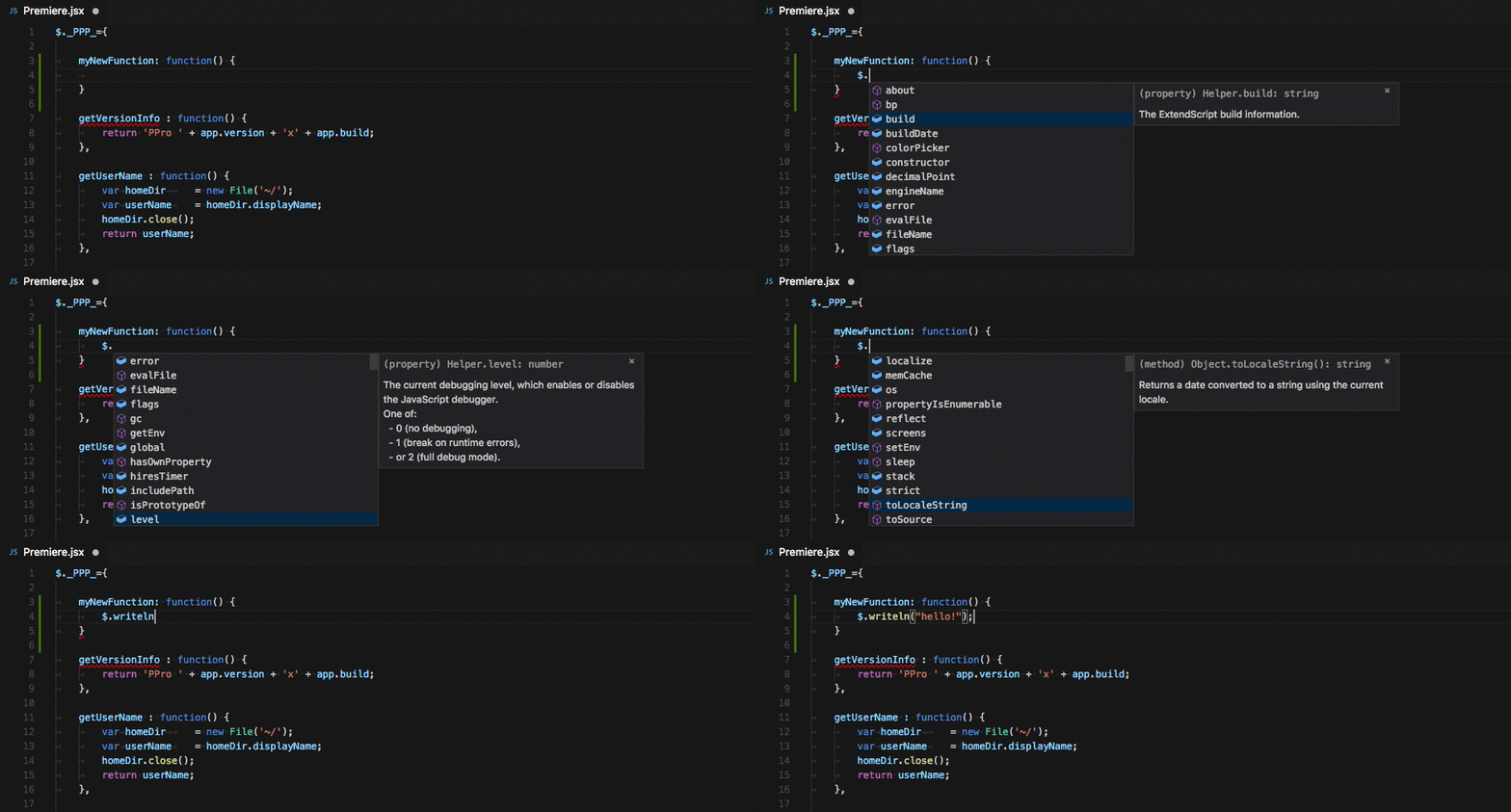
Open the PProPanel-vscode​ folder in Visual Studio Code (or other TypeScript-aware IDEs?), open up the Premiere.jsx file, and simply begin typing. The environment is already set up to provide rich IntelliSense support.

Powered By TypeScript Declaration Files and JSDoc

The environment has to get information about the types from somewhere, right? The type information is identified by the TypeScript system in the following ways:

  • In the Panel JavaScript Environment:
  • In the App ExtendScript Environment:
    • Uses the TypeScript-provided ES5 type information (ES3 is coming - when available, it will be switched to use that!).
    • Uses custom Type Declaration files (included within the sample here) to help make the IDE aware of what types are available, as well as documentation!
    • Sources JSDoc comments for type information.

Beyond this, TypeScript is capable of type inference (set var x = 5; and the IDE will infer that x is a number). For more on how TypeScript does all of this, see this document.

Inline ExtendScript and PremierPro API Documentation

The declaration files included in the sample are currently incomplete, but Bruce Bullis​ has indicated interest in helping to fill in the blanks. These files are an improvement over the current documentation​ in that they can be [more] easily read on the web​​ (don't need to be downloaded and opened in a browser) and also power in-line documentation and suggestions (as in the above gif)!

Writing in TypeScript

As configured, the sample does not actually assume that you will be writing in TypeScript and transpiling to JavaScript, but that you are simply writing JavaScript/ExtendScript. If you wish to use this feature, you will have to configure your IDE to do so (Visual Studio Code​​, Webstorm​​, Sublime Text, etc.).

Writing in NEW JavaScript

It should also be noted that TypeScript can transpile from new JavaScript to old JavaScript. This may not seem all that interesting except that you could use the latest ES6 features to write code for both your panel JavaScript or your app ExtendScript. These would be transpiled into platform-compatible versions: target: "es5" for panel and target: "es3" for ExtendScript!

As with TypeScript, this use-case would require setting up the TypeScript compiler.

Debugging In Visual Studio Code

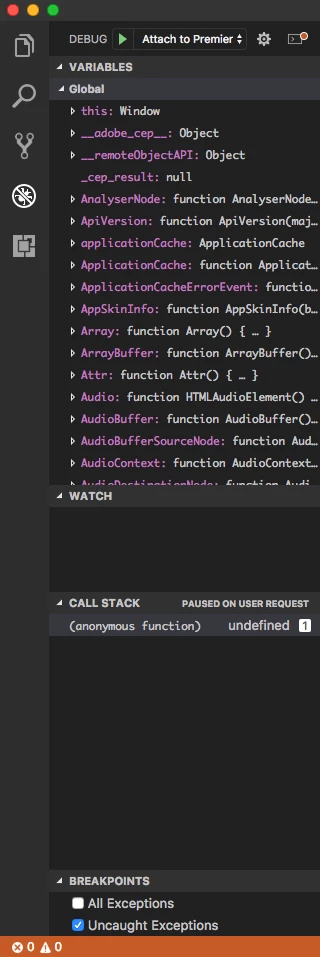
This sample also contains configuration settings to allow debugging of the panel (HTML) environment directly in Visual Studio Code, rather than through a Chrome browser. See:
Questions? Comments? Ask/post away!

This topic has been closed for replies.
Correct answer sberic

Sturm359  wrote

For reference, I am using PHPStorm (since other projects I work on use Laravel and PHPStorm appears to handle front-end development just fine, I see no need to also purchase WebStorm).

If you haven't checked it out yet, I would highly recommend giving Visual Studio Code a test run. It is fully integrated with TypeScript out of the box and makes working with the language a breeze.

Sturm359  wrote

Since developing an Adobe CEP extension requires two separate JS environments

Technically speaking, Adobe CEP extension development involves three separate JS environments:

  1. dom_app - ExtendScript
  2. dom_html - Browser JavaScript
  3. dom_html - Node JavaScript

This is an incredibly important point and may affect how you organize your development strategy.

Sturm359  wrote

I already have my project set up with two tsconfig.json files to handle transpiling to the correct ECMAScript versions for each.

Please be very careful using TypeScript to transpile into ExtendScript. ExtendScript itself is effectively an abandoned language and has some serious language-level bugs in it. This Bug, for instance, causes transpiled Generator code to break when run in an ExtendScript Virtual Machine.

Rather, you should probably write ExtendScript natively. The TypeScript language services can still provide auto-completion, IntelliSense, warnings and error support, and more, provided the tsconfig.json (or jsconfig.json) file is configured properly.

That said, if you use fairly simple coding patterns, you are likely okay. I would suggest that you ensure that all of your code is properly tested if you do decide to transpile TypeScript to ExtendScript.

Sturm359  wrote

But SystemJS doesn't like Node.js, so I cannot use its built-in functions like "fs". I've heard of Mixed context, but after looking at it briefly, it seems more complicated than it's worth (unless I can be convinced otherwise) and, again, I'd run into how I could get that to work with TypeScript.

TypeScript works just fine with NodeJS. In our CEP panel we can import "fs" like this:

import * as fs from 'fs';

However, this approach absolutely requires enabling the Mixed Context. It may also require a webpack setup wherein you set the target to "node-webkit". The webpage you linked has quite a bit of information, but it is centered around another users' solution. I would highly recommend reading Adobe's Cookbook. This is the section on Node, which has some very important information in it. Please be sure to read the Mixed Context sub-section of that page. It should help convince you that it's not such a bad thing to use.

I should also note that the Cookbook I linked is specific to the most recent CEP9. For earlier versions, see this repo.

I'm not really sure what to say about CommonJS vs SystemJS, myself. I guess I don't really have an opinion. Our tsconfig.json uses "es2015" for the "module" setting, but that's in support of Vue.js and Webpack​.

Does this help answer some of your questions?

6 replies

Sturm359
Inspiring
January 24, 2020

Now that I have the transpiling thing down, I'd like to ask about frameworks. I've already posted about this a few months ago (with no responses), but I thought perhaps the people following this thread might have a possible answer for me. If I should repost it here, please let me know.

Inspiring
November 21, 2019

Hey @sberic, was wondering your thoughts about all this now that the ExtendScript Debugger is available for VS Code, and includes intellisense. Do you see benefits to doing this TypeScript integration when writing ExtendScript now that the ExtendScript Debugger is around?

Sturm359
Inspiring
October 19, 2018

Good day, everyone.

I have been working with ExtendScript since 2013 and the main projects I have at work are being called from a Java desktop app through AppleScript (so results can be written to a remote MySQL database). It's as hacky as can be, but that's what I came up with years ago.

I now find myself in a position where I really want to redo all of these projects. I need to convert them from very poorly-made, single-file, procedural, spaghetti-code AES JavaScript files to something more structured and easier to maintain in the future. To that end, I want to use TypeScript and leverage many of its benefits, including modules. And to get rid of the Java desktop launcher app, I think an Adobe CEP extension would be the best way to go (I hope).

Since developing an Adobe CEP extension requires two separate JS environments, I already have my project set up with two tsconfig.json files to handle transpiling to the correct ECMAScript versions for each. And since CEP doesn't seem to support CommonJS, I have the HTML Panel side set up to use SystemJS (0.21, as 2.0 has little documentation for newbies so far) in order to facilitate modules. And I'm using TypeScript's namespacing to use external modules on the AES side.

It works, even if it seems a bit kludgey. I can write TypeScript for both sides and have it all transpiled correctly on the fly. External modules work on both sides now (somewhat), so I can have classes in their own files, etc.

Is this the "correct" way to go about it, though? For reference, I am using PHPStorm (since other projects I work on use Laravel and PHPStorm appears to handle front-end development just fine, I see no need to also purchase WebStorm). SystemJS is a huge headache for a newbie like me—I cannot even seem to get node_modules to work correctly with it—and I sometimes find myself having to copy a module from the dom_app folder to the dom_html folder or vice-versa to get them to be referenced in each context; neither context seems to be able to reference a module from any directory higher than itself (I cannot do an import from "../../node_modules/<whatever>", for example). Also, I had to write my own cookie class because I could not get js-cookie to be imported with SystemJS.

I've tried Webpack before, and—maybe because I'm still a newbie with it, too—I couldn't get it to work right, either, thus the need for SystemJS (Since CEP doesn't like CommonJS). But SystemJS doesn't like Node.js, so I cannot use its built-in functions like "fs". I've heard of Mixed context, but after looking at it briefly, it seems more complicated than it's worth (unless I can be convinced otherwise) and, again, I'd run into how I could get that to work with TypeScript.


UGH, such a pickle! I've started with a relatively simple project—Just list some files from a user-chosen folder and have Illustrator open them. I absolutely would welcome any eyeballs to see if there's a better way to get it all working. If I should be creating a new thread to ask this, please let me know that, too. I guess I'm just looking for the "perfect" development environment that takes advantage of TypeScript, external modules, and Node.js' functions. Something relatively easy-to-follow would be ideal. Thank you.

sberic
sbericAuthorCorrect answer
Legend
October 19, 2018

Sturm359  wrote

For reference, I am using PHPStorm (since other projects I work on use Laravel and PHPStorm appears to handle front-end development just fine, I see no need to also purchase WebStorm).

If you haven't checked it out yet, I would highly recommend giving Visual Studio Code a test run. It is fully integrated with TypeScript out of the box and makes working with the language a breeze.

Sturm359  wrote

Since developing an Adobe CEP extension requires two separate JS environments

Technically speaking, Adobe CEP extension development involves three separate JS environments:

  1. dom_app - ExtendScript
  2. dom_html - Browser JavaScript
  3. dom_html - Node JavaScript

This is an incredibly important point and may affect how you organize your development strategy.

Sturm359  wrote

I already have my project set up with two tsconfig.json files to handle transpiling to the correct ECMAScript versions for each.

Please be very careful using TypeScript to transpile into ExtendScript. ExtendScript itself is effectively an abandoned language and has some serious language-level bugs in it. This Bug, for instance, causes transpiled Generator code to break when run in an ExtendScript Virtual Machine.

Rather, you should probably write ExtendScript natively. The TypeScript language services can still provide auto-completion, IntelliSense, warnings and error support, and more, provided the tsconfig.json (or jsconfig.json) file is configured properly.

That said, if you use fairly simple coding patterns, you are likely okay. I would suggest that you ensure that all of your code is properly tested if you do decide to transpile TypeScript to ExtendScript.

Sturm359  wrote

But SystemJS doesn't like Node.js, so I cannot use its built-in functions like "fs". I've heard of Mixed context, but after looking at it briefly, it seems more complicated than it's worth (unless I can be convinced otherwise) and, again, I'd run into how I could get that to work with TypeScript.

TypeScript works just fine with NodeJS. In our CEP panel we can import "fs" like this:

import * as fs from 'fs';

However, this approach absolutely requires enabling the Mixed Context. It may also require a webpack setup wherein you set the target to "node-webkit". The webpage you linked has quite a bit of information, but it is centered around another users' solution. I would highly recommend reading Adobe's Cookbook. This is the section on Node, which has some very important information in it. Please be sure to read the Mixed Context sub-section of that page. It should help convince you that it's not such a bad thing to use.

I should also note that the Cookbook I linked is specific to the most recent CEP9. For earlier versions, see this repo.

I'm not really sure what to say about CommonJS vs SystemJS, myself. I guess I don't really have an opinion. Our tsconfig.json uses "es2015" for the "module" setting, but that's in support of Vue.js and Webpack​.

Does this help answer some of your questions?

Sturm359
Inspiring
October 22, 2018

Hey, sberic, thanks for responding. I hope you had a good weekend.

sberic  wrote

If you haven't checked it out yet, I would highly recommend giving Visual Studio Code a test run. It is fully integrated with TypeScript out of the box and makes working with the language a breeze.

I have used VSCode in the past and I did, indeed, like it. However, I needed something more for working with Laravel projects, thus I purchased PHPStorm a while back and fell in love with its capabilities. It also handles TS out-of-the-box easily. Now, I wouldn't mind trying VSCode again, but I don't think the IDE is really the issue at hand, I think.

sberic  wrote

Technically speaking, Adobe CEP extension development involves three separate JS environments:

Okay, this does make some sense, although I'll have some difficulty separating the Browser JS and Node JS in my head, I think.

sberic  wrote

Please be very careful using TypeScript to transpile into ExtendScript. ExtendScript itself is effectively an abandoned language and has some serious language-level bugs in it.

The reason why I didn't really want to write ExtendScript (AES) natively is that I did so years ago and wound up with scripts that are thousands of lines long with spaghetti code all over the place. I have to maintain it and it becomes more and more difficult year after year. After having learned some OOP principles, it makes more sense for me to re-do those old scripts using those principles—classes, inheritance, etc. And if I can leverage external modules, then I can make the code perhaps a bit more modular as well as easier to maintain and build upon in the future. Would you think so?

I understand the inherent issues that could arise with transpiling to such an old language, however, I don't really plan on doing anything super-fancy. I only know the basics of OOP and don't plan on using all of the features of TypeScript. Heck, I don't even understand all of them. And you can bet that I'll be doing plenty of testing before deploying. (It's for our internal company's use only.)

sberic  wrote

I'm not really sure what to say about CommonJS vs SystemJS, myself. I guess I don't really have an opinion. Our tsconfig.json uses "es2015" for the "module" setting, but that's in support of Vue.js and Webpack.

Now, to the crux of the matter. In order to use modules without SystemJS (because of its Node.js incompatibility), It seems that I would need to try Webpack again. Okay, I'm certainly willing to do so, but can you tell me how to set up the webpack.config.js file properly? Especially to handle both (or all three) JS contexts? Or maybe have it only handle the HTML Panel context while the JSX context only runs the TS compiler without Webpack? (Actually, that's a thought that I'll have to test…) I ask because, in my previous dealings with Webpack, it generates code that the ExtendScript VM doesn't handle. I'm not sure exactly where the problem is, but I do know it is probably in the comments. I've seen ExtendScript just give up when it encounters a // @ts-ignore directive, for example.

So, yes, you have helped to answer some of my questions. I'll try Webpack again, but see if I can only have it work on the Panel (JS) side.

Naoki-Hada
Known Participant
September 11, 2017

Hi sberic​, pqiorpa​,

Thank you very much for sharing your code.

I went through your code.

I'm new to TypeScript.

I have been developing CEP plugin about half year and got task to convert

semi-large CEP project (multiple Adobe apps support) to TypeScript.

Is there any sample CEP project does "transpiles" with multiple Adobe app support?

ex) alert(app.version)

Thank you,

Naoki

sberic
sbericAuthor
Legend
September 12, 2017

Naoki-Hada  wrote

I'm new to TypeScript.

I have been developing CEP plugin about half year and got task to convert

semi-large CEP project (multiple Adobe apps support) to TypeScript.

That sounds like fun! Which apps do you specifically need to convert?

TypeScript is very easy configure for CEP development. You only need to set up a TypeScript context for each of the two separate script domains in the CEP environment:

  • A tsconfig.json file for the panel JavaScript.
  • A tsconfig.json file for the application ExtendScript.

In the tsconfig.json files you need to be aware of the lib and target options.

The lib option allows you to define the ECMAScript environment that your code will be running in. It tells TypeScript which ECMAScript (JavaScript/ExtendScript) functions are available. In the panel (HTML) side, you will have "es5" and some other options because the code is a web browser (Chrome/Chromium). In the app (ExtendScript) side, you will have "es5" because there currently is no option for "es3". Alternatively, you could use pqiorpa​'s setup with the noLib option instead of lib. Then you use the types option in the tsconfig.json file to specify which apps you want to support (his command line example sets this up).

The target option allows you to define which ECMAScript version the TypeScript compiler should output.  For the panel (HTML) side, you should be okay with "es5" because the more recent versions of Chromium at the base of CEP extensions have support for most of those features. ExtendScript is based on ECMAScript 3 so the app (ExtendScript) side will use "es3".

This is how the sample project is setup. You can see those settings in the project here.

Naoki-Hada  wrote

Is there any sample CEP project does "transpiles" with multiple Adobe app support?

ex) alert(app.version)

Not that I am aware of, no. It would not be hard with pqiorpa​'s types, though! You could either include all the typings (.d.ts files) within the Sample Premiere Pro project or simply combine the Sample Premiere Pro project with those typings and adjust the app-side tsconfig.json to use the specific types option. It shouldn't be difficult!

Naoki-Hada
Known Participant
September 12, 2017

sberic​,

Thank you very much for detail explanation.

I think I can do rocket start

The working CEP plugin is targeting Photoshop, Illustrator, InDesign and Premiere Pro.

As project became larger, it got more issues especially around CSInferface.evalScript().

I was using WebStorm for IDE.

I'll check with VS Code as well.

Thank you,

Naoki

pqiorpa
Participating Frequently
August 26, 2017

I have created guide how to start using TypeScript with Adobe ExtendScript.

It works with Visual Studio Code too.

GitHub - pravdomil/types-for-adobe: Use TypeScript for Adobe Audition / Illustator / InDesign / Photoshop

sberic
sbericAuthor
Legend
August 26, 2017

pqiorpa  wrote

I have created guide how to start using TypeScript with Adobe ExtendScript.

It works with Visual Studio Code too.

GitHub - pravdomil/types-for-adobe: Use TypeScript for Adobe Audition / Illustator / InDesign / Photoshop

Any thoughts on potentially integrating this into the Adobe CEP TypeScript example?

I see that you followed the naming convention used by the ExtendScript Toolkit (instead of "ExtendScript APIs" it's "JavaScript APIs"). Did you perhaps use a script to automate conversion of the XML documentation (installed with the toolkit) to TypeScript typings format?

Either way, I think it would be excellent to get these combined and added to the repo. The goal for the TypeScript example folder was always to expand it's contents beyond the minimal setup it's at now and into a full-fledged ExtendScript environment with proper per-application support (which it seems you've mostly nailed!).

One further question: are the "JavaScript" typings are feature-complete enough to cover all of the ECMAScript 3 intricacies or not? I notice that you have Object as a class. This is very different from the version provided in TypeScript for ECMAScript 5​ (and 3​, whenever it gets through review), where Object is an interface (for some important reasons).

pqiorpa
Participating Frequently
August 28, 2017

Now the definition files are ECMAScript 3 compatible. I have converted Object and other core objects into interfaces.

Yes I had used convertor to convert XML documentation into TypeScript. You can find it here:

GitHub - pravdomil/extendscript-xml-to-typescript: ExtendScript XML documentation to TypeScript converter https://github.com/pravdomil/extendscript-xml-to-typescript

About joining with Adobe-CEP example repo: I want to create separate repo for declaration files as it should be (check DefinitelyTyped).

Then you can use npm package manager from Node.js to install declaration files from my repository.

On top of that, npm will ensure that you have the latest version.

I updated readme file, there is now small guide how to create first script for Adobe Illustrator.

https://github.com/pravdomil/types-for-adobe/blob/master/README.md

BTW: is there any CreativeCloud plans for developers?

jingtaotan
Inspiring
July 11, 2017

Very interesting stuff! Thanks Bruce Bullis​ for the work and sberic​ for the announcement. Will definitely send feedback (or even submit a pull request) when working with this.

Bruce Bullis
Community Manager
Community Manager
July 11, 2017

[All work = Eric]