


Inspiring
November 17, 2016
Answered

Video Preview Error
  • November 17, 2016
  • 2 replies
  • 2639 views

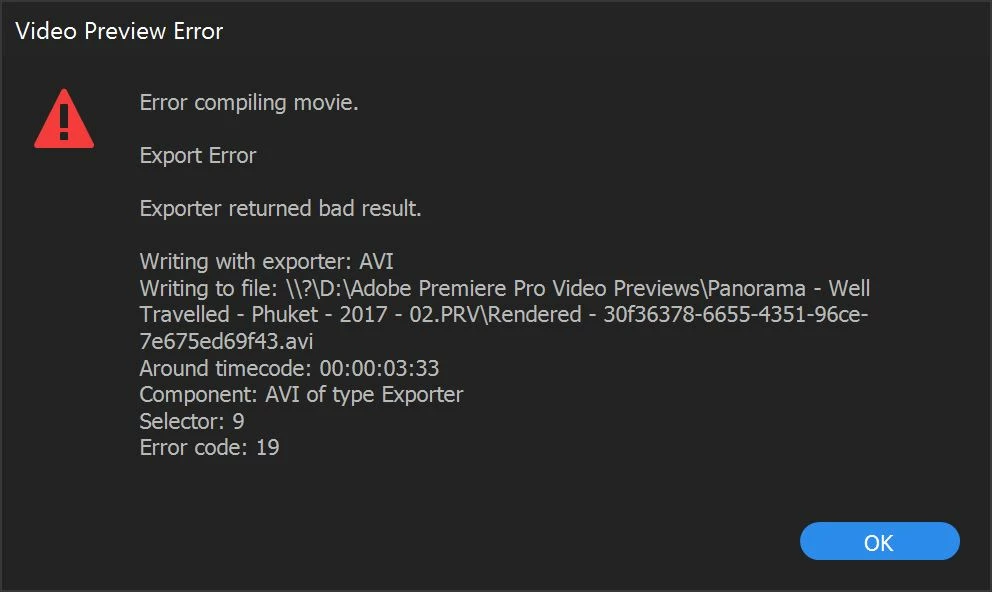
Since the 2017 update, Premiere has been failing when rendering a clip preview.

The workaround is to choose a Preview File Format and Codec in the Sequence Settings that does work (AVI or Quicktime).

I-Frame Only MPEG resulted in the specific error shown in the screenshot, but all of the P2 DVCPRO and GoPro Cineform variants give a similar error.

    This topic has been closed for replies.
    Correct answer the outward spiral

    I received an update for Premiere, After Effects and Prelude this morning. My current build of Premiere is now 11.0.1 (6).

    After that update, my preview render problem has mysteriously gone away. All formats/codecs are now rendering successfully.

    2 replies

    Legend
    November 17, 2016

    MPEG previews gave you that error message?  About .avi files?

    Inspiring
    November 17, 2016

    Yes, the error is occurring when the sequence is using I-Frame Only MPEG, which is the preview format used in a good majority of the sequence presets.

    As I said before, the AVI and QT preview formats don't fail.

    I probably should have mentioned also, that the footage (4K UHD MXF AVC) is 59.94 FPS, and the sequence is set to drop frame. Not sure if frame rate settings can upset certain preview renderers.

    the outward spiralAuthorCorrect answer
    Inspiring
    November 18, 2016

    I received an update for Premiere, After Effects and Prelude this morning. My current build of Premiere is now 11.0.1 (6).

    After that update, my preview render problem has mysteriously gone away. All formats/codecs are now rendering successfully.

    Ann Bens
    Community Expert
    Community Expert
    November 17, 2016

    You probably need to fix the timeline for that particular time.

    Can ben anything: effect, transition, keyframes,....

    Inspiring
    November 17, 2016

    None of the above. Straight 4K UHD ungraded footage (MXF - AVC).