Exit
  • Global community
    • Language:
      • Deutsch
      • English
      • Español
      • Français
      • Português
  • 日本語コミュニティ
  • 한국 커뮤니티
0

Videos in my preview are zoomed and quality drops

New Here ,
Dec 03, 2019 Dec 03, 2019

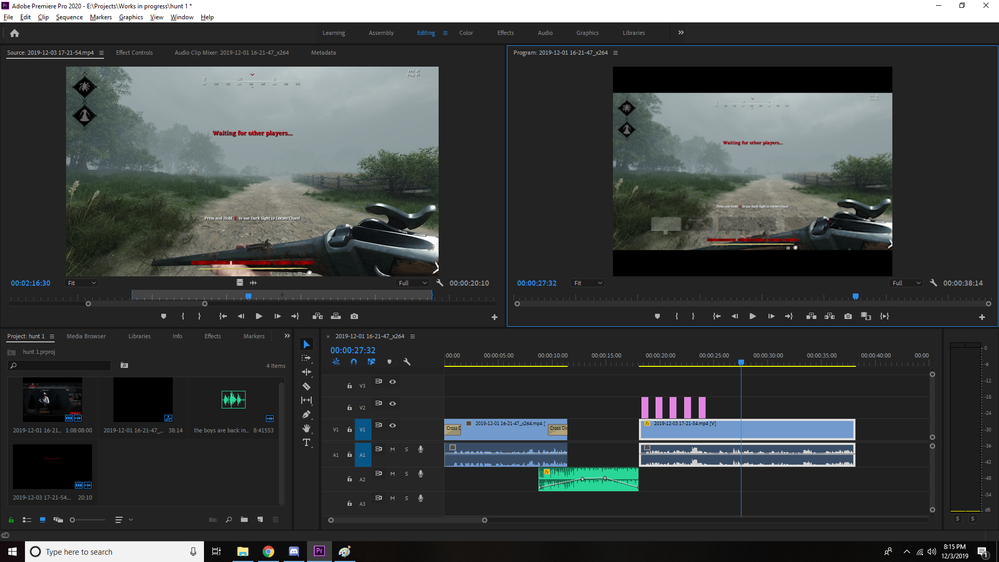
Just view the photos to see what my issue is specifically, but details are as follows:

When i record my videos, they record in 1080p and when im editing the clips they show up in that quality, however when i drag clips over to the timeline, they are either zoomed in, or if i scale it to the frame size, the quality drops to about 240p. i cant figure out what is wrong for the life of me. would appreciate any help. thank you.
zoomedzoomedscale to frame sizescale to frame size

TOPICS
User interface or workspaces
5.0K
Translate
Report
Community guidelines
Be kind and respectful, give credit to the original source of content, and search for duplicates before posting. Learn more
community guidelines

correct answers 1 Correct answer

Community Expert , Dec 03, 2019 Dec 03, 2019

If your source footage is 1920x1080, use a timeline that is 1920x1080 as well. Either go to Sequence > Sequence Settings and set the Editing Mode to Custom and then manually change the Width and Height, or create a new timeline by using Ctrl+N, or drag the source clip (1920x1080) to the New Item icon in the Project panel.


Based on what i see on the footage you are using a 4:3 timeline instead of a 16:9, probably even a SD timeline. That´s the issue you have.

Translate
Community Expert ,
Dec 03, 2019 Dec 03, 2019

If your source footage is 1920x1080, use a timeline that is 1920x1080 as well. Either go to Sequence > Sequence Settings and set the Editing Mode to Custom and then manually change the Width and Height, or create a new timeline by using Ctrl+N, or drag the source clip (1920x1080) to the New Item icon in the Project panel.


Based on what i see on the footage you are using a 4:3 timeline instead of a 16:9, probably even a SD timeline. That´s the issue you have.

Translate
Report
Community guidelines
Be kind and respectful, give credit to the original source of content, and search for duplicates before posting. Learn more
community guidelines
Community Beginner ,
Dec 03, 2019 Dec 03, 2019
LATEST

Your screen shots are a little hard to see, but....  1) What are your settings for the Program monitor?  The drop-down box to the lower left and lower right of the video that's playing?  "Fit" and "Full"? 2) What are settings for your Sequence?  Did you create the sequence using the video specs or did you define it some other way.  Go to Sequence->Sequence Settings to see.

Translate
Report
Community guidelines
Be kind and respectful, give credit to the original source of content, and search for duplicates before posting. Learn more
community guidelines