
Participating Frequently
July 1, 2019
Answered

Why won't Bars and Tone display correctly?

  • July 1, 2019
  • 9 replies
  • 4022 views

On my most recent project I have wanted to use the Bars and Tone element in Premiere but for some strange reason every time I have tried to add it with any settings whatsoever it won't ever display the entire graphic which is supposed to look like this:
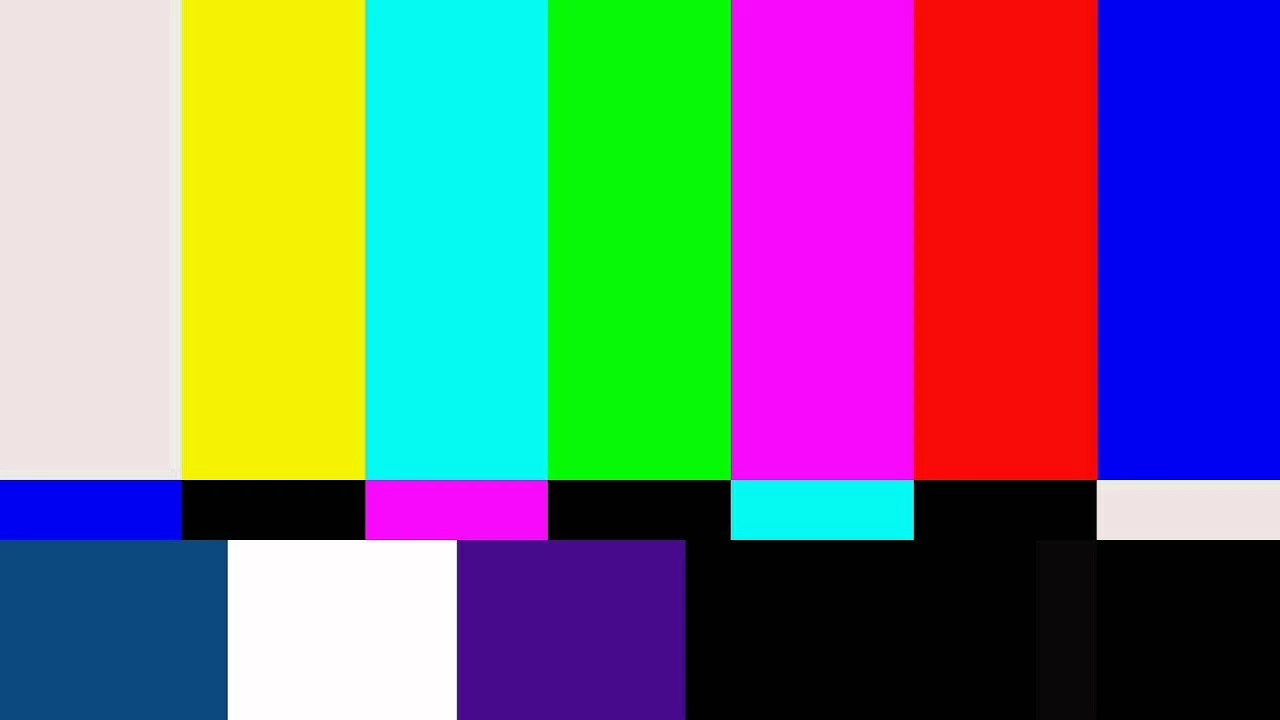
But when I try adding it, it looks like this:
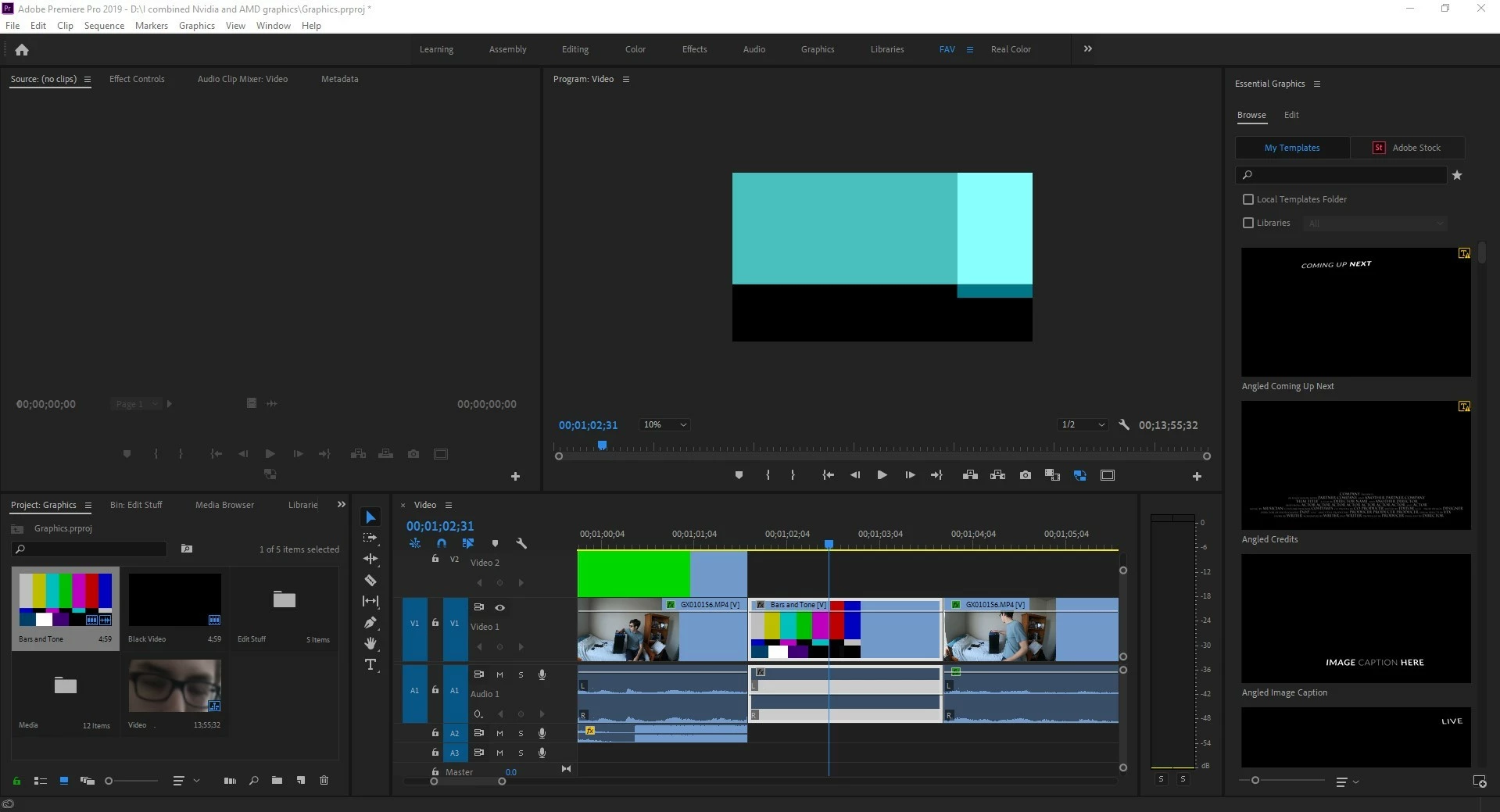
If you need more project details ill give it. But so far I haven't been able to get the correct format no matter what I try. and what's more is that the clip preview thumbnail in the timeline is correct and the thumbnail in the project media is correct as well! WHY??? Please help! I'm not even trying to use it for its original purpose I just wanted to create a glitched bars and tone effect.

This topic has been closed for replies.
Correct answer Ann Bens

If Software Only works it means you have an issue with your graphicscard.

9 replies

Community Manager
July 3, 2019

Hi JAMations,

Sorry to hear that you are facing this issue. Have you tried switching the Renderer to Mercury Playback Engine Software Only (FAQ: How to change the Video Renderer in Premiere Pro? ) and checked if you are getting the correct preview. Let us know if it helps.

Thanks,

Sumeet

JAMationsAuthor
Participating Frequently
July 3, 2019

This worked although I think it would be much slower to work with this does in fact work perfectly. Thank you!

Ann Bens
Community Expert
Ann BensCommunity ExpertCorrect answer
Community Expert
July 3, 2019

If Software Only works it means you have an issue with your graphicscard.

khomthepreditor
Inspiring
July 3, 2019

Could this have something to do with the color space/profile of the B&T vs the project?

Legend
July 3, 2019

If I was a bug or Kermit The Frog I would rather look at a slightly different green ( framed on my wall ).

Is the B&T something you saw on the BMT while watching a movie about the DMZ and recalling R&R in Japan while changing your MOS and looking forward to a DDT214 and wishing you had UHD ?

Community Expert
July 1, 2019

I had issues with bars and tone and I ended up creating its own sequence and exporting it as a video file for use in the main sequence.

JAMationsAuthor
Participating Frequently
July 3, 2019

I think that's my only option at this point. I have already looked through every kind of scaling possible and as I remember I didn't change the scaling or anything to do with the media for it to look the way it does. I attempted to render the element on another computer and it seems to work fine on another PC so ill just use this other PC for now. Thanks!

MyerPj
Community Expert
Community Expert
July 1, 2019

Check the 'scaling' in the Effect Control Panel.

You may have a mix of bar size, scaling and sequence frame size.

I have Set to Frame Size in Preferences\Media, and a clip gets set that way when added to a timeline.

JAMationsAuthor
Participating Frequently
July 3, 2019

I checked my preferences and I don't believe it is set to scale the media or change it.

Ann Bens
Community Expert
Community Expert
July 3, 2019

As its a lovely color green might want to check this:

Green or purple streaks appear in the Source and Program monitors

Legend
July 1, 2019

What's also weird.. is there's NOTHING on the bars and tone that remotely matches the pattern you have displayed...conjunction of color etc... how bizarre ...

Legend
July 1, 2019

YICK !

WHAT THE ???

JAMationsAuthor
Participating Frequently
July 1, 2019

Legend
July 1, 2019

YIKES.. that's UGLY !

What happens if you go to effect / scale, and reduce that clip in size …. do you start to see more of it.... ??

JAMationsAuthor
Participating Frequently
July 1, 2019

Legend
July 1, 2019

have you tried to make the program monitor setting to ' FIT ' ??

JAMationsAuthor
Participating Frequently
July 1, 2019

Yes, I have.

JAMationsAuthor
Participating Frequently
July 1, 2019

I tried to fit and it still looks the same.MyerPj

R Neil Haugen
Legend
July 1, 2019

That looks like Premiere expected that B&T instance to be placed on a different sequence. What is the framesize for the sequence set in the Sequence settings dialog?

And right-click/Properties on the B&T to find the framesize for that instance.

Neil

Everyone's mileage always varies ...
JAMationsAuthor
Participating Frequently
July 1, 2019

They look the same to me? As far as I can tell I tried making sure they match.