


New Participant
November 6, 2024
Answered

Cannot access my team Dropbox in Rush

  • November 6, 2024
  • 1 reply
  • 759 views

I am using Rush on a Mac with Sonoma 14.2.1. Since the last Dropbox update in mid 2024, I no longer have access to my teams's Dropbox account through the media browser to add new media to a project. I still have access to my personal folder. I can also save my exported files to this team folder, but I cannot see it in my Cloud options when I want to insert into a project. I have spoken to Dropbox and they claim that it's not their problem, it's an Adobe problem. Seems strange to me since it started when Dropbox made their change. Does anyone have any ideas? I feel like it's a permission thing but I can't find any way to fix it! Many thanks in advance!
This topic has been closed for replies.
Correct answer Kevin-Monahan

Hi @jennifert1223,

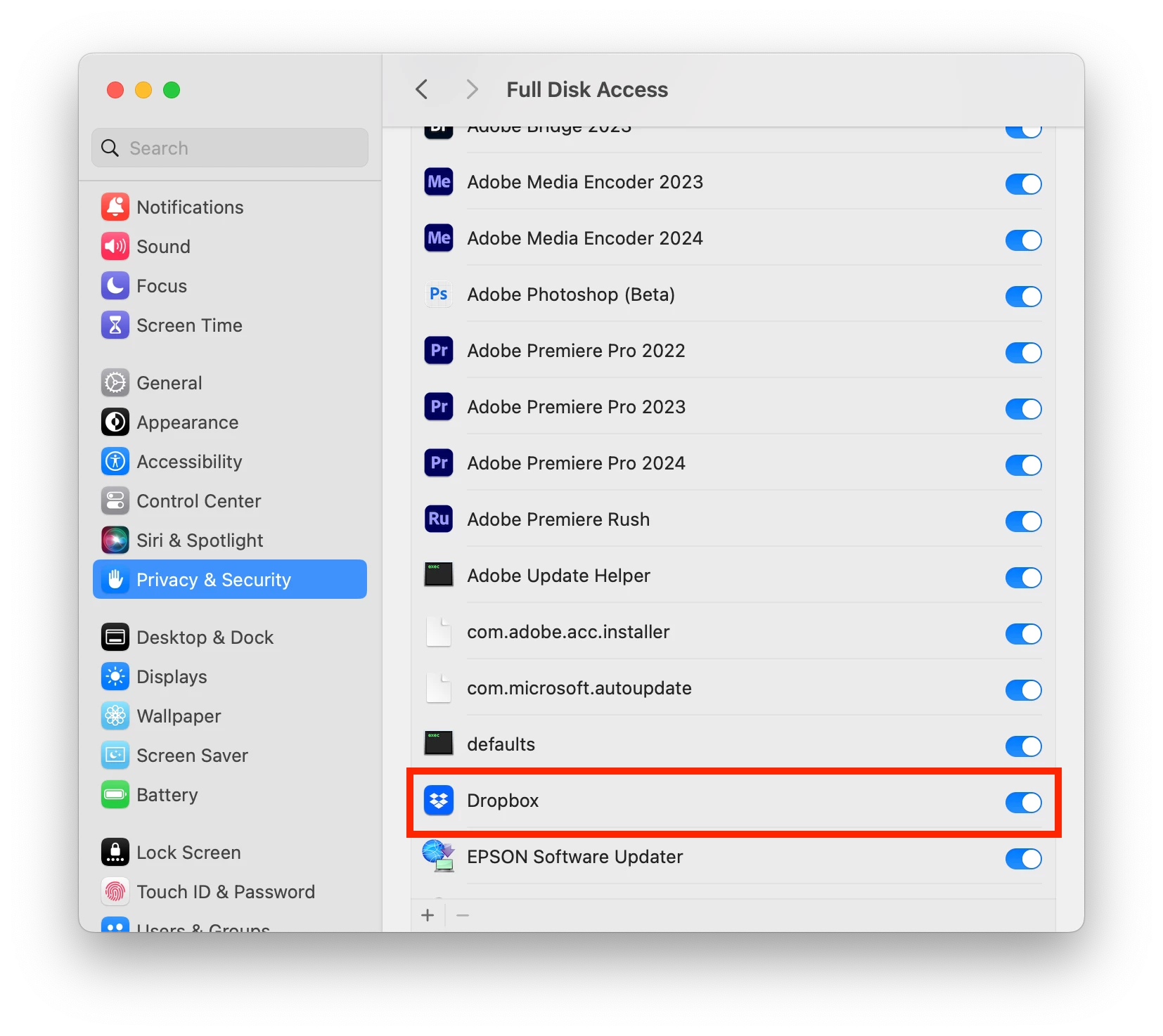
How are you today? Thanks for the response. Yes, Rush must have full disk access to any media drives that interact with the application. I'm also a Mac user, and with every major update, I head to the system settings and make sure that the program has full access to critical hard drives.


I hope the information helps. Sorry for the hassle.


Cheers,
Kevin


1 reply

Kevin-Monahan
Community Manager
Community Manager
November 6, 2024

Have you tried enabling Dropbox in the Privacy and Security settings in System Settings? That could work. Let me know if you need help, @jennifert1223.


Thanks,
Kevin


Kevin Monahan - Sr. Community & Engagement Strategist – Pro Video and Audio
New Participant
November 7, 2024

I went into settings > Privacy and Security and there are a lot of options there. Are you talking about Full Disk Access? Under Files and Folders, Rush has access to my Google Drives but there is no option for Dropbox.

New Participant
November 7, 2024

Hi @jennifert1223,

How are you today? Thanks for the response. Yes, Rush must have full disk access to any media drives that interact with the application. I'm also a Mac user, and with every major update, I head to the system settings and make sure that the program has full access to critical hard drives.


I hope the information helps. Sorry for the hassle.


Cheers,
Kevin


Thank you so much! This did the trick although it took me a minute to fully grasp. The interesting thing is that the Rush media browser is still recognizing my old Dropbox folder even though its no longer there. I can see it via the media browser but it's not clickable. When the update happened it renamed the folder and you have to navigate thru the HD > Users > [Username] > NEW dropbox name. It's no longer available via the section labeled "Cloud." In turn I favorited the new dropbox so it's easy to now find when I need it. Thank you for your help!