


March 9, 2020
Answered

pixelated video glitch in Premiere Rush?

  • March 9, 2020
  • 50 replies
  • 45926 views

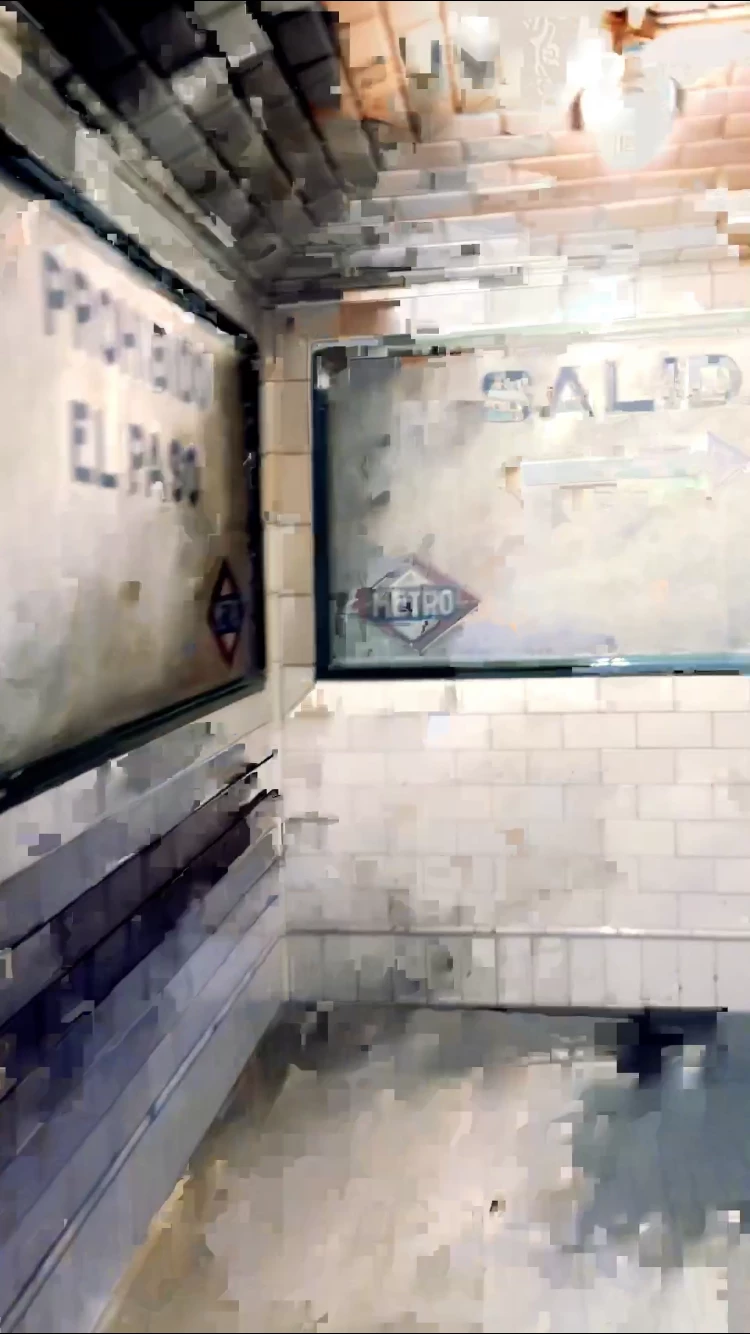
hoping someone can help me get to the bottom of this Rush glitch- I've been editing my videos on the app for a month now with no problems but now I'm seeing a bunch of my media in the video I'm currently editing get really pixelated, the pixelation varies per frame whenever I try to re-Edit or re-import the original media ( photo below is of one of the frames). It's like wack-a-mole trying to get this video pixelation free and I feel like I'm going insane! Any advice will be SO welcomed! 

Title edited by mod
 

    Correct answer _tonygee_

    Before exporting, try scrubbing through the video timeline using your finger pushing the timeline from beginning to end. In my experience I found the app buffers the entire video when you scrub through the frames especially when there are cuts between frames.


    Then export.


    During export keep an eye on the preview window -the glitch should no longer appear.


    Hope this helps.

    50 replies

    Participant
    February 21, 2021

    Been having the same issue on the new iphone SE. I really like the editor for quick and easy edits on the go. I'm about to give up though. I have edited about 10-15 videos using Rush and just about every video rendered has multiple glitches. Did lots of troubleshooting and tried everything to get rid of the glitches with no luck. It does it with every type of iphone framerate and resolution. Sucks because it is an awesome editor 😔

    Participant
    January 23, 2021

    Same here on different Iphones. Iphone (6,Xr,12Pro) and different Versions including the newest version. 
    glitches on footage directly from iphone camera aswell as imported footage from dji mavic and sony Alpha footage. 

    cmon Adobe. Please do something NOW. 

    Participating Frequently
    January 14, 2021

    I've found a couple of things that can help. As someone else pointed out, using Handbrake can correct footage that has already been shot on an iphone. Everything played great on my phone but had green and purple pixelation in Premiere. When you add the file into Handbrake, go to the Video tab and choose Constant Quality. Then Encode (you can load multiple files and encode them all in a Queue). Once you import into Premiere there shouldn't be any other issues.


    What I also found, and this should help you moving forward, is that in your iphone camera settings, under Formats, make sure you choose Most Compatible. I just switched that on my phone and the original footage didn't have the issues that the previous clips did.


    Hope this helps some of you out.

    Participating Frequently
    January 16, 2021

    Just to follow up. Even with video on the iphone set to Most Compatible (1080p 30 fps) there are occasional glitches - not as many. I changed the video settings to record 1080p 60fps and had no glitches.

    Participating Frequently
    January 23, 2021

    And as a final follow up, the glitches are random. At 60fps there have been fewer glitches but there have still been the oocasional ones that slip in. Fortunately it's a quick fix with Handbrake but obviously there is something about footage from an iphone. Maybe it's a variable frame rate or less reliable frame rate than an actual video camera. These are, after all, phones that are designed with many other functions as opposed to pro cameras that are just that. If Handbrake can correct the problem it would seem logical that Premiere would have a similar functionality.

    Participant
    September 16, 2020

    Hey, I've got a video I can send to you guys, that wasn't shot on the Snapchat app. Where can I send it?

    Kartika Rawat
    Community Manager
    Community Manager
    September 28, 2020

    Hey Sebastian!

    Can you upload them here and share the download link with us: https://helpx.adobe.com/creative-cloud/help/share.html


    Happy to help.

    Kartika


    Participant
    August 30, 2021

    Kartika, I have a video I can send you but this link does not work. It's a .mov file that I shot with iphone XR. I have tried different ways, even converting it to mp4 before exporting to Rush but the same problem occurs but when the video is played in a different media, it's clear and does not pixalate. Please let me know who to send it to. Thanks.

    caroline_edits
    Community Manager
    Community Manager
    September 15, 2020

    Hey everybody – our engineers are working on this issue but they need your help! We've seen these pixels show up particularly bad on video clips that were filmed using the Snapchat camera.
    We're looking for files that were NOT filmed on Snapchat that still result in this pixelated image! If you'd be willing to share your clips, please DM me for next steps. 


    Happy to work for y'all on our end!

    Caroline

    Participant
    September 28, 2020

    I have one recorded from Zoom. It is glitchy. Very frustrated.

    Participant
    September 12, 2020

    I am having this issue too. There is a pixelated band across the top of my video, both when working on the timeline and when exporting. This is the case for every export preset I've tried. My original files do not have this issue. A screenshot is below. 

    Strangely enough, when I used the "YouTube 2160p 4K Ultra HD" preset when exporting, the pixelated band shrunk. (see second screenshot)

    I've exported many projects on Premiere Rush before and have never had this issue. Has anyone found a solution to this problem? 

    I'm using the desktop version of Premiere Rush, v.1.5.25.


    Participant
    September 27, 2020

    I have the same problem my video and audio glitches and the videos are iphone 11 4K videos

    tyla129
    Participant
    September 3, 2020

    [Mobile Experience]
    Same issue for me. It's been happening every time I try to make a video. There's always a spot that gets pixelated. I tried everything: delete, reimport, cut part of the video, move it around, restart my phone, close & reopen the app...what else do I need to do to get rid of this? It seems like many people are running into the same issue - a good product recommendation for Adobe is to at least have a 'Known Issues' somewhere in the app & whether the team is working on it or if it has been fixed. Anyway, very frustrating experience, the thoughts of uninstalling the app cross my mind multiple times since this issues keep happening. 

    Participating Frequently
    August 20, 2020

    STILL NO SOLUTION & THIS HAPPENS ALL THE TIME. Literally not one single response from Adobe is an actual resolution, it's just a pushback BS response asking for more information. Come on guys!

    Participant
    September 1, 2020

    Im having the same issue as well! I treid re exporting it and its the same pixel glithes in the same spots.

    Participant
    April 25, 2020

    I am having the same issue as well. The pixelated images aren't there during editing but on export they are on two clips. I have tried deleting and reinstalling and still same thing. Very frustrating! I have tried the clips again and again and still same result. They play fine when on the same timeline. PLEASE HELP!!!

    Participant
    March 9, 2021

    I'm having the same issue and need help urgently - the video glitches and flashes when I export it but it looks fine during playback on the timeline. I've uninstalled and reinstalled Rush, and attempted 4 different export settings to see if lower resolution helps but the glitches persist.

    Kartika Rawat
    Community Manager
    Community Manager
    March 12, 2020

    Hi there!

    We're sorry about this. We would need more info to troubleshoot further.

    Let us know, happy to help.

    Thank you,

    Kartika


    reneq66832956
    Participant
    March 18, 2020

    Hello, I'm having the same issue. I have it installed on an iPhone 11. 

    What can I do to fix this issue? 

    Thank you


    Kartika Rawat
    Community Manager
    Community Manager
    March 18, 2020

    Thanks for writing in. What type of media files are you working with (codec/format, frame rate, frame size)? 

    Are you getting this issue during playback or in an exported video?

    Let us know, we're happy to assist.

    Kartika