


March 9, 2020
Answered

pixelated video glitch in Premiere Rush?

  • March 9, 2020
  • 50 replies
  • 45926 views

hoping someone can help me get to the bottom of this Rush glitch- I've been editing my videos on the app for a month now with no problems but now I'm seeing a bunch of my media in the video I'm currently editing get really pixelated, the pixelation varies per frame whenever I try to re-Edit or re-import the original media ( photo below is of one of the frames). It's like wack-a-mole trying to get this video pixelation free and I feel like I'm going insane! Any advice will be SO welcomed! 

Title edited by mod
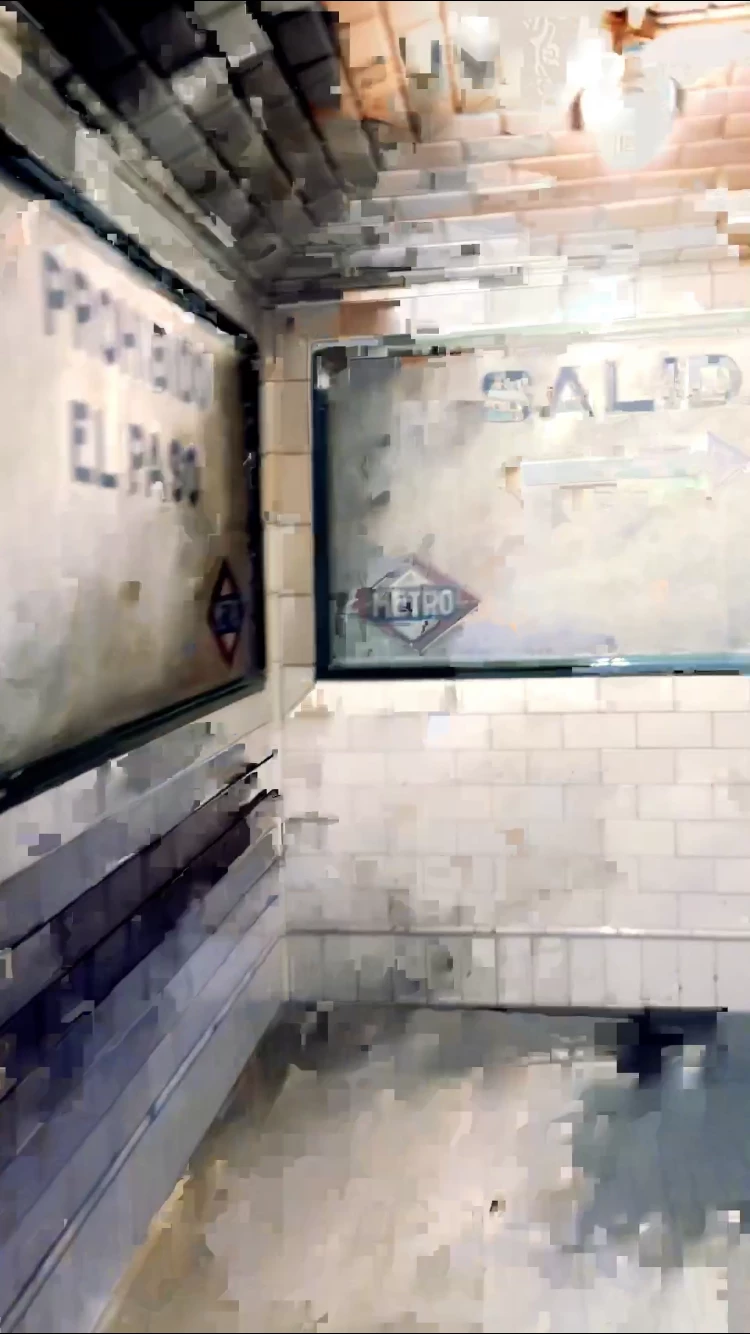
 

    Correct answer _tonygee_

    Before exporting, try scrubbing through the video timeline using your finger pushing the timeline from beginning to end. In my experience I found the app buffers the entire video when you scrub through the frames especially when there are cuts between frames.


    Then export.


    During export keep an eye on the preview window -the glitch should no longer appear.


    Hope this helps.

    50 replies

    Participant
    March 21, 2023

    Same issue here in 2023...

    Participant
    March 9, 2023

    Exactly the same issue here. I have the new Ipad Air and was absolutedly enthusiastic about Rush's workflow and user interface for quick video editing on vacation. Unfortunately my job was apparently useless since there is a lot of glitches in several parts of my video after exporting it. And my feeling is that sound is disorted too. I am giving up with Rush and will try to claim my money back.

    stouthouse5
    Participant
    March 1, 2023

    I'm taking to the "streets" Let's get a twitter storm going (i know that was cheesy).  I'm tried of not being able to depend on and produce high quality content for my clients with a program that I pay $$$ of money for and is known for leading the way in digital design!! Here's the twitter handles and what I wrote: 


    Fix the 3 year issue with Adobe Rush glitching after export??? #fixthis https://community.adobe.com/t5/premiere-rush-discussions/pixelated-video-glitch-in-premiere-rush/m-p/13601604/page/4


    @PremiereRush (Adobe Video Creators)

    @Adobe 

    @15581561 (David Wadhwani, President of Adobe Digital)

    @4408130 (head of audio)

    @10523040_blake (developer)


    I don't know what else to do to bring attention to this issue. I love Adobe Rush and want this to resolve!! 


    Participant
    March 4, 2023

    Same issue there! I discovered Rush some weeks ago and I love this app... but this issue is very frustrated... 😕😕

    Participant
    February 23, 2023

    Wait, it this never going to get resolved? I just used Rush for the first time on my iPad and I have this glitch issues. There's no glitches in my video nor during playback in the app, but once I export there's several glitches. 


    Is there any solution here?

    stouthouse5
    Participant
    March 1, 2023

    I'm taking it to twitter since Adobe has not helped with this issue ~ and I have a HUGE project coming up that CAN NOT have glitches. 

    Participating Frequently
    February 11, 2023

    Adobe support is absolutely useless and will lead you around and around in circles forever because not even they know how to fix this problem that only they have. Here's the only fix I've found:

    I love the editor itself which is why I still deal with this problem that Adobe refuses to help their paying customers with. So, when I export the video and notice the glitch, I go back to where the glitch occurs, make a cut before and after, and I import the raw footage. Then I cut the raw footage down to the area that glitches so that the clip repeats itself twice. 

    Export the video, and if the glitch only happens once, great! Just cut it out in another editor like Capcut, TikTok, etc. and you're good to go. If it happens twice in a row (i.e., both idential clips glitch) then you have no choice but to follow the steps above, but in another editor. 

    It sucks that Adobe wastes our time and is so unhelpful, but at least you can edit the entire video in Rush and then just make that quick fix in another app and be done with it without having your entire video be ruined for no reason. 

    Another factor I've noticed is when my phone's storage is close to being full, that's when the glitches happen more frequently. 

    Hope that helps! 


    Please be polite or you might break our community rules.

    [Abuse removed by Moderator]

    Participant
    February 11, 2023

    Wow Adobe, just read through this 3 year history having just experienced the glitch issue on my first use of Rush on my iPhone. 

    Your response to this needs to be a simple, thank you all for raising this bug, sorry for it, and we will fix it in the next release....


    Participant
    February 11, 2023

    Rush is simply unusable on an iPad. Clearly the pixelated glitch is an old problem and isn't going to be resolved. I'm just over it. So very disappointing to spend time editing and have the end result be ruined. Premier Rush is garbage.

    Participant
    February 5, 2023

    It's been almost 3 years since this post and it looks like this stil hasn't been sorted out. I wish I'd look into all possible glitches before actually paying the subscription and editing a video for a client. I was shocked after exporting the video and seeing all the glitches... This is really so unprofessional. I've spent hours on editing the video and now it looks like I can do it all over again in another video editing software? Is this for real? 

    Participant
    December 18, 2022

    I have repeatedly had this same issue with RU. There are artifacts and glitches upon export at a transition point between two clips it will show a pixelated potion of a clip that is several clips prior and not between the two. removing the clips and replacing doesnt change this. it comes back. I am using the most upto date version of adobe ru 2.5 (1128) and Iphone 13 pro on ios 15.7. i have had this problem on each iphone it seems to be related to transitions disolve. frustrated that it happens 90% of the time. I have had to use imovie in most cases. 


    Participant
    December 19, 2022

    Based on the fact I posted on here nearly a year ago, I highly double adobe will sort this out. Every response they have offered has not been relevant to what I've been asking. It's like they respond to something you never asked and don't help you solve the issue. I still have the issue of pixelated video. It's stupid, how can Adobe of all people charge a subscription for a service that pixelates your video, it makes it look unprofessional and amateur which is very annoying when I make videos for a living. I will be cancelling my subscription and using something that actually allows me to create a good standard of video without paying a subscription to a place that doesn't fix problems with their own software 

    Participant
    December 11, 2022

    Why is this marked as solved when it popped up in google? I have three clips in a two minute video that are glitching. I've tried everything in this thread with no success. Is there something that fixes this that I missed? I am on gen 5 IPad Pro.

    Participating Frequently
    December 16, 2022

    How has this problem STILL not been fixed? Adobe, are you just going to keep asking the same questions over and over and apologizing? Or are you going to find a solution for your paying customers? No wonder people are abandoning the app for free versions like Capcut. Imagine being a paid app and losing business to a FREE one. Fix this problem! 

    Participant
    December 4, 2022

    Hi! I am having the same glitch problem on my iPhone 12 mini. This is my first time editing a video on the phone app. Not sure what I should about the glitch-hopefully it can be fixed so I won't have to restart??