Hi Rick,
Would you be willing to speculate further?
Browsing through the .hhk file, I noticed that the section name elements are out of sequence in identical order that they are shown when user uses index.
Does this mean that if I manually reorder the hhk file, it would fix the problem? Or is that too dangerous to fool with? (are the section names normally out of order in hhk, or should they be ordered correctly as shown in Index Designer??)
Is there any easier way to rebuild an hhk file? Can I delete it and have it automatically rebuilt?
Noticed in the Index Designer that when I click the Create/View Index File button & then click View, nothing happens. Is this a symptom of a corrupt hhk?
Thanks for any insight,
John
From: Captiv8r
Sent: Tuesday, November 15, 2011 4:33 PM
To: John Dawson
Subject: Help topics not in alpha order when user clicks keyword in Index
Re: Help topics not in alpha order when user clicks keyword in Index
created by Captiv8r<http://forums.adobe.com/people/Captiv8r> in RoboHelp - View the full discussion<http://forums.adobe.com/message/4028182#4028182
Hi, John D. This is John D. 
You can "manually reorder the HHK file" as you describe to achieve the order you want. A couple of clarifying notes are added below:
- I doubt if your HHK file is corrupted (although all things are possible.) The HHK file is an xml text file and easily editable with notepad.
- Obviously you will want to back up your original first
 before you edit.
 - You cannot delete the Index in the Designer and recreate it on the fly as simply as using the Auto TOC which uses the folder structure. The only way to create an "automatic Index", is to use the Smart Index Wizard. But most folks don't find that useful because it takes more time to use it correctly. It is better to create it from scratch. Besides this would not solve your alphabetical issue.
- I have pasted a test below where I added an alpha character in each topic title directly in the xml as shown. (In other words, I did not add the alpha character to the actual Title tag in the topic.) It works as advertised in WebHelp output.
- Interestingly, it does not work in the MS HTML Help .chm version. This is because Microsoft uses the topic title to form the text of the displayed entry.
- It's not a bug, because a lot of the process is governed by Microsoft's original HHK format. But, it would be a nice feature request (See Rick's signature above)
<?xml version="1.0" encoding="utf-8"?>
<index version="1.0">
<properties>
</properties>
<item name="How it works">
<section name="E First Topic" link="First_Topic.htm">
</section>
<section name="D How it works" link="How_it_works.htm">
</section>
<section name="C The Information Screen" link="The_Information_Screen.htm">
</section>
<section name="B Starting the application" link="Starting_the_application.htm">
</section>
<section name="A Welcome" link="Welcome.htm">
</section>
</item>
<item name="Starting the application">
<section name="A How it works" link="How_it_works.htm">
</section>
<section name="B First Topic" link="First_Topic.htm">
</section>
<section name="C Error Messages" link="Error_Messages.htm">
</section>
<section name="D About" link="About.htm">
</section>
</item>
</index>
Here's what the WebHelp output shows for the two Index entries:
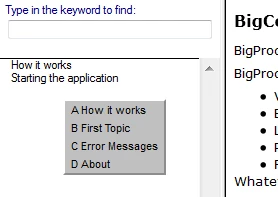
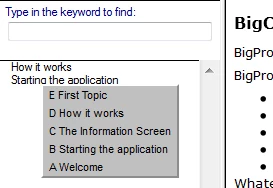
And, the MS HTML Help CHM:
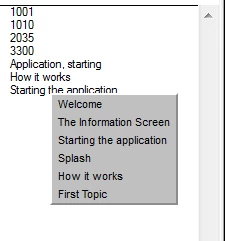
Happy alphabetizing!
John Daigle
Adobe Certified RoboHelp and Captivate Instructor
Evergreen, Colorado
www.showmethedemo.com

 AdChoices