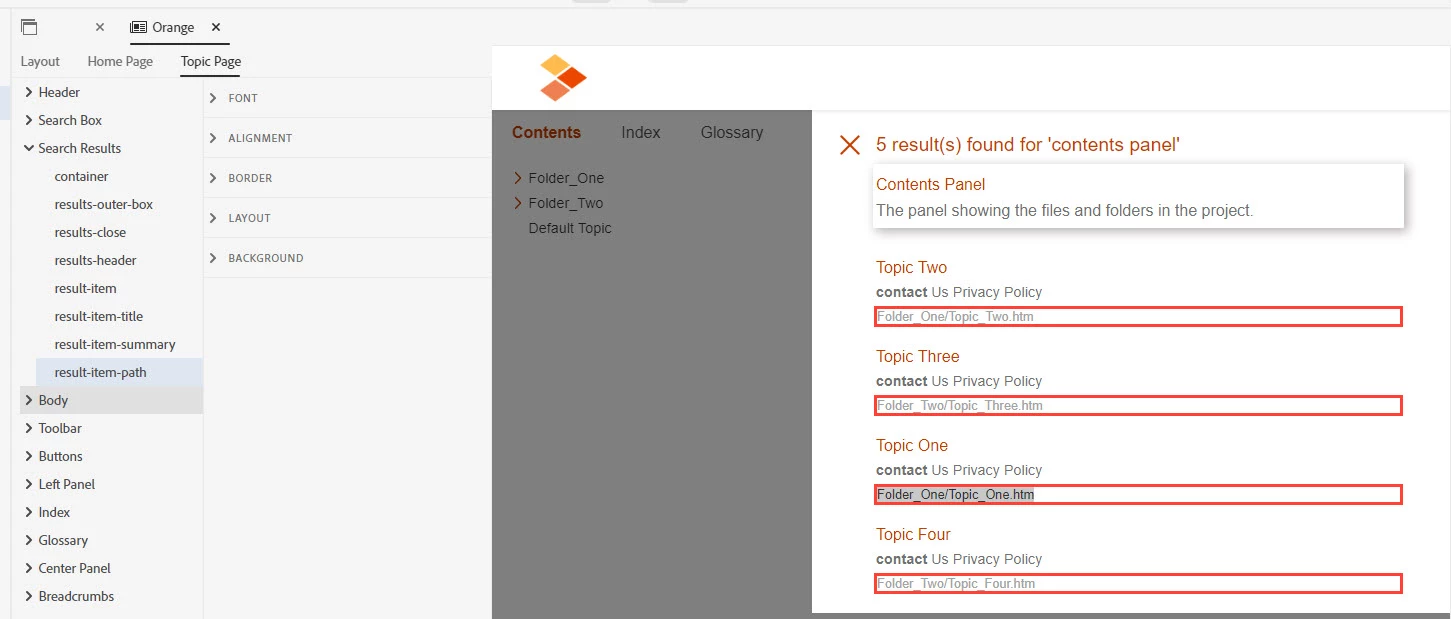
Select "result-item-path" and open "LAYOUT" section properties on right-adjacent side. Now select value "none" in "display" property. Save the skin and generate the output. It should hide the paths in search results of the output. Please let us know if it still doesn't work.
The issue was fixed. Are you seeing it in 2022? If so start a new thread with your problem and include which template (skin) you are using.
________________________________________________________ My site www.grainge.org includes many free Authoring and RoboHelp resources that may be of help.
Translate
Use the menu (bottom right) to mark the Best Answer or Highlight particularly useful replies. Found the answer elsewhere? Share it here.
This is the exact issue. The search result should show "Product A" not the variable. The text "product name" is what user will see while searching instead of Product A.
You can insert variables in a TOC page name. Click on the TOC page and go to the Title in Properties. Put the cursor where you want the variable and press CTRL + 1. It must be 1 on the alpha keyboard, not the numeric keys.
Variables are not an option in filenames but can't you avoid them there? If it is because you have separate topics, then your TOC will be different anyway so that only the right topics are in it. If you have one topic with content that uses tags to filter for separate builds and using your example, About_Features would work for the file name. If I have not understood properly, please explain more.
Translate
Use the menu (bottom right) to mark the Best Answer or Highlight particularly useful replies. Found the answer elsewhere? Share it here.
Thanks Peter. I got your point. I did a try to remove the product name from the file name as you recommended, but kept the product name as a variable in topic title and TOC. The issue is in the search results, it shows the variable as is, not the value although I selected the variable set in the output, as in the below screenshot.
May I ask another question please. I'm using the same project for multiple clients with condition tags, but a client asked to use a specific name for the product. I use the product name in some of topic names and body. Is there a way to set a word as a variable to be changed in all occurrences while generating?
Example: The product name is "X" , and needs to replaced by "Y" for a certain client. But "X" will be used for other clients.
You can define different variable sets for different clients, overriding value of required variable in the set. Then, use specific variable set in output preset, to achieve required output value. You can define and customize variable sets in OUTPUT mode, in left panels below the output presets. And, you can choose the variable set in frameless preset as metioned here: https://helpx.adobe.com/robohelp/using/generate-frameless-output.html#Content (check last point in this section).
I created a variable called "product name" with one value "X"
I inserted the variable "X" for each occurrence of the product name
Before generating to the client, I must edit the "product name" variable to be "Y"
For the output, I added the variable set for variable "product name"
Is that how it goes? I can't define multiple values for the same variable. So, I need to edit it each time before generating it. Is that right? Also, what about the topic names like "About "X" features.htm", can I apply this variable on the file names as that affects the search.
You can add a custom CSS file in Responsive HTML5 Skin Editor containing this information.
Open Responsive HTML5 Skin Editor, and go to "Layout > Layout" section. Under "USER ASSETS" section, click on "Add Asset" and browse the CSS file downloaded from here: Custom CSS. Save the skin and generate Responsive HTML5 output. It should hide the paths in search results.






 AdChoices