EmanAssem
Inspiring
February 17, 2020
Resuelto

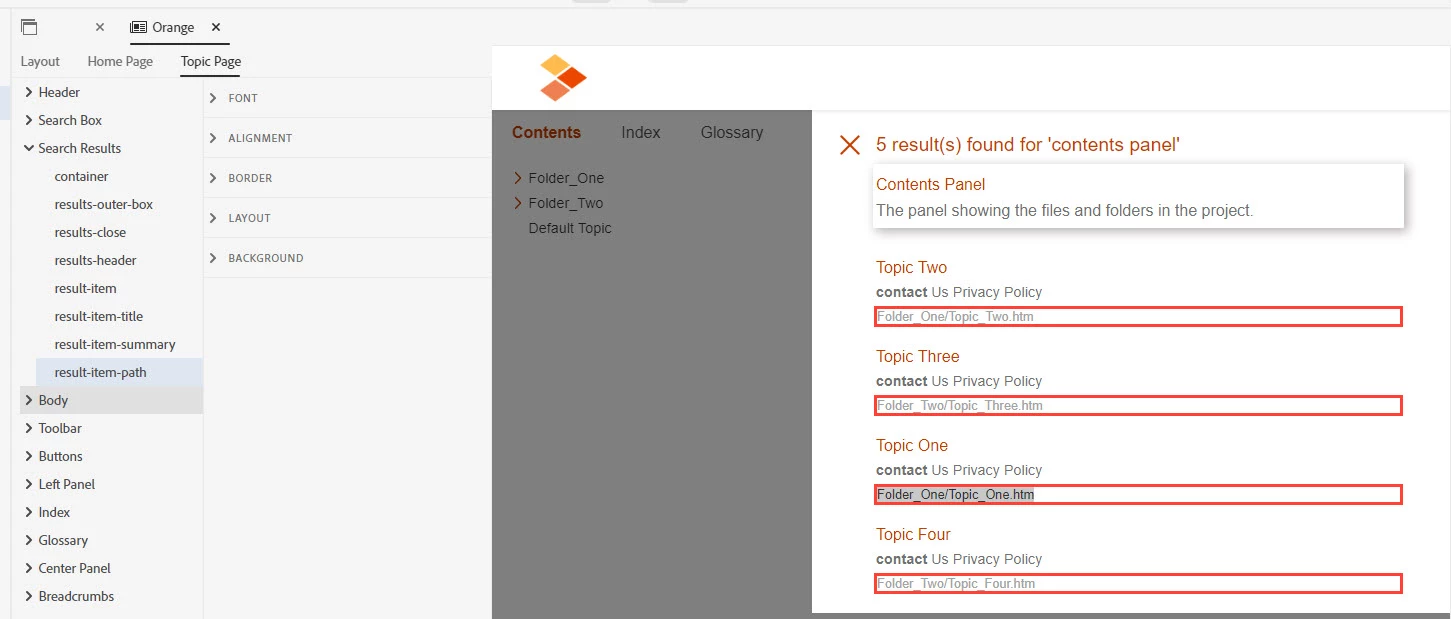
In RH 2019 search results, is there a way to hide the file path for results? Please help.

  • February 17, 2020
  • 11 respuestas
  • 2491 visualizaciones

Este tema ha sido cerrado para respuestas.
Mejor respuesta de vikassingla

Select "result-item-path" and open "LAYOUT" section properties on right-adjacent side. Now select value "none" in "display" property. Save the skin and generate the output. It should hide the paths in search results of the output. Please let us know if it still doesn't work.


Regards,

Vikas Singla

11 respuestas

vikassinglaRespuesta
Adobe Employee
February 17, 2020

Select "result-item-path" and open "LAYOUT" section properties on right-adjacent side. Now select value "none" in "display" property. Save the skin and generate the output. It should hide the paths in search results of the output. Please let us know if it still doesn't work.


Regards,

Vikas Singla

EmanAssem
Inspiring
February 17, 2020

Thanks so much. It works. Please is there a way to apply this update on the generated package directly without re-generate as we're in a hurry. I mean like css file or whatever?


 

Appreciated

Adobe Employee
February 17, 2020

There will be a CSS file named "layout.css" in "<output folder>/template/<skin name>/" folder. Add the following css text at the bottom of the file:

.RH-LAYOUT-HOMEPAGE-SEARCHRESULTS-result-item-path {
  display: none;
}

.RH-LAYOUT-SEARCHRESULTS-result-item-path {
  display: none;
}

You will achieve the same results as done via Skin Editor. Please verify.


Regards,
Vikas Singla