


Participant
June 22, 2022
해결됨

Mac Robohelp to Zendesk, no option for Zendesk appears

  • June 22, 2022
  • 6 답변들
  • 682 조회

I have a project finished and I need to export it to Zendeck. I've setup Zendesk as a Publisher Profile, but the Zendesk options to no appear in the output panel. There is no way to send the file to them. I've been on Adobe tech support but so far they are no help. It seems like such an easy issue: where is the Zendesk options that match the Adobe Robohelp online help pages?
    이 주제는 답변이 닫혔습니다.
    최고의 답변: Peter Grainge

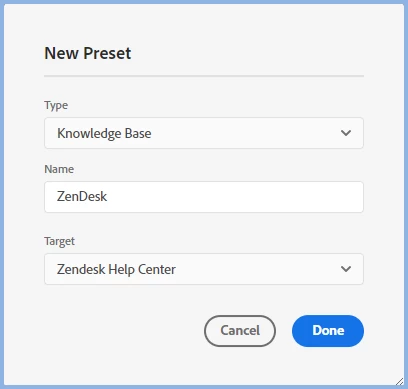
    Have you created a Knowledge Base preset?


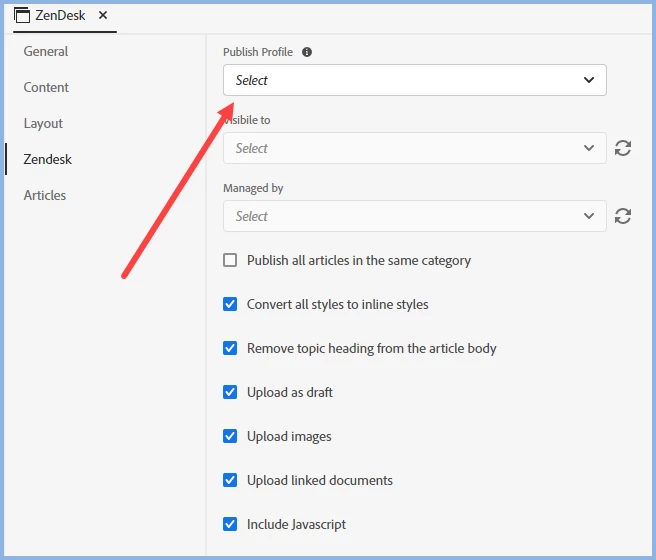
    When you click Done go to the Zendesk group. Are you not seeing your profile in the dropdown.


    ________________________________________________________

    My site www.grainge.org includes many free Authoring and RoboHelp resources that may be of help.


    6 답변

    Peter Grainge
    Community Expert
    Community Expert
    April 12, 2023

    @defaultnmxh3egi2av0 Assuming you have looked at the links in this thread and read all that is there, unless someone else comes along with an answer, I think you will need to go to Adobe Support. Don't be put off by the original user's comment, they may not have used the email method. See https://helpx.adobe.com/contact/enterprise-support.other.html#robohelp for your Adobe Support options. The email link tcssup@adobe.com is recommended as it reaches a team dedicated to Technical Communication Suite products including RoboHelp. 

    ________________________________________________________

    My site www.grainge.org includes many free Authoring and RoboHelp resources that may be of help.


    Use menu (bottom right) to mark as Best Answer or to Highlight particularly useful replies. Found the answer elsewhere? Share it here.
    Community Expert
    June 28, 2022

    Those values should be pulled in from Zendesk, so you should check in Zendesk for the configuration. The Robohelp help points to this topic for prerequisites for setting up zendesk: https://support.zendesk.com/hc/en-us/articles/4408846795674


    EricLeeSmith작성자
    Participant
    June 29, 2022

    Yes, I've read this and other articles on Zendesk, have spoken to their tech support, and can't find an answer. This is a case of it dropping between the cracks. That said, it is in Robohelp's best interest to make sure they work with Zendesk, and right now they don't, or at least I can't figure it out. If you know a consultant who could help me, I'm happy to pay to get past this. Thanks, Eric

    Adobe Employee
    June 30, 2022

    Hi Eric, 

    Once you have selected Zendesk profile from publish profile dropdown, you can try clicking the refresh button placed adjacent  to the 'Visible to' and 'Managed by' dropdowns. This will load the data from your Zendesk account. 

    Please let us know if this works or else we can get on a call to resolve this. 


    Thanks and Regards,

    Pankhuri Saxena

    Peter Grainge
    Community Expert
    Community Expert
    June 27, 2022

    I suspect you looked at the topic for publishing. That is a step on from generating the output as covered here.


    Generate a Knowledge Base output in RoboHelp (adobe.com)

    ________________________________________________________

    My site www.grainge.org includes many free Authoring and RoboHelp resources that may be of help.


    Use menu (bottom right) to mark as Best Answer or to Highlight particularly useful replies. Found the answer elsewhere? Share it here.
    EricLeeSmith작성자
    Participant
    June 28, 2022

    Hi Peter,

    Right at the start of the "Configure a Zendesk output preset" of the Publish to Zendesk Help Center it says:

    You can use the following settings to configure the Content Only output preset:

    But that doesn't work and cost me days, the correct answer, which you gave me, is: Knowledge Base.

    That now populates the Zendesk area in RoboHelp, but not I fail with the message that I need to assign a "Visible to" and "Managed by" menu item, which are both empty. I can't for the life of me figure out how to get those to populate. I feel so close, but I'm on day 7 of trying to get this link made. Any help is much appreciated.

    Peter Grainge
    Community Expert
    Community Expert
    June 25, 2022

    Have you created a Knowledge Base preset?


    When you click Done go to the Zendesk group. Are you not seeing your profile in the dropdown.


    ________________________________________________________

    My site www.grainge.org includes many free Authoring and RoboHelp resources that may be of help.


    Use menu (bottom right) to mark as Best Answer or to Highlight particularly useful replies. Found the answer elsewhere? Share it here.
    EricLeeSmith작성자
    Participant
    June 27, 2022

    This worked! The issue is that the RoboHelp documentation does not say to pick Knowledge Base as the Preset. Once I did, the Zendesk menu item in the stacked row showed up. Thank you!!!

    Peter Grainge
    Community Expert
    Community Expert
    June 23, 2022

    Go to the Output tab and click the + icon. Select Knowledge Base and in that select ZenDesk as the target. 

    ________________________________________________________

    My site www.grainge.org includes many free Authoring and RoboHelp resources that may be of help.


    Use menu (bottom right) to mark as Best Answer or to Highlight particularly useful replies. Found the answer elsewhere? Share it here.
    EricLeeSmith작성자
    Participant
    June 24, 2022

    Thanks, I have spent many hours on this, so I've been several times. The issue is, once I define the Zendesk Publish Profile, it never becomes selectable in RoboHelp. The data is there, it's on the Profile list, but I cannot assign any output to that Profile. The error message in RoboHelp is immediate and says: "No publish profile is selected. Try again after selecting one." But there's no place to select it.

    Community Expert
    June 23, 2022

    If you used the general chat box on the main site, try the dedicated technical communication suite people using the email address on this page:
    https://helpx.adobe.com/contact/enterprise-support.other.html#robohelp


    You could also check the About Robohelp sample project to see what information that provides on setting up zendesk output (should be in your Documents\My Robohelp Projects folder, but if not, it will be in the robohelp installation directory - copy it to the documents folder as it won't run from the installation folder). 


    Also see if there's anything on Peter's excellent site www.grainge.org.