Exit
  • Global community
    • Language:
      • Deutsch
      • English
      • Español
      • Français
      • Português
  • 日本語コミュニティ
  • 한국 커뮤니티
1

remove glossary tab from Microsoft HTML Help layout

Community Beginner ,
Apr 30, 2014 Apr 30, 2014

How do I remove the Glossary tab from Microsoft HTML Help layout? Using RoboHelp 11

Thanks.

293
Translate
Report
Community guidelines
Be kind and respectful, give credit to the original source of content, and search for duplicates before posting. Learn more
community guidelines

correct answers 1 Correct answer

LEGEND , Apr 30, 2014 Apr 30, 2014

Hi there

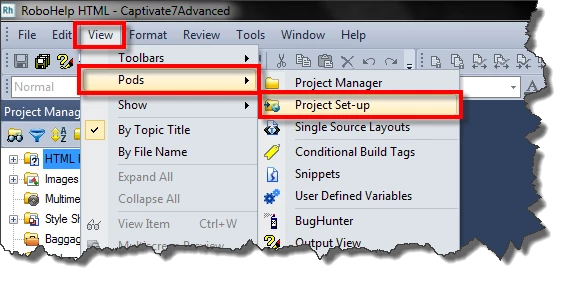
You do that by editing the Window defintion. Click View > Pods > Project Set-up.
tmp1.png

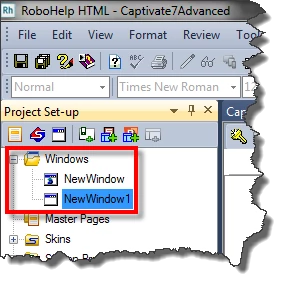
Expand the Windows folder and double-click the CHM Window definition.
tmp2.png

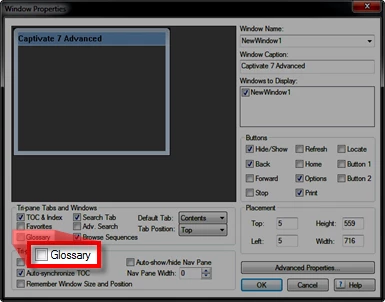
Then DE-select the Glossary option.

tmp3.png

Cheers... Rick

Translate
LEGEND ,
Apr 30, 2014 Apr 30, 2014
LATEST

Hi there

You do that by editing the Window defintion. Click View > Pods > Project Set-up.

tmp1.png

Expand the Windows folder and double-click the CHM Window definition.

tmp2.png

Then DE-select the Glossary option.

tmp3.png

Cheers... Rick

Translate
Report
Community guidelines
Be kind and respectful, give credit to the original source of content, and search for duplicates before posting. Learn more
community guidelines
Resources
RoboHelp Documentation
Download Adobe RoboHelp