


Known Participant
March 18, 2021
Answered

RH Topic Header size changes when search result is viewed

  • March 18, 2021
  • 16 replies
  • 1372 views

I've published a RH project in 2 formats - frameless and HTML5 - and in both instances when a user clicks on a search result, the topic heading font size changes. I've gone through all the layout settings and don't see a way to prevent this. Thoughts?

I'm using RH 2019.0.14 by the way.

This topic has been closed for replies.
Correct answer Amebr

I had an idea over the weekend. I think you have a font-size specificed on the span tag.


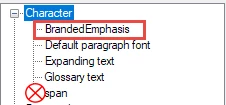
For a quick fix, if you look under "Character styles" I think you'll find one called 'span'. Double-click on it, select Format > Font and delete the value in the Size field.


Otherwise you could look in the stylesheet code using a text editor and find a style like this, and delete the font-size entry.

span {

    properties: here;

    properties: here;

}


I'd recommend deleting the span style itself. This is because the span tag is used for all inline styling, so setting styles in your stylesheet can mess that up. Instead set up separate styles for any formatting you want.


If you've used the span tag with the stylesheet styling, I think you'll have some manual tidying up to do though, so test in a copy of your project first.


For Classic, create the style by right-clicking on the Character styles entry and selecting New, then typing a name for the style (e.g. BrandedEmphasis). Behind the scenes this creates a css style that looks like this:

span.BrandedEmphasis {

    font-size: 12pt;

    color: #ff00ff;

    font-weight: bold;

}


16 replies

AmebrCommunity ExpertCorrect answer
Community Expert
March 22, 2021

I had an idea over the weekend. I think you have a font-size specificed on the span tag.


For a quick fix, if you look under "Character styles" I think you'll find one called 'span'. Double-click on it, select Format > Font and delete the value in the Size field.


Otherwise you could look in the stylesheet code using a text editor and find a style like this, and delete the font-size entry.

span {

    properties: here;

    properties: here;

}


I'd recommend deleting the span style itself. This is because the span tag is used for all inline styling, so setting styles in your stylesheet can mess that up. Instead set up separate styles for any formatting you want.


If you've used the span tag with the stylesheet styling, I think you'll have some manual tidying up to do though, so test in a copy of your project first.


For Classic, create the style by right-clicking on the Character styles entry and selecting New, then typing a name for the style (e.g. BrandedEmphasis). Behind the scenes this creates a css style that looks like this:

span.BrandedEmphasis {

    font-size: 12pt;

    color: #ff00ff;

    font-weight: bold;

}


SFlakes01Author
Known Participant
March 22, 2021

That worked! I removed the span character style as I never use it anyway and the result topic headers retain their size. Thank you so much Amebr!


Peter Grainge
Community Expert
Community Expert
March 20, 2021

The link you sent me requires a login and password. You told me what to use as a login but I don't have a password. Email me via my site to see how we can resolve this.

________________________________________________________
See www.grainge.org for free Authoring and RoboHelp Information

Use menu (bottom right) to mark as Best Answer or to Highlight particularly useful replies. Found the answer elsewhere? Share it here.
SFlakes01Author
Known Participant
March 22, 2021

I didn't work this weekend Peter so I missed your update. Amebr's suggestion below however resolved this issue. Thank you for taking the time to review.

Peter Grainge
Community Expert
Community Expert
March 19, 2021

I've got the link to download. I will take a look tomorrow. 

________________________________________________________
See www.grainge.org for free Authoring and RoboHelp Information

Use menu (bottom right) to mark as Best Answer or to Highlight particularly useful replies. Found the answer elsewhere? Share it here.
Peter Grainge
Community Expert
Community Expert
March 19, 2021

Would this work?


Create a copy of the project and delete all the topics except two or three. In those topics delete the content and replace with any old text you like.


Check the issue is still there and then send it.

________________________________________________________
See www.grainge.org for free Authoring and RoboHelp Information

Use menu (bottom right) to mark as Best Answer or to Highlight particularly useful replies. Found the answer elsewhere? Share it here.
SFlakes01Author
Known Participant
March 19, 2021

Yes....let me get that setup. I'll get the contact info to send it to from your page. Many thanks Peter for taking the time to investigate this.

SFlakes01Author
Known Participant
March 19, 2021

I had to send it via a different file transfer system than the one advised on your site because of restrictions on my end. Please let me know if you do not receive it.

Peter Grainge
Community Expert
Community Expert
March 19, 2021

Can you share the project? If you can, then see the Contact page on my site and send the project as instructed there. Do make sure you include a link to this thread and please do not email the project direct.

________________________________________________________
See www.grainge.org for free Authoring and RoboHelp Information

Use menu (bottom right) to mark as Best Answer or to Highlight particularly useful replies. Found the answer elsewhere? Share it here.
SFlakes01Author
Known Participant
March 19, 2021

I unfortunately would not be able to do that based on the proprietary information it contains. I may just have to establish a long term goal of converting this topic by topic to a new project.

Peter Grainge
Community Expert
Community Expert
March 19, 2021

Add a new skin and call it say Charcoal Grey 2. Generate an ouput with that without customising it in any way.


If that works, also test a new frameless skin.


Post back with the results of that.

________________________________________________________
See www.grainge.org for free Authoring and RoboHelp Information

Use menu (bottom right) to mark as Best Answer or to Highlight particularly useful replies. Found the answer elsewhere? Share it here.
SFlakes01Author
Known Participant
March 19, 2021

I ran the test above - added a new skin & output preset for both with no modifications to the presets or layouts. The headers are resized in the search results.


Peter Grainge
Community Expert
Community Expert
March 19, 2021

I searched for text that was in the heading and it didn't change the size.

________________________________________________________
See www.grainge.org for free Authoring and RoboHelp Information

Use menu (bottom right) to mark as Best Answer or to Highlight particularly useful replies. Found the answer elsewhere? Share it here.
SFlakes01Author
Known Participant
March 19, 2021

Peter I ran the test you suggested and the header was not resized in a new project. Any suggestions on how I can resolve the problem in the existing project? It's too large to recreate.

Community Expert
March 19, 2021

I wonder if it's to do with the search highlight. Can you try searching for text that is not in the topic heading?

SFlakes01Author
Known Participant
March 19, 2021

The result is the same...the header is still resized.

SFlakes01Author
Known Participant
March 18, 2021

You're right....it does not occur in a new project.

Peter Grainge
Community Expert
Community Expert
March 18, 2021

I'll know better what to suggest if you run that test.

________________________________________________________
See www.grainge.org for free Authoring and RoboHelp Information

Use menu (bottom right) to mark as Best Answer or to Highlight particularly useful replies. Found the answer elsewhere? Share it here.