


Known Participant
June 1, 2021
Answered

Different Searchresult between webhelp generated in robohelp 2017 and robohelp 2019/2020

  • June 1, 2021
  • 24 replies
  • 677 views

I am working at PengVin Affärssystem AB (Sweden)
We have recently upgrade from robohelp 2017 to robohelp 2020

We build the project as WebHelp / Responsive HTML 5


I have found that the "searchengine" in 2019/2020 does not receive the expected number of hits.

sometimes the difference is very large compared to the old.


For en example:

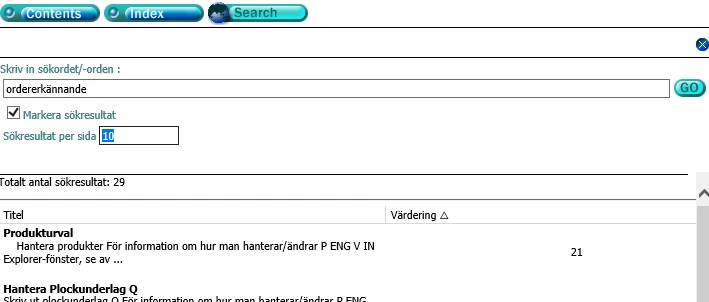
Searching for the word "Ordererkännande" (=order acknowledgement)
you got 29 hits in the old build
URL for test:
https://webhelp.prod.pengvin.se/webhelp2020/PengVinHelp.htm#Order/Orderregistrering_Q.htm


In the build from robohelp 2019/2020 you got none result .
PengVinHelp (listen2music.se)

The content in both cases is the same


If you search for the word "Fakturor" (=Invoices) you got even worse differences
94 hits in the old build and only 4 in the new build

If you search for the word "Faktura" (=Invoice) you got 
118 hits in the old build and only 149 in the new build

and so on...


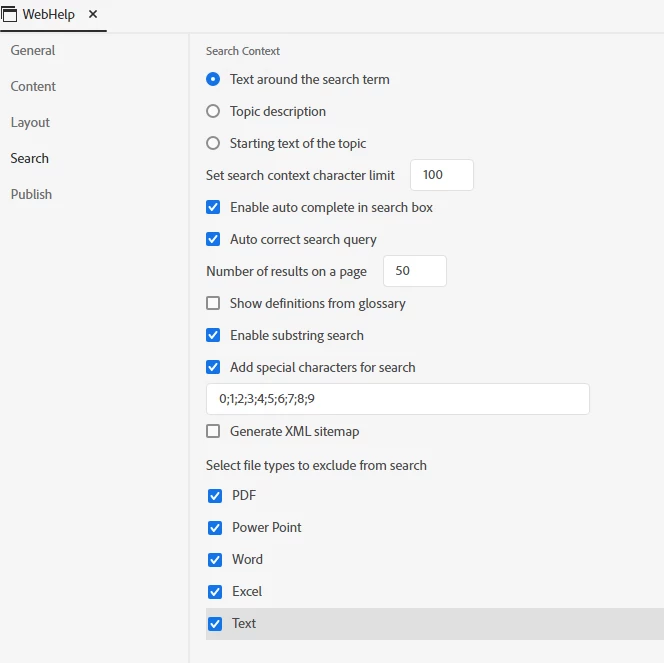
In robohelp output we have these settings for search
 

    This topic has been closed for replies.
    Correct answer Peter Grainge

    I am advised that this will be fixed in Update 5 which is planned for tomorrow (10th June).

    ________________________________________________________
    See www.grainge.org for free Authoring and RoboHelp Information

    24 replies

    Legend
    June 10, 2021

    @Peter Grainge I will sure run some tests regarding search with the new update in the next couple of days.

    Peter Grainge
    Community Expert
    Community Expert
    June 10, 2021

    @Karin Albrecht Search has changes in Update 5. I wonder if they would help your project.

    ________________________________________________________
    See www.grainge.org for free Authoring and RoboHelp Information

    Use the menu (bottom right) to mark the Best Answer or Highlight particularly useful replies. Found the answer elsewhere? Share it here.
    Legend
    June 10, 2021

    Hi there,

    I have made the experience that the setting "Auto correct search query" leads to quite strange search results in German language, so maybe this is also the case in Swedish. Maybe you could try if the results look more reliable with this setting turned off.

    Best regards
    Karin

    Known Participant
    June 10, 2021

    Thanks for fast response.

    Now it works great!

    And also thanks to the adobe team who fixed the issue!

    Peter Grainge
    Community Expert
    Peter GraingeCommunity ExpertCorrect answer
    Community Expert
    June 9, 2021

    I am advised that this will be fixed in Update 5 which is planned for tomorrow (10th June).

    ________________________________________________________
    See www.grainge.org for free Authoring and RoboHelp Information

    Use the menu (bottom right) to mark the Best Answer or Highlight particularly useful replies. Found the answer elsewhere? Share it here.
    Peter Grainge
    Community Expert
    Community Expert
    June 3, 2021

    Wrong assumption. In Classic versions everything in the project was included unless build expressions were used to exclude topics, in the new UI it is the other way around. Nothing is included unless it is in the TOC. That is explained here. There is a big change in what goes into an output. The change means that some topics are not going to get into the output and that will cause broken links. The Topic List report will show you which topics are not in the TOC.


    You also need to clean up the output topics that have been imported. As far as I can see they are not affecting the issue reported here but they will likely cause other issues. Post a separate question on that later when Adobe have looked into this issue.

    ________________________________________________________
    See www.grainge.org for free Authoring and RoboHelp Information

    Use the menu (bottom right) to mark the Best Answer or Highlight particularly useful replies. Found the answer elsewhere? Share it here.
    Known Participant
    June 3, 2021

    Thank you for taking the time to look to our project!


    I have recently taken over the project from another employee who is not currently working. 

    So I do not know everything that has been done in the project over the years and working in robohelp is pretty new to me, working with development, usually I work as a developer. But the company has worked in robohelp serveral years, I assumes that what is not included in TOC is not relevant to include.

    Peter Grainge
    Community Expert
    Community Expert
    June 2, 2021

    In an earlier post I suggested you removed the link to the project. You seem to have removed the download so Adobe will not now be able to download it. 


    Ignore the request to upload again, I will get the original zip to Adobe.

    ________________________________________________________
    See www.grainge.org for free Authoring and RoboHelp Information


    Use the menu (bottom right) to mark the Best Answer or Highlight particularly useful replies. Found the answer elsewhere? Share it here.
    Peter Grainge
    Community Expert
    Community Expert
    June 2, 2021

    By searching on the file names I found you had imported six output topics that had been imported. Unfortunately deleting those topics has not fixed the issue.


    I also found the highlighting I had seen was in fact the browsers find highlighting.


    Whilst not relevant to this issue, I noticed quite a few topics are not in the TOC. I wonder if you are aware that in 2020 topics only get into the build if they are in the TOC? If you don't want users to see them in the TOC, add them and then click the Hide in Output check box in the TOC properties.


    Hopefully Adobe will find the issue.

    ________________________________________________________
    See www.grainge.org for free Authoring and RoboHelp Information

    Use the menu (bottom right) to mark the Best Answer or Highlight particularly useful replies. Found the answer elsewhere? Share it here.
    Peter Grainge
    Community Expert
    Community Expert
    June 2, 2021

    I just spotted that in Assets > JS there are a number of files that start WH. That suggests you have imported some output topics and I think I saw a post where that did cause issues.


    Do you recall importing any topics from an output?

    ________________________________________________________
    See www.grainge.org for free Authoring and RoboHelp Information

    Use the menu (bottom right) to mark the Best Answer or Highlight particularly useful replies. Found the answer elsewhere? Share it here.
