
Inspiring
February 20, 2020
解決済み

How do I change the color of Hide left Panel for Mobile in New RoboHelp UI?

  • February 20, 2020
  • 返信数 13.
  • 1087 ビュー

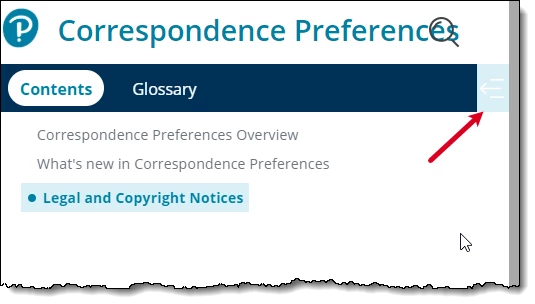
I am updating the Oceanic skin to match our corporate branding. I cannot find a way in the UI to change the color behind the Hide Left Panel icon. I need it to match the color of the rest of the menu bar. I can see the field in the underlying layoutDiff.css file, but I cannot change it there since any changes made in the UI overwrite manual changes to the layoutDiff.css file. I am modifying the skin as a template for other users that need to make modifications for their individual projects.
このトピックへの返信は締め切られました。
解決に役立った回答 Viky T

I logged a defect with Adobe RH-6644. They confirmed this is an issue and they will be fixing this in an upcoming release. Here is the work around until it is fixed.

As of now, you need to modify the background color of "Show" state button separately. Please download the custom CSS file from here: [https://documentcloud.adobe.com/link/track?uri=urn%3Aaaid%3Ascds%3AUS%3A31d12d18-3369-4c68-a927-0ba7d12c533f]. Open the custom.css and change the color from "blue" to the desired value. Now, go to Skin Editor: "Layout > User Assets > Add Asset" and browse the downloaded CSS. Save the skin and generate the Frameless Output. It should have same color in the output.

This customization option will be added to the skin editor in an upcoming patch.

返信数 13

Viky T作成者解決!
Inspiring
February 28, 2020

I logged a defect with Adobe RH-6644. They confirmed this is an issue and they will be fixing this in an upcoming release. Here is the work around until it is fixed.

As of now, you need to modify the background color of "Show" state button separately. Please download the custom CSS file from here: [https://documentcloud.adobe.com/link/track?uri=urn%3Aaaid%3Ascds%3AUS%3A31d12d18-3369-4c68-a927-0ba7d12c533f]. Open the custom.css and change the color from "blue" to the desired value. Now, go to Skin Editor: "Layout > User Assets > Add Asset" and browse the downloaded CSS. Save the skin and generate the Frameless Output. It should have same color in the output.

This customization option will be added to the skin editor in an upcoming patch.

Community Expert
February 21, 2020

Side note: I can get just the icon background to change using Mobile Left Panel > panel-show, but not the whole block.


Community Expert
February 21, 2020

Ah, mobile view.


Yes, that'll need to be changed to match your branding too.


However, I just did a test and the background wasn't changed for the Hide Contents panel option in mobile view. The Show contents panel option changed correctly as in Peter's screenshot.


😞


Peter Grainge
Community Expert
Community Expert
February 21, 2020

I think the issue could be customising behind the scenes.


In 2019 New UI you should only customise through the skin editor for the reason you are finding. It's not that it is buggy, it's by design. It's explained in the RoboHelp Reimagined sample project but fundamentally it is so that Adobe can change the code of a skin without affecting any customisation applied. Classic was different and if they had to make such changes, customisation was lost.


There is an option to automatically run a script when the generation has finished but that's a whole different world.


Also there is an option to add User Assets. I would need to check up on what that would cover but I don't think it is relevant here.


Use the menu (bottom right) to mark the Best Answer or Highlight particularly useful replies. Found the answer elsewhere? Share it here.
Peter Grainge
Community Expert
Community Expert
February 21, 2020

Snap! Amber and I did much the same thing at the same time even though we are thousands of miles apart.


Use the menu (bottom right) to mark the Best Answer or Highlight particularly useful replies. Found the answer elsewhere? Share it here.
Peter Grainge
Community Expert
Community Expert
February 21, 2020

I took a fresh copy of Oceanic and set all three options under Mobile Toolbar to red and got this.


That seems to be what you want if I am following. I didn't stop to try different combinations but maybe not all three are needed.


From what you say, in the output that is appearing on the right. I am wondering if something else you have done is affecting that?


Use the menu (bottom right) to mark the Best Answer or Highlight particularly useful replies. Found the answer elsewhere? Share it here.
Viky T作成者
Inspiring
February 21, 2020

I customized the skin. In fact I have tried it mulitple times. I am finding the skins and the styles very buggy. I make changes and sometimes randomly the settings disappear or revert back to the default. This makes me very nervous about switching to the new version of RH. I am just trying to figure it out before I switch to the new version and Frameless layout. I cannot use the standard skin. I need to use our company branding.

Community Expert
February 21, 2020

With a fresh copy of the skin it works for me in the output:


Have you added a custom css to the skin? If so, perhaps something in that is interferring? 


(edited to fix images and formatting. hopefully...)

Viky T作成者
Inspiring
February 21, 2020

Thanks. I appreciate you looking into this. I looked at the help in IE, Firefox, and Chrome and I get the same result. I printed to a PDF and it is in Times New Roman and it removed the yellow highlighting as well. I am assuming it will print the same way the pdf is generated.

Peter Grainge
Community Expert
Community Expert
February 21, 2020

Ah, I confused that with the Ocean skin that used to come with RoboHelp. Unless Amber has some thoughts, I will take a look but it will not be today.


Use the menu (bottom right) to mark the Best Answer or Highlight particularly useful replies. Found the answer elsewhere? Share it here.