Inspiring
June 17, 2021
Answered

Project upgraded from RH9 to RH2020 missing all topics

  • June 17, 2021
  • 23 replies
  • 1929 views

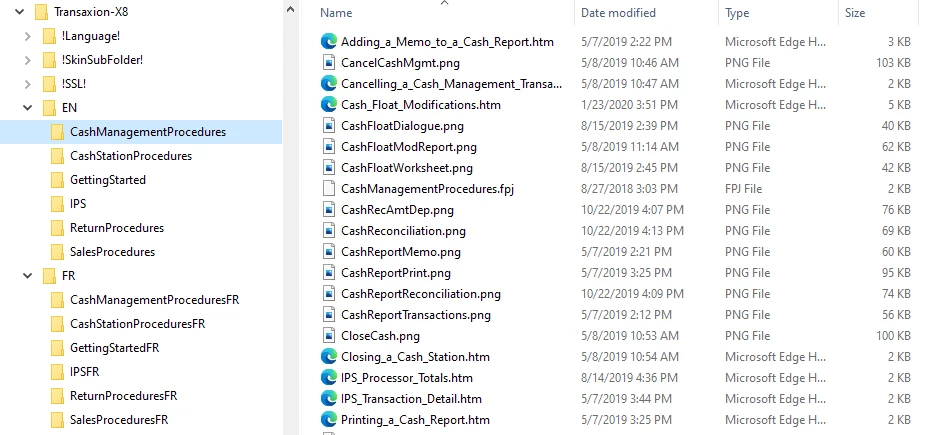
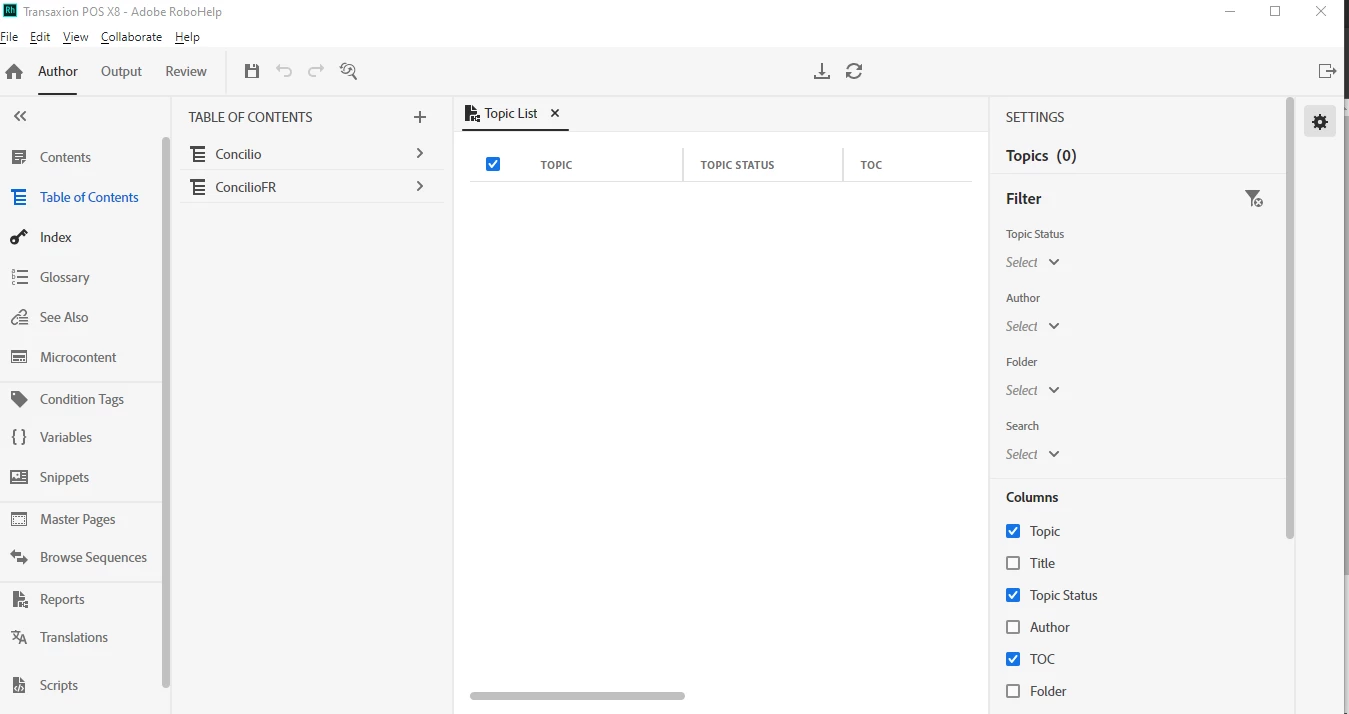
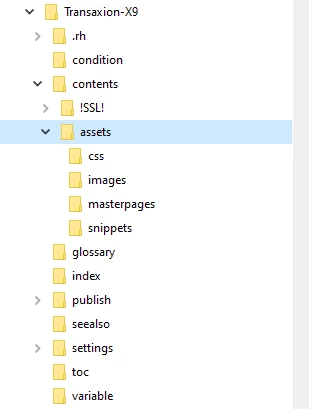
We have recently upgraded to RoboHelp 2020 and the first thing I did was to install the latest update (2020.5.71). I am trying to upgrade my existing RoboHelp 9 project but end up without any topics. All topics (and most images) are stored in sub-folders in existing RH 9 project. I cannot get a screenprint of  the RH 9 project as it constantly crashes on opening since I started running Windows 10 (which is why we upgraded to 2020). I am attaching a screenprint of the RH 9 project folders in Windows Explorer and also of the RH 2020 project folders. The project has 2 tables of contents (English & French) which are both shown in RH 2020 upgraded project but none of the content. Help topics I found online regarding upgrading classic projects to RH 2020 indicated that  topics/images in root folder would be moved to Assets folder while all others would remain in existing folders so the fact that topics/images in old project are in subfolders shouldn't be causing the issue. My project is stored on a network drive for backup purposes but I also tried to do the upgrade from a copy on my local hard drive and that didn't make a difference.
 

This topic has been closed for replies.
Correct answer PMCDEV

Just wanted to update this post to advise that I have now successfully upgraded my RH 9 project to new RH 2020 format. Thanks to everyone who offered help and especially to Ssurbi and Peter Grainge for the solution.


For anyone else who may be struggling with a similar issue and come across this post, I ended up starting the process over by fixing the root.fpj folder (which likely became corrupted by the RH 9 project in Windows 10). Then I upgraded the RH 9 project to RH 2019 Classic and finally to RH 2020. 


I think that my issues were complicated by the fact that my projects are usually located on a network drive for backup purposes. When working from my office this is normally not an issue (except for HTML help) but since I am now working from home via a VPN I believe that contributed to the problems with the project conversion. I am therefore going to stick to working on project from my local hard drive and synching with network drive every couple of days.


Now I just need to get used to the new interface! 😉 Thanks again!

23 replies

Peter Grainge
Community Expert
Community Expert
July 22, 2021

RoboHelp 9 on a network was never a recommended set up. I suggest daily zip file of your project is put on the network with the name preceded by date in YYMMDD format. That makes them easy to find. Every so often delete say all but the end of the month.

________________________________________________________
See www.grainge.org for free Authoring and RoboHelp Information

Use the menu (bottom right) to mark the Best Answer or Highlight particularly useful replies. Found the answer elsewhere? Share it here.
PMCDEVAuthorCorrect answer
Inspiring
July 21, 2021

Just wanted to update this post to advise that I have now successfully upgraded my RH 9 project to new RH 2020 format. Thanks to everyone who offered help and especially to Ssurbi and Peter Grainge for the solution.


For anyone else who may be struggling with a similar issue and come across this post, I ended up starting the process over by fixing the root.fpj folder (which likely became corrupted by the RH 9 project in Windows 10). Then I upgraded the RH 9 project to RH 2019 Classic and finally to RH 2020. 


I think that my issues were complicated by the fact that my projects are usually located on a network drive for backup purposes. When working from my office this is normally not an issue (except for HTML help) but since I am now working from home via a VPN I believe that contributed to the problems with the project conversion. I am therefore going to stick to working on project from my local hard drive and synching with network drive every couple of days.


Now I just need to get used to the new interface! 😉 Thanks again!

Peter Grainge
Community Expert
Community Expert
July 1, 2021
  • Surbhi found both files missing in root.fpj, I found one file missing. 
  • Surbhi found correcting root.fpj fixed everything so clearly all the other FPJ files were OK. That was not my experience.


However, I was looking at what I had upgraded to 2019 Classic while Surbhi was looking at the RH9 you sent me. That supports your plan of fixing RH9, then going to 2019 Classic, then 2020.


That said, I would be tempted to fix RH9 and trying going to 2020 again from there. If it fails your RH9 Classic project is left untouched so you can try 2019 Classic. However, do back up RH9 if you go to 2019 Classic as that does change your project.


If there are further issues, check all the FPJ files.


Let us know how it goes. Have a good vacation.

________________________________________________________
See www.grainge.org for free Authoring and RoboHelp Information

Use the menu (bottom right) to mark the Best Answer or Highlight particularly useful replies. Found the answer elsewhere? Share it here.
PMCDEVAuthor
Inspiring
June 30, 2021

Thank you for your help so far. Unfortunately, I have had to deal with other priorities this week before starting vacation so have not had time to try all the suggestions. (I did try deleting the CPD file before seeing that the suggestion had been deleted.)


When I checked the root.fpj file for my RH 2019 Classic project, the root folder were already there exactly as Surbhi indicated. (Likely because I had recreated the folder structure from within the project as previously suggested by Peter.) However, since root.fpj does contain the folders as it should, that does not explain why the upgrade to RH 2020 was not succssful (i.e. still missing topics/images).


At this point, I'm thinking that when I return from vacation I should edit the root.fpj file from the old RH 9 project (which I have verified does NOT contain the proper root folders), then upgrade the old project to RH 2019 Classic and (if successful), finally upgrade project to RH 2020. In the meantime, I really appreciate the help I have received so far and just wanted to post this update so everyone will know I am still working on it. Thanks again! 

Peter Grainge
Community Expert
Community Expert
June 25, 2021

I have since extracted the original zip again and this time it is only the root.fpj that seems to be wrong! Clearly the elves are at play.

________________________________________________________
See www.grainge.org for free Authoring and RoboHelp Information

Use the menu (bottom right) to mark the Best Answer or Highlight particularly useful replies. Found the answer elsewhere? Share it here.
Peter Grainge
Community Expert
Community Expert
June 25, 2021

@PMCDEV It seems Surbhi had a different experience from me when she upgraded to Classic.


Only the root.fpj broke for Surbhi so see what happens when you fix that in 2019 Classic.

________________________________________________________
See www.grainge.org for free Authoring and RoboHelp Information

Use the menu (bottom right) to mark the Best Answer or Highlight particularly useful replies. Found the answer elsewhere? Share it here.
Peter Grainge
Community Expert
Community Expert
June 25, 2021

@PMCDEV What I sent to Surbhi was the zip file you sent to me. Follow Surbhi's steps on that version (RoboHelp 9 zip) as the upgrade to 2019 breaks many other FPJ files.

________________________________________________________
See www.grainge.org for free Authoring and RoboHelp Information

Use the menu (bottom right) to mark the Best Answer or Highlight particularly useful replies. Found the answer elsewhere? Share it here.
Adobe Employee
June 25, 2021

Hi,


Peter shared your project with me and it turns out that .fpj file is the culprit here.

Your EN and FR folders in root are not listed in root.fpj file. I added them in root.fpj like this:

<folder>
<name>EN</name>
</folder>
<folder>
<name>FR</name>
</folder>

2019 Classic started all the topics and images fine. There are no broken links.

Then I upgraded  the project to latest RH 2020 Update 5 and it looks fine there as well. 

Can you please try this and update here?


Thanks and Regards,
Surbhi Maheshwari

Peter Grainge
Community Expert
Community Expert
June 25, 2021

I had suggested here that deleting the CPD might be worth a try. I have since learned it plays no part in the upgrade so I have deleted the suggestion.


Surbhi fixes anything so send her the project. 🙂

________________________________________________________
See www.grainge.org for free Authoring and RoboHelp Information

Use the menu (bottom right) to mark the Best Answer or Highlight particularly useful replies. Found the answer elsewhere? Share it here.
PMCDEVAuthor
Inspiring
June 24, 2021

After re-importing all my topics/images, I was successfully able to generate all versions of my output in RH 2019 Classic. However, when I upgraded the RH 2019 Classic project to RH 2020, once again all topics/images are missing - except for the intro topic for each language. This is very discouraging! I guess I can just recreate folder structure in RH 2020 and import all topics again - but I am concerned as to why this process is not working for me - even after taking the interim step of upgrading the project from RH 9 to RH 2019 Classic. 


Also, I did try recreating one folder in RH 2020 to import topics/images but it appears to work differently than it did in RH 2019 Classic. In my original RH 9 project, images were stored in subfolders I created to match topic folders. In RH 2019 Classic, once I imported the topics, the images all appeared in the same sub-folder with the associated topics which was fine. However, in RH 2020, the images just appear in the "images" folder under "assets" and I am not sure if that is what is supposed to happen and, if so, if I can move them into sub-folders without breaking anything.

Adobe Employee
June 25, 2021

Hi,


Upgrade should itself take care of all topics and images etc. It must be some specific scenario. Can you please share your 2019 classic project with us at sumahesh@adobe.com

We will have a look at it and get back to you asap. Thanks for all your help.


Regards,
Surbhi Maheshwari