


Inspiring
May 5, 2024
해결됨

I can't understand "Don't post generative AI content with headlines that imply it depicts..."

  • May 5, 2024
  • 4 답변들
  • 3432 조회

Hello.


When uploading images to Adobe Stock, a warning appears: "Do not submit generative AI content with headlines that imply it depicts an actual newsworthy event."


I don't quite understand what this means. I couldn't understand it from Google, I also read a topic opened by the moderators in this forum on the subject, but I still couldn't understand it.


What exactly does this warning mean? Can you explain it by giving concrete examples?


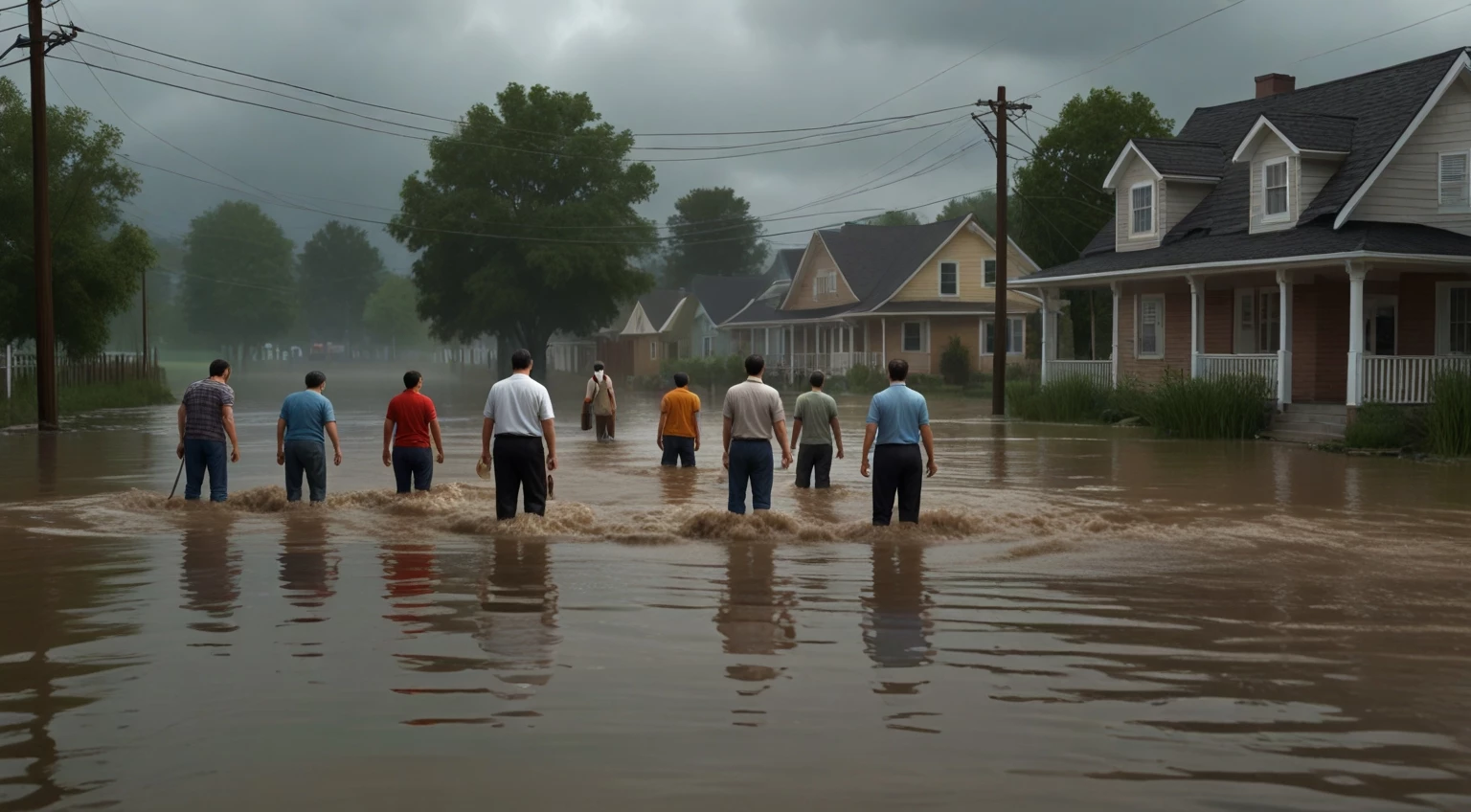
For example, I want to ask this: Today, the flood disaster in Brazil was on the world agenda, and I was inspired by this, and I had the artificial intelligence produce an image like the one below, with a prompt like "People experiencing flood disaster."


My question is, can I send this (or a similar) image to Adobe Stock for review or not?


Thanks for your help.
최고의 답변: Jill_C

A 37% rejection rate isn't necessarily a reason to close the account; however, you should consistently strive to do better than that. You can do so by zooming in to at least 100% and carefully inspecting your images. If there are minor errors, they can be corrected in Photoshop; but if the errors are significant, delete the image and move on.

4 답변

Abambo
Community Expert
Community Expert
May 6, 2024

It's quite simple: you can't say that it is the real thing. So your flood picture can't get a title like "flood in Brazil" or "flood in Texas" (the houses look more like American houses…). You can use a title like "people walking down a flooded street". 


As other pointed out, you should earn a refusal for quality issues.

ABAMBO | Hard- and Software Engineer | Photographer
coffeeman_L작성자
Inspiring
May 6, 2024

Yes, as you said, I have trouble with quality issues. I'm not an artist, I don't know anything about drawing, illustration or photography. Coincidentally, I read somewhere that content produced with artificial intelligence is now acceptable on Adobe Stock and similar platforms, so I started this business with the hope that Adobe Stock could be one of the passive income sources for my upcoming retirement.


Since I started, 123 of my uploads have been accepted, but 74 have not been accepted (99% due to quality issues).


The overall ratio of my rejected images is approximately 37.50%. This scares me, because I find this rate quite high and I am very worried that my Adobe Stock account may be closed after a while because of this rate. (What do you think about this?)


Since I'm not an artist, I have no choice but to use artificial intelligence to produce the images. Visual production with artificial intelligence is currently not very successful in my opinion - for example, I ask the artificial intelligence for a realistic drawing, it sends me a drawing of a man with three arms, many mistakes like this.


I can guess about some of my rejected images, but I have no idea about the majority.


For example, here are the two images I uploaded today and were rejected:

I can make a guess about the first one: I think the ambient lighting was insufficient for a voting place, there should have been a place with more light. (Of course, I don't know if these thoughts are right or wrong.)


But for example this second one:


I don't have a clear idea why this was rejected. There is something unreal about the strings of the double bass, maybe this is the problem, but there are some of my previous images that have such minor errors that have been accepted.


Could you please tell me your thoughts?


And as a participant who produces images only with artificial intelligence, what do you think I can do to reduce the rejection rate of my posts?


I wrote a little longer this time. Thank you again for your help.

coffeeman_L작성자
Inspiring
May 7, 2024

Generative AI is not a "make me rich" card in a board game. A lot of the outcome is not correct. 

But you seem to check the wrong issues. The lightning is not the problem, except if it is wrong and does not match the shadows. You should check the box, which is weird, the voting sheet with those random graphics on and the lady's left hand. But more severe are the multiple artefacts that you see, when you look at the asset in full size. The overall quality reminds me more about a clipart from the nineties. 


Your bass player has not minor errors. You will need to correct such errors, if you can't correct, do not submit. Look at the strings. Those are very obvious errors. Then check the right hand. Check also the face.


Btw: having assets with obvious errors in the portfolio will lead to problems with your account, more than having many refusals. 


There is no offical guide on how many refusals you can have, but as long as you do stay under 50%, you are good.


quote


Btw: having assets with obvious errors in the portfolio will lead to problems with your account, more than having many refusals. 


Can you explain this sentence a little?

Jill_C
Community Expert
Community Expert
May 5, 2024

You can submit it, though I think it would be rejected on the basis of quality issues - particularly the hands which are poorly drawn.


However, you cannot indicate in your title or keywords that this is at all related to the current flooding in Brazil, because it's not. No reliable news source is going to use an AI image to illustrate such an event anyway.

Jill C., Forum Volunteer
daniellei4510
Community Expert
Community Expert
May 5, 2024

Note the head and hands. 


Adobe Community Expert | If you can't fix it, hide it; if you can't hide it, delete it.
daniellei4510
Community Expert
Community Expert
May 5, 2024

Yes, you can submit it, so long as you don't title it or use keywords that would indicate it's from an actual event. For example, "New Orleans Hurricane Aftermath." Keep the title and keywords as generic as your prompt. Never the less, the image will still be rejected. The men are poorly rendered, faces and hands in particular.                             

Adobe Community Expert | If you can't fix it, hide it; if you can't hide it, delete it.