Known Participant
February 26, 2024
해결됨

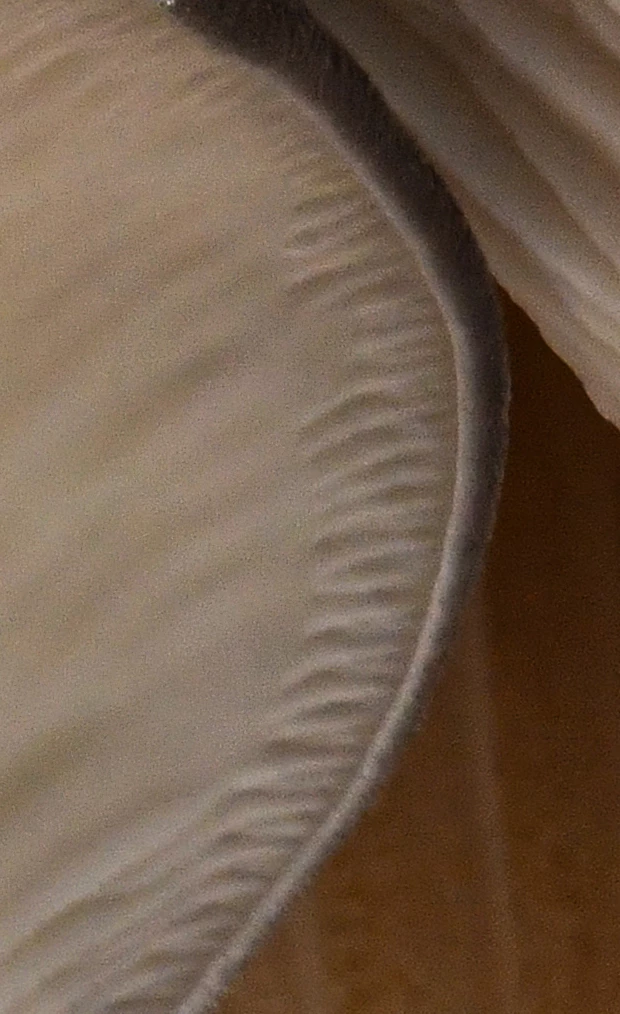
Non-compliance rejection, File ID: 731066368 Original name: D85_8558 Blue Oyster Mushrooms.jpg

  • February 26, 2024
  • 3 답변들
  • 842 조회

Looking for some help. What can I change to make the image more acceptable? The explanation for rejection isn't clear. Non-compliant image, undeclared AI, use of another artist's name and non-compliant with overall guidelines. Not sure what any of those mean. It's not an AI image

이 주제는 답변이 닫혔습니다.
최고의 답변: Ricky336

Hello,

This is a bit strange


Did you blur this part? Quality could also be a factor here!

Also, look at your keywords - did you use any brand name in the keywords - or keywords that could be mistaken for a brand name?!

There can be a variety of reasons for this rejection, so it is a bit hard to determine what exactly.

3 답변

Abambo
Community Expert
Community Expert
February 26, 2024

Well, there are clearly reasons to reject this asset for quality issues.


As for the non-compliant image, there are multiple reasons that may trigger that, probably keywords, title, but may also be the content.

ABAMBO | Hard- and Software Engineer | Photographer
Thomas_Morris작성자
Known Participant
February 26, 2024

Thanks for your answer! Clearly, I need to examine my images more closely! I would reject that one too. This will help me!

Abambo
Community Expert
Community Expert
February 27, 2024

You're welcome.

ABAMBO | Hard- and Software Engineer | Photographer
Ricky336
Community Expert
Ricky336Community Expert답변
Community Expert
February 26, 2024

Hello,

This is a bit strange


Did you blur this part? Quality could also be a factor here!

Also, look at your keywords - did you use any brand name in the keywords - or keywords that could be mistaken for a brand name?!

There can be a variety of reasons for this rejection, so it is a bit hard to determine what exactly.

Thomas_Morris작성자
Known Participant
February 26, 2024

Thank you! No, I didn't intentionally blur it. It's a focus stacked image that I didn't inspect closely enough. Everyone is coming in with the same critique and it's encouraging! I can inspect my images more closely to either fix them or start over.

daniellei4510
Community Expert
Community Expert
February 26, 2024

Setting aside the "official" reason for rejection, I'm not quite sure what's going on in this image. Areas that have no reason to be out of focus are severely lacking in detail. Over-processing? Not sure. But there doesn't appear to be any logical reason why these areas are so soft in comparison to similar areas on the same plane of focus. Interestingly enough, these issues are very similar to what can happen in an AI generated image, and perhaps this is the reason for the official rejection. Because a camera simply wouldn't do this.


Adobe Community Expert | If you can't fix it, hide it; if you can't hide it, delete it.
Thomas_Morris작성자
Known Participant
February 26, 2024

Ah! This was a focus stacked image that I didn't inspect closely enough! Thank you! This will encourage me to examine my images more closely, especially when I do a focus stack! Thanks!

Abambo
Community Expert
Community Expert
February 27, 2024

Well, that explains the weird blur on your assets. 


You should examine your assets at 100%. If you think you see an issue, going to 200% or even further will help to identify the issue. 

ABAMBO | Hard- and Software Engineer | Photographer