paulsally
Participant
September 29, 2018
Answered

Rejection for Artifacts

  • September 29, 2018
  • 2 replies
  • 652 views

Hi all,

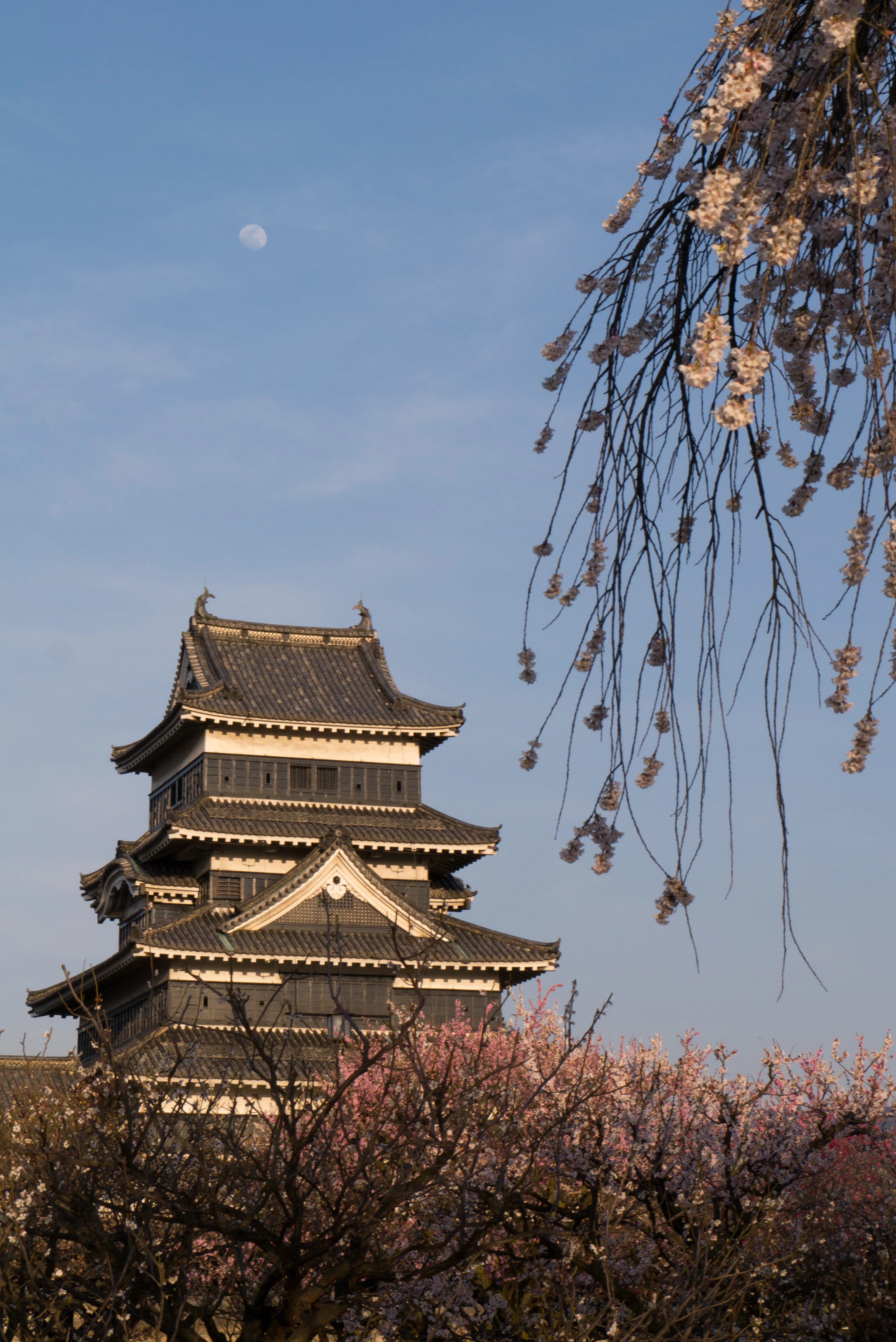
Would you give me some feedback on the following image that has been rejected with Artifacts reason? It was accepted on Shutterstock and Alamy. I haven't retouched the image at all.

Thanks!

.S.
Correct answer Abambo

the only artefact I found is here:

That can easily be edited out. But the overall sharpness of the image is not good. And I can imagina that this is the reason for the refusal.

Shutterstock is less critical on image quality, the are more picky with tradenames and logos that are just above noticable, not even recognisable.

As of Alamy, I have no idea of their quality control but I had never refused an image and I have never sold one...

2 replies

Ricky336
Community Expert
Community Expert
September 30, 2018

The 'artifact' of course is a dust spot, that can be easily edited out. I agree with Abambo that the overall sharpness is not good.

I can't find any other problems either.

I think that the reviewer could also have put this under 'Image out of focus' rejection reason. Adobe tends to be quite picky about these sorts of things.

Looking at this at 100% you can see that it is not quite sharp (unfortunately). Good enough for personal use, but probably not good enough for commercial use. (Not on Adobe anyway.)

paulsally
paulsallyAuthor
Participant
October 2, 2018

Thanks Abambo​ and ricky336​ for your helpful feedback, also regarding the review process of different sites.

I hadn't noticed that artifact in the sky, now I know that I have to inspect the whole picture at 100% to check for any spots.

As for sharpness I had a Panasonic G3 and I've always had the impression that it was not very sharp. Now I have an Olympus OM-D 10 (Mark I), it seems better. I can't invest on a camera now, but I do appreciate when an image is sharp... Even if I didn't show it with this shot.. eheh... so next time I can buy a camera I will check for sharpness. In fact, I'm not sure if it were the camera or if I didn't actually focus on the castle but focus fell, instead, somewhere in between the branches in the foreground and the castle in the background...

I had contacted Adobe via the form and I was replied that the photo presents issues with noise and sharpness. They say noise is present on the sky, the darker parts of the castle and the cherry trees on the bottom. Also the image is not sharp enough and it even seems to show a slight motion blur especially on the castle roof tiles and the cherry branches.

I can't see strong noise (apart from that spot) on the sky, though if I zoom, it gets a bit grany... But the main issue, I agree, is sharpness (and that spot).

Thanks for bothering to provide feedback, I'm moving my first steps

Abambo
Community Expert
Community Expert
October 3, 2018

You're welcome.

The real big concern is sharpness of the building. So you really need to know if your camera is putting the focus where you want it to be. Some cameras have front or back focusing meaning that you will rarely get sharp images. Some cameras can compensate that. If not, you will need to send the camera in for maintenance.

I do not see motion blur. It may be that there was a camera shake that too will produce blurred images.

For sharp images, you should also avoid the extreme f-stops. Most lenses have their sharpest moment around f8. That would also allow for lower ISO and higher shutter speed.

I would have photoshoped the the branches in the foreground. But that's aesthetic.

The noise in the sky can be eliminated with a good denoising program. Photoshop or Lightroom would also do a good job here.

So yes:

  • look at your pictures at 100%. The main subject should be crisp sharp. With portraits, the sharpest point should be the eyes.
  • with telelenses use a tripod or high shutter speed.
  • find the sweet spot (sharpest opening) of your lens.
  • use lowest ISO possible, especially on smaller sensors.
  • clean-up dust particles
ABAMBO | Hard- and Software Engineer | Photographer
Abambo
Community Expert
AbamboCommunity ExpertCorrect answer
Community Expert
September 29, 2018

the only artefact I found is here:

That can easily be edited out. But the overall sharpness of the image is not good. And I can imagina that this is the reason for the refusal.

Shutterstock is less critical on image quality, the are more picky with tradenames and logos that are just above noticable, not even recognisable.

As of Alamy, I have no idea of their quality control but I had never refused an image and I have never sold one...

ABAMBO | Hard- and Software Engineer | Photographer
