

Answered
Creating a highlight/shadow on a 2D graphic
Hi!
Does anyone have a tutorial or suggestion on how to create a highlight / shadow on 2D graphic? Any example on a simple shape like a circle would be so helpful!

Hi!
Does anyone have a tutorial or suggestion on how to create a highlight / shadow on 2D graphic? Any example on a simple shape like a circle would be so helpful!
Hello @Substance5EE2,
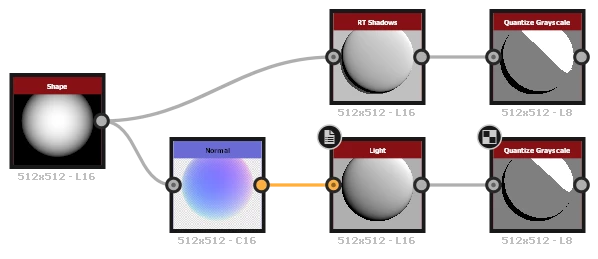 To produce cartoon shading on a shape, you can connect a combination of Normal and Light node or our new RT Shadows node into a Quantize Grayscale node, as shown in this example.
I hope this is helpful!
Best regards.
Already have an account? Login
Enter your E-mail address. We'll send you an e-mail with instructions to reset your password.
 AdChoices