

Inspiring
August 9, 2022
Question

Edge select ?

  • August 9, 2022
  • 2 replies
  • 737 views

Hello

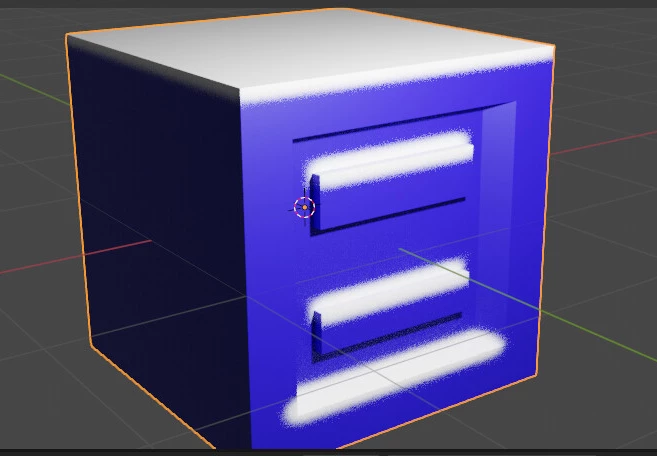
how can i recognize edges without baking ?

Is it possible to recognize steps to put dirt running under it?


thanks

This topic has been closed for replies.

2 replies

davescm
Community Expert
Community Expert
August 10, 2022

'do you know any tutorials on how to create dripping dirt in a complex model with lots of steps at various heights and widths?'

There are a few around - you might want to take a look at this one. It is old but the principles remain the same

https://www.youtube.com/watch?v=1lxgmNXrT2I


'is it possible to load 2 objects in the viewport and have ambient occlusion that appears in the position between the two objects?'

You can load two objects and bake both. Personally though I would still recomend separating designing teh materials (Substance Designer) from applying the materials (Substance Painter) and use teh strengths of both applications


'why when using node : edge select i get dirty edges and glitches ?'
Did you bake a curvature map and what settings did you use? Also what settings in your node


'is it possible to use TEXELS in Designer?'

There is no unit as such for it. Designer creates procedural materials that are scalable and in which resolution can be changed. Maps can be directly output in maps up to 8kx8k or the procedural material itself passed to another application as sbsar e.g. Substance Painter and used at whatever resolution is required. How that translates to texel density on your model depends on your UV unwrap and the final resolution you choose when applying them to your objects.


do you have tutorials to learn how to use position map?

I don't know of a tutorial in Designer. You could take a look at a couple on Painter which would show you how a generator can use a position map and try and replicate the same in Designer. The principles are that you can use the map to give you the X Y and Z position of any point on th surface of your object (relative to a bounding box). That can then be used to drive nodes/masks to give effects that change with position or direction.


Dave


Inspiring
August 10, 2022

great tutorial
Thank you for your help .

I just have one doubt:
how can i have more dirt running down the steps in the middle of the wall?

thanks


davescm
Community Expert
Community Expert
August 9, 2022

You need to bake in order that the simple material nodes can recognise edges, curvature, position etc. Without it the material nodes have nothing to work on.


Dave

Inspiring
August 9, 2022

what about recognizing steps to make splashes of dripping dirt?
it's possible ?
as ?

davescm
Community Expert
Community Expert
August 9, 2022

Any material which has to respond to position (e.g. drips) needs a position map to tell it which way is 'up'. That way drips can run down


You may find it more effective to design materials in Designer but apply them to models in Painter


Dave