I would do it in Designer,
you wont be able to edit any archive files in designer (anything ending in sbsar) but you can still use them in designer and preview them.
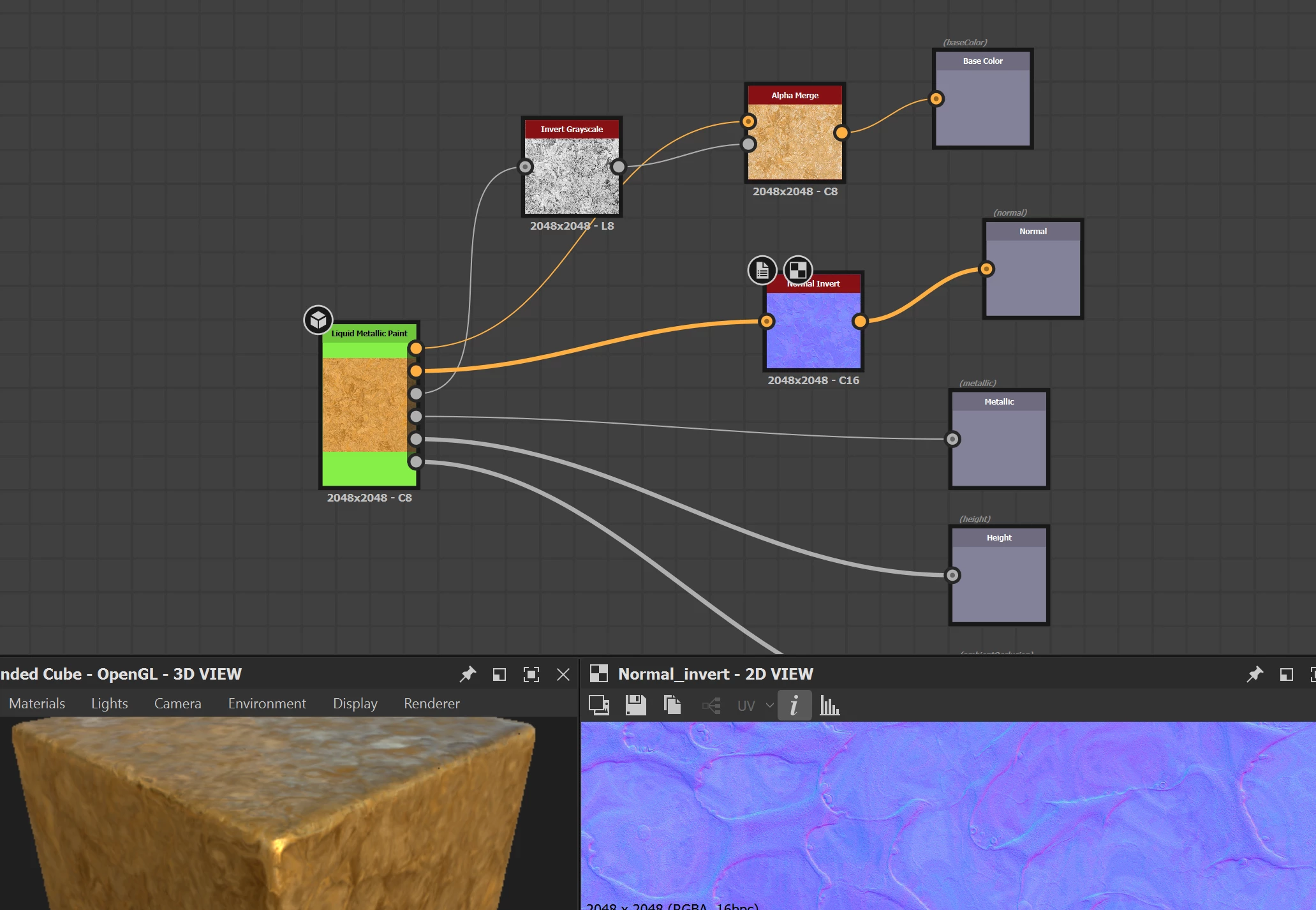
Open an empty graph, drag and drop the archive you have downloaded into it, right click on it and select Create-OutputNodes this will give you a basic setup for export.
(you can also hold right click on that archive and drag it onto the mesh in the render window to get a preview)
Then you can pack it however you like, in the quick screen shot below I just inverted the roughness to make it smoothness added it to alpha channel of base color and plugged it into the output.
You will want a normal invert node as well as the substance files default to DirectX and Unity is OpenGL so just invert green channel is all that node does.
You can use RGBA merge node for any other type of packing you want, then just select the parent size you want and render it out.
Right click on the substance graph and select export outputs as bitmaps when you have it set up how you like.
If you want to do loads and batch it I think you will have to do 2 step process, with sbsrender render out the default maps from the archive, then use those as inputs into your conversion node tree to do the packing and use sbsrender to run that, I don't think you can pass an archive as a input into another archive with sbsrender but might be wrong.



 AdChoices