New Participant
July 19, 2021
Answered

Extract Curves node is not reading selection set from 3ds max mesh

  • July 19, 2021
  • 1 reply
  • 683 views

Hello, can't solve the problem, maybe it is a bug, but I can't extract curves from imported custom mesh, I'm using simple cube with selection set, but it is not working in Substance Designer node Extract Curves. Here is the mesh I'm testing: https://www.dropbox.com/s/umhtugn8oa6y1n0/box.fbx?dl=0

The name I'm using for selection set: box_frame_Edge


Any help appreciated, thank you.
This topic has been closed for replies.
Correct answer Luca Giarrizzo

Hello,


Indeed, the Extract curves node expects a Scene holding SubD meshes as input.

The extracted edges should match the ones included in the selection set which tag is input into the Edge filter parameter field. I was able to verify this using the file you kindly provided.


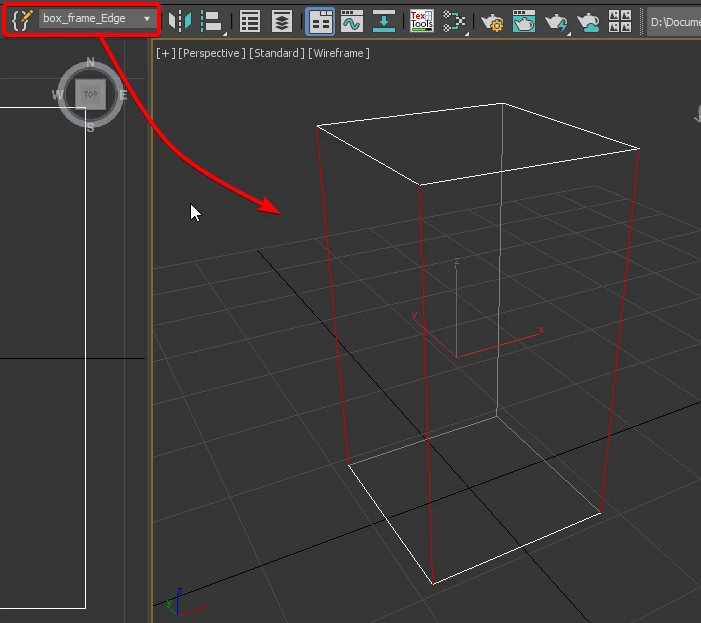
The selection set in 3ds Max, note one of the vertical edges is not included in the set.


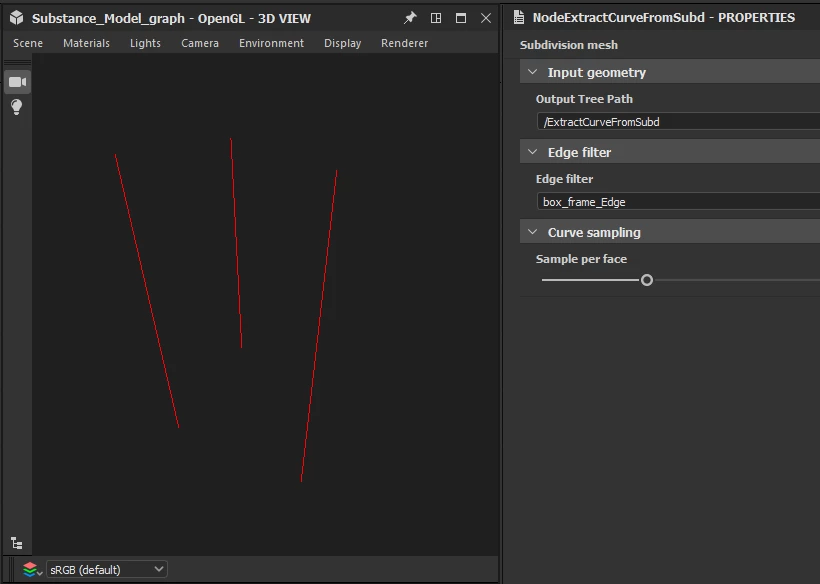
The same edges are correctly extracted using this selection set tag in Substance 3D Designer, with the Extract curves node.


I hope this cleared things up!

This page of our documentation describes the node in greater detail, if it can be of any help. Feel free to let me know if this reply successfully addressed the issue.


Best regards.


1 reply

tehooneAuthor
New Participant
July 19, 2021

Ok, found out what the problem was, needed to convert scene node with imported mesh to As Subd - True, but when I set it true it subdivided the mesh and randomized selected (in a set) edges randomly. Any ideas?

Luca Giarrizzo
Community Manager
Luca GiarrizzoCommunity ManagerCorrect answer
Community Manager
July 19, 2021

Hello,


Indeed, the Extract curves node expects a Scene holding SubD meshes as input.

The extracted edges should match the ones included in the selection set which tag is input into the Edge filter parameter field. I was able to verify this using the file you kindly provided.


The selection set in 3ds Max, note one of the vertical edges is not included in the set.


The same edges are correctly extracted using this selection set tag in Substance 3D Designer, with the Extract curves node.


I hope this cleared things up!

This page of our documentation describes the node in greater detail, if it can be of any help. Feel free to let me know if this reply successfully addressed the issue.


Best regards.


Luca Giarrizzo | Quality Engineer, 3D & Immersive | Adobe
Luca Giarrizzo
Community Manager
Community Manager
July 20, 2021

Hello Luca, thank you for the fast reply, yeah everything is working, I found the problem I was forcing with, if you work with triangulated mesh in 3ds max for some reason when you export it to fbx, it will change selected edges in Selection Set, and I found out it when re-import the mesh again after export into 3ds max. You can see it on the provided box just tesselate it with a modifier, create Selection Set, export to fbx and you will se in Designer edges are incorrect and it is the problem on the Autodesk side while generating fbx, otherwise everything is working. But as soon as I started experementing with substance model graph it is looking amazing. Maybe you can give me some tips what nodes I can explore to get en effect like on the pictures? I'm doing frame from the extraced curves from the mesh. Just tried wrap on faces node still do not completely how can I get some of the close look as on the reference picture.

Thank you!


Hello,


Interesting information regarding FBX export from 3ds Max impacting selection sets, thank you!


Substance Model graphs currently do not include nodes which can perform the welding and smoothing you suggest in the example image you kindly included.


At this time, the only nodes capable of reprojecting and welding geometry are the SceneTree rasterization – which is limited to world-axis projection – and Mesh cleanup nodes. Combining these nodes can result in fun geometry to play with for kitbashing, for instance.


Mesh decimate may also be used to simplify geometry per object by collapsing vertices which are less important to the overall silhouette.


Regarding the warping deformation you also suggested, it is akin to a noise-driven vertex offset deformation and unfortunately neither is it currently available in Substance Model graphs.


Please note this is a first step for Substance Model graphs, and we will expand this feature in the months and years to come. Your feedback and suggestions are really valuable and appreciated in this growing process, thank you for your patience and help!


Best regards.


Luca Giarrizzo | Quality Engineer, 3D & Immersive | Adobe