


New Participant
April 3, 2024
Answered

Flood Fill issues

  • April 3, 2024
  • 1 reply
  • 1781 views

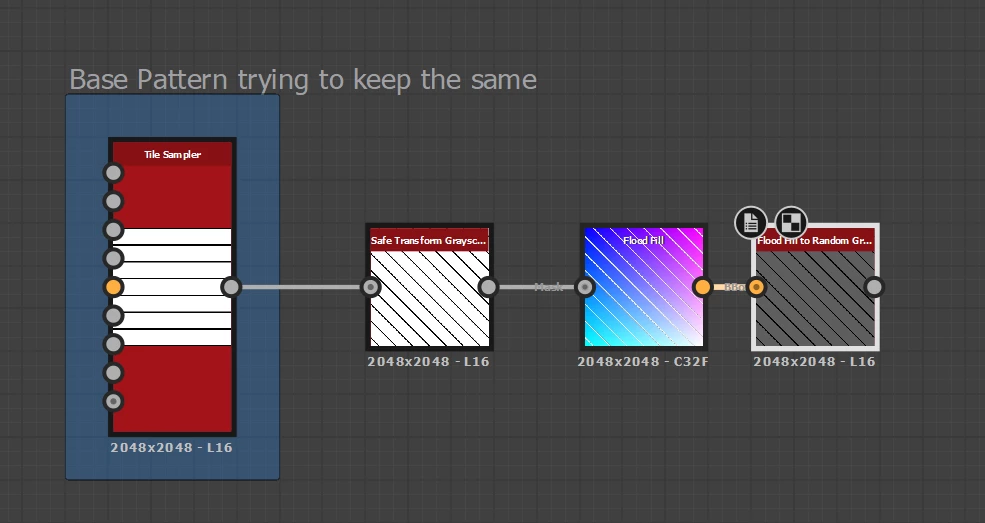
Hello peeps my goal is gray scale luminance varience  with the tiled bars, i need the base to stay white and black but im trying to use the flood fill to random gray to create my varience, for some reason flood fill dosent seem to work can canyone explain what the issue might be. also it seems like tile safe rotation in safe transform based on true or false can effect the outcome any idea why that is? thanks again peeps for all your help.
 

Correct answer Luca Giarrizzo

Hello Matthew,


Indeed, Flood Fill requires a black border at least one pixel wide all around a shape to work properly.

To make this easier, I have attached a simple 'Trim borders' tool I have made to trim the borders of an image with an exact amount of black pixels (1 by default). This avoids scaling down the image and the potentially undesirable filtering that may involve.

It is easy enough to restore the trimmed parts with a Distance node. I hope this helps!


Best regards.

1 reply

New Participant
April 3, 2024

So i seemed to have fired out what is causing this im not sure on the math or coding side of it but if the pattern contrinues past the square border it nullifies the flood fill, by connecting the safe transform node to a blend and shaving the edges off by 0.001 it allows the flood fill to work. weird but interesting.


Luca Giarrizzo
Community Manager
Luca GiarrizzoCommunity ManagerCorrect answer
Community Manager
April 5, 2024

Hello Matthew,


Indeed, Flood Fill requires a black border at least one pixel wide all around a shape to work properly.

To make this easier, I have attached a simple 'Trim borders' tool I have made to trim the borders of an image with an exact amount of black pixels (1 by default). This avoids scaling down the image and the potentially undesirable filtering that may involve.

It is easy enough to restore the trimmed parts with a Distance node. I hope this helps!


Best regards.

Luca Giarrizzo | Quality Engineer, 3D & Immersive | Adobe