


Substance Designer - Incorrect UI scaling when plugged in to external monitor
Hi all
I primarily work off of a workstation laptop that goes back and forth between being plugged into an external monitor and just being used by itself as a laptop.
If I plug in my laptop to an external display and then open Substance Designer, much of the UI text elements are scaled to be extremely large. This is fixed only by restarting the laptop every time I plug it into a monitor. Likewise, when I unplug the monitor and try to use Substance Designer again just on my laptop, the UI scaling on the text makes it look tiny. And this is, again, only fixed by restarting the laptop.
(Picture for reference)
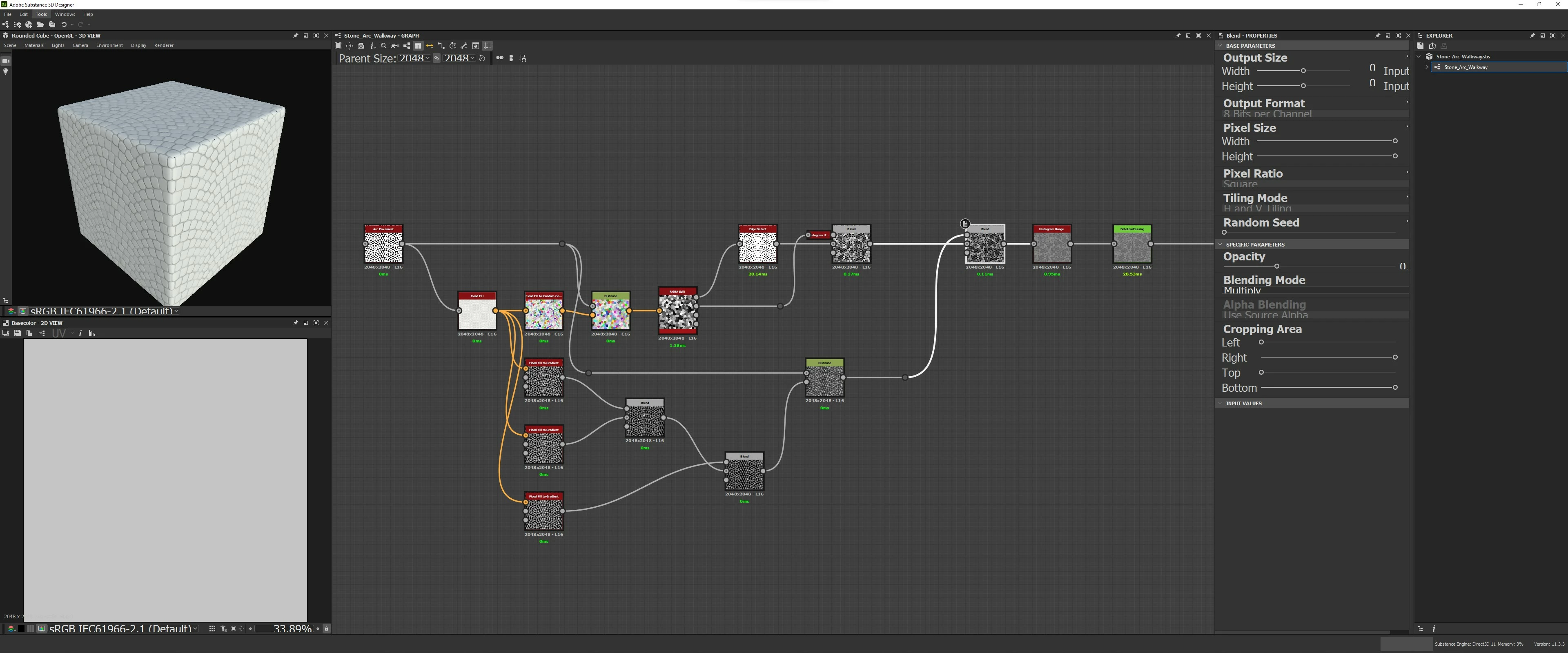
Is there a setting or way to get the text to display correctly on both displays without having the restart my laptop everytime I unplug/re-plug it into my monitor? If it's important, the laptop is a 4k display scaled to 150% and the monitor is a 3840x1600 display at 100% scaling. I would assume the scaling number is reason behind this but I'm just guessing.
 AdChoices