
Copy link to clipboard
Copied
For my custom exporter I'd like to access the data as to what color space got applied for the exported maps.
Using code how can I query the current project settings with regards to the color spaces?
So that would be these settings:
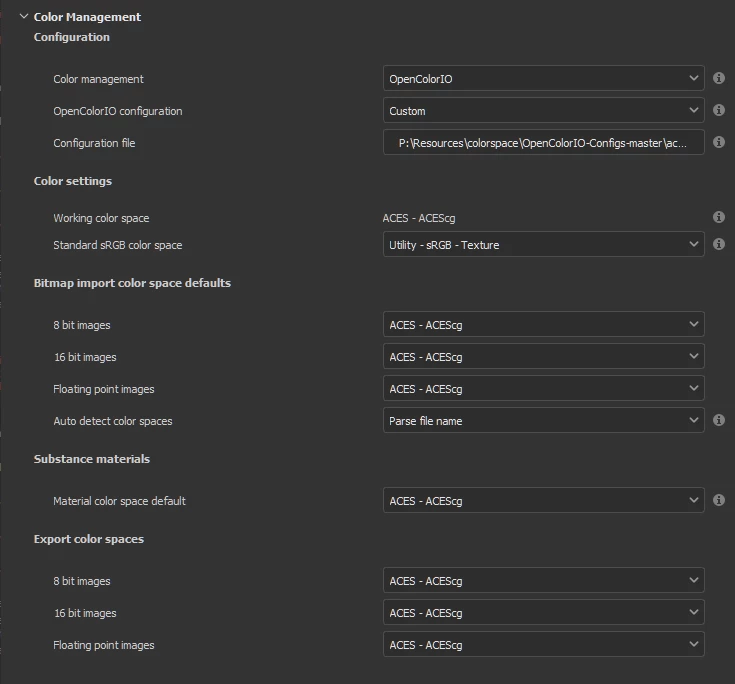
And in particular accessing data similar to this UI shows would be perfect:
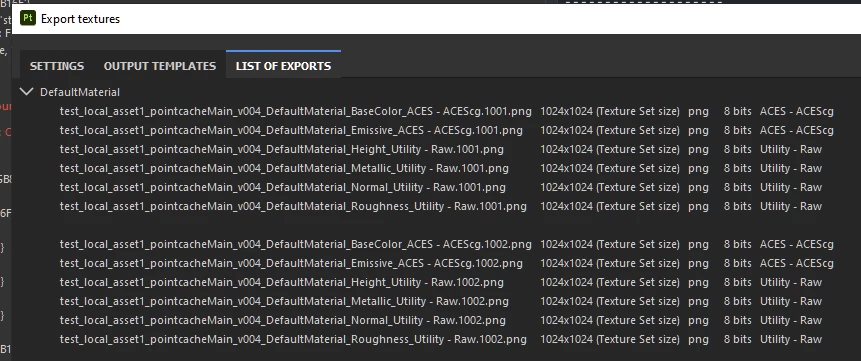
I'd like to be able per texture set find the outptu maps, their resolutions, formats, bit depths, color spaces, the UDIM tiles and preferably even if the filename template used to define the path.
So for a substance_painter.export.export_project_textures(config) export I'd like to know this information about the output files.
Any pointers?
Copy link to clipboard
Copied
For sake of trying I've set up these two prototypes to get to the relevant data that I need:
- https://gist.github.com/BigRoy/782b85755de08b1ebe19c7aea7e30615
- https://gist.github.com/BigRoy/57a80e9bd9cccdd2c40de445f06437c0
But unfortunately they do not provide me exactly with what a particular Export configuration will end up exporting with regards to the channels, the bit depths, the color spaces, etc. I wonder if there's any way to parse the default `.spexp` files to get to that data to get there in the end.
Oh boy, this should've been trivial!
Copy link to clipboard
Copied
Hearing back from support there is no API function to retrieve this information in 8.3 or earlier - as such there appears to be no trivial way to retrieve this information through one of the APIs. The Bug/Support request number is 209342.
For now I ended up retrieving the outputs for as much as possible using my earlier code snippets and by using the file name templates of the export config (which could be retrieved through the javascript API) and parsing the output filenames back for their data, as in here: https://github.com/ynput/OpenPype/blob/aa0c62b4d7e73d10e63f7384a9d534a12c8fd16e/openpype/hosts/subst...
It's far from ideal and still doesn't reliably tell me:
- Can't figure out the color space if the template doesn't have $colorSpace token in the exportt filename.
- Can't detect what channels ended up in each particular output. This unfortunately seems to be the only real data I couldn't get to, even with a workaround.
- Can't detect what bitdepth it writes the particular channel too. Workaround would be to sample the file after export.
- Can't detect whether the current project was in fact initialized with OCIO or not - but launching Substance Painter with OCIO environment variable would force that OpenColorIO color management as far as I know, and thus would allow to at least force it to be used.
Get ready! An upgraded Adobe Community experience is coming in January.
Learn more