


New Participant
September 21, 2023
Question

Similar UV shells look different after AO baking

  • September 21, 2023
  • 1 reply
  • 194 views

Hello everyone! 


I am modelling a guitar in Maya. There are 6 strings of different width, but the meshes are similar, and the UV shells are similar as well. The UV-shells are located in the lower right corner of the UV map. No overlapping, no invereted faces/normals.
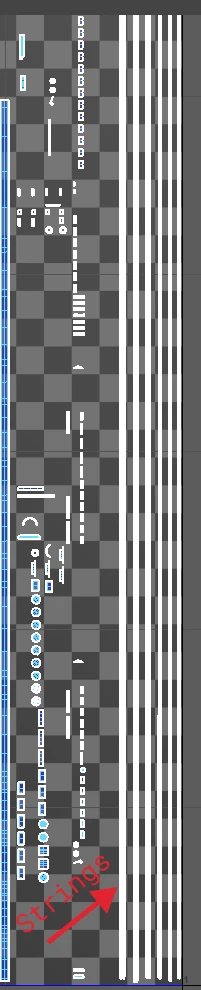
The issue: after the maps baking in Substance Painter the strings look quite different. On the screenshot below: two left ones are quite ok, I guess, but others seem to be of darker gray. 
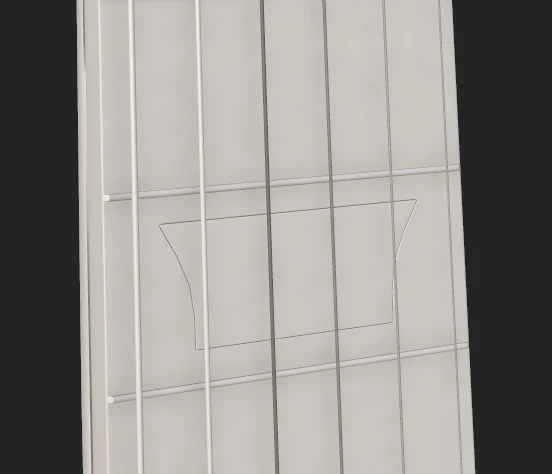
I've been told that something is wrong with AO, but I have no idea what's actually wrong, since:

  • the UV-shells are not overlapped,
  • the meshes of strings have no N-gons or tris,
  • there are no inverted faces/vertices.

So pretty much the meshes and shells are very similar, but for some reason the final result looks different.

I'd really appreciate your help! Thanks!   

This topic has been closed for replies.

1 reply

Cyril Dellenbach
Community Manager
Community Manager
September 25, 2023

Hi @Danil32437582gbmk,


Thanks for the details.


Could you share a screenshot from the entire UV map? My first guess is that the UV shells are too small for a clean baking. This could result with artifacts such as the one you're facing.


You can also share with me directly the 3D model, if you want me to take a closer look. You can send it to cdellenbach@adobe.com


Best regards,


Cyril Dellenbach (Micro) | QA Support Artist | Adobe
New Participant
September 25, 2023

Hello, @Cyril Dellenbach! Thanks for the reply! 


It seems that your guess on the model size is accurate: I totally forgot to scale it properly.


I've sent yout the file, thank you so much for that option! Would be cool to get your feedback!