


Inspiring
January 17, 2018
Answered

I cant use my GPU in Premiere Pro 2018, Adobe Media Encoder, After Effects

  • January 17, 2018
  • 9 replies
  • 71263 views

Hello I have a big problem.

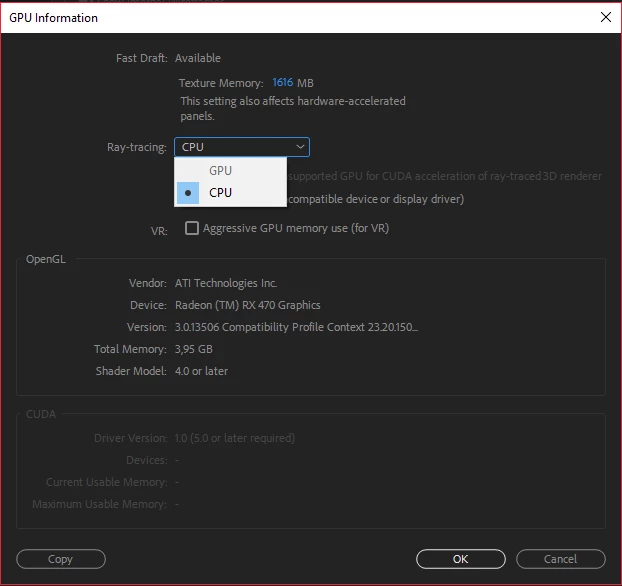
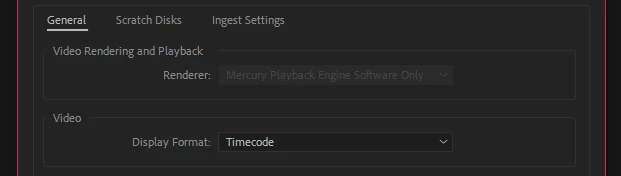
My GPU dont works. I cant use it for rendering (OpenCL)

I have a Asus ROG Strix RX 470. And i5-6600k

It must work my GPU is good 😕😕 I have all 2018 versions. I mean PePro2018, AE 2018, MEncoder 2018...

I've just buyed 32GB of RAM for AE... I'm a student I dont have much money and I dont want to spend again a bunch of money for a CUDA graphics card...

I dont understand why it shouldnt work with my RX 470.

There's no reason why it shouldnt work...

[And I still dont understand why AE is using only CPU for the most rendering... we have 2018 guys.. but thats now another topic..]

does anyone have any ideas?

I already tried this tutorial:

HowTo Enable OpenCL for AMD Cards in Premiere Pro CC 2017 - YouTube

I think it worked only in 2017. Adobe removed this trick in 2018, and thats also very sad and unfair
This topic has been closed for replies.
Correct answer johnnyk7917700

For systems with multipls GPUs, the solution is to Disable OPENCL support for the INTEL GPU in the registry

Computer\HKEY_LOCAL_MACHINE\SOFTWARE\Khronos\OpenCL\Vendors

It will show  AMD and Intel.  Set the intel dll to 1 to disable

I was looking for a solution for two years and found it this week!

9 replies

Inspiring
July 10, 2019

I wonder why the correct answer says " Set the intel dll to 1 to disable", while "1" in the registry usually means "ON/Enabled."

And people reports it's working. Hmm.. mystery

Participating Frequently
July 18, 2019

I observed the same. So I switched it the other way around and it still seems to work. So I think all Premiere needs is a difference between the two as far as I can tell.

Participant
March 9, 2019

I made opencl_supported_cards.txt file in premiere root directory and typed name of my card in it, name of my radeon hd 5870 is Cypress. After that GPU is ok and no need to crack reg of system.

NHKomaiha
Participating Frequently
July 7, 2018

I'm trying it, hope it works

Inspiring
February 1, 2018

Hello,

In Windows/system32  rename/delete this file:

amdocl64.dll

also i think for 2018 they put this amdocl12cl64.dll

Just rename and OpenCl Mercury will be available. (might not actualy use your GPU but option will be there) I noticed it still uses my Intel GPU not my AMD

/J

johnnyk7917700Correct answer
Inspiring
February 3, 2018

For systems with multipls GPUs, the solution is to Disable OPENCL support for the INTEL GPU in the registry

Computer\HKEY_LOCAL_MACHINE\SOFTWARE\Khronos\OpenCL\Vendors

It will show  AMD and Intel.  Set the intel dll to 1 to disable

I was looking for a solution for two years and found it this week!

Participating Frequently
June 20, 2019

Thank You so much for this. It worked!

Participant
January 31, 2018

Here you can see Premier Pro CC 2017 and 2018. Both installed in the same machine and running at the same time. AdobeSupport​ Please fix this.

Thanks

Inspiring
January 27, 2018

well I cry why is adobe doing this to us

Participant
January 24, 2018

Running MEdia encoder 2017 give me the option to use my graphics card. Even After Effects and Premiere let me select it, but Media Encoder 2018 wont let me select my graphics card and only lets me use the software renderer.

2018 is really making me upset because everything worked fine and used my graphics card until I upgraded. Premiere will randomly not recognize it and I've updated the drivers to the most recent drivers multiple times.

Beyond aggravating.

-Neil

Bill Gehrke
Inspiring
January 25, 2018

Neil,

Have you tried the GPU-Z trick.  Install GPU-Z and when you do set it to run when you open Windows If it is running before you start Premiere it should stop the intermittent problem

Participant
January 25, 2018

Thanks Bill. I tried that and does nothing. It is something with Premier 2018. At the moment I have 2017 and 2018 installed in the same computer. If I open 2017, I can select the OpenCL and it is fine. But in 2018, I can select the OpenCL and there are plugins that I can't use.

Participant
January 23, 2018

Anybody has been able to solve this?

OpenCL works perfect on 2017, but not on 2018. How is this possible? I has to installed both.

Inspiring
January 24, 2018

thats also my problem I think. I dont checked OpenCL on 2017, but on 2018 it definitely doesnt works

Legend
January 17, 2018

Unfortunately, in all versions of After Effects you're permanently stuck with CPU-only rendering if you're not using an Nvidia GPU. In addition, the Ray-Tracer GPU feature has been depreciated by Adobe, in favor of a mostly CPU-only version of the Cinema4D renderer. (This means that although it's been updated to permit some newer Nvidia GPUs to use it, no new features are being added.)

Inspiring
January 19, 2018

So, should I get a Nvidia GPU? Would it be worth?

Because ,,Mercury Playback Engine'' would benefit from it. How much would be the benefit?

Bill Gehrke
Inspiring
January 19, 2018

That all depends on what effects and features you use in your workflow.  Do you do much scaling or frame rate changes?  What media?
