Community Manager
May 6, 2026

Navigate Faster with Sequence Index
  • May 6, 2026
  • 2 replies
  • 198 views

🧭 Navigate Faster with Sequence Index


TL;DR

  • Sequence Index is a navigation tool, not an edit panel
  • It surfaces clips and titles instantly
  • It’s ideal for large or long timelines

Why Sequence Index Exists

Scrolling long timelines is slow. Sequence Index lets you:

  • Locate clips by name
  • Navigate complex structures instantly

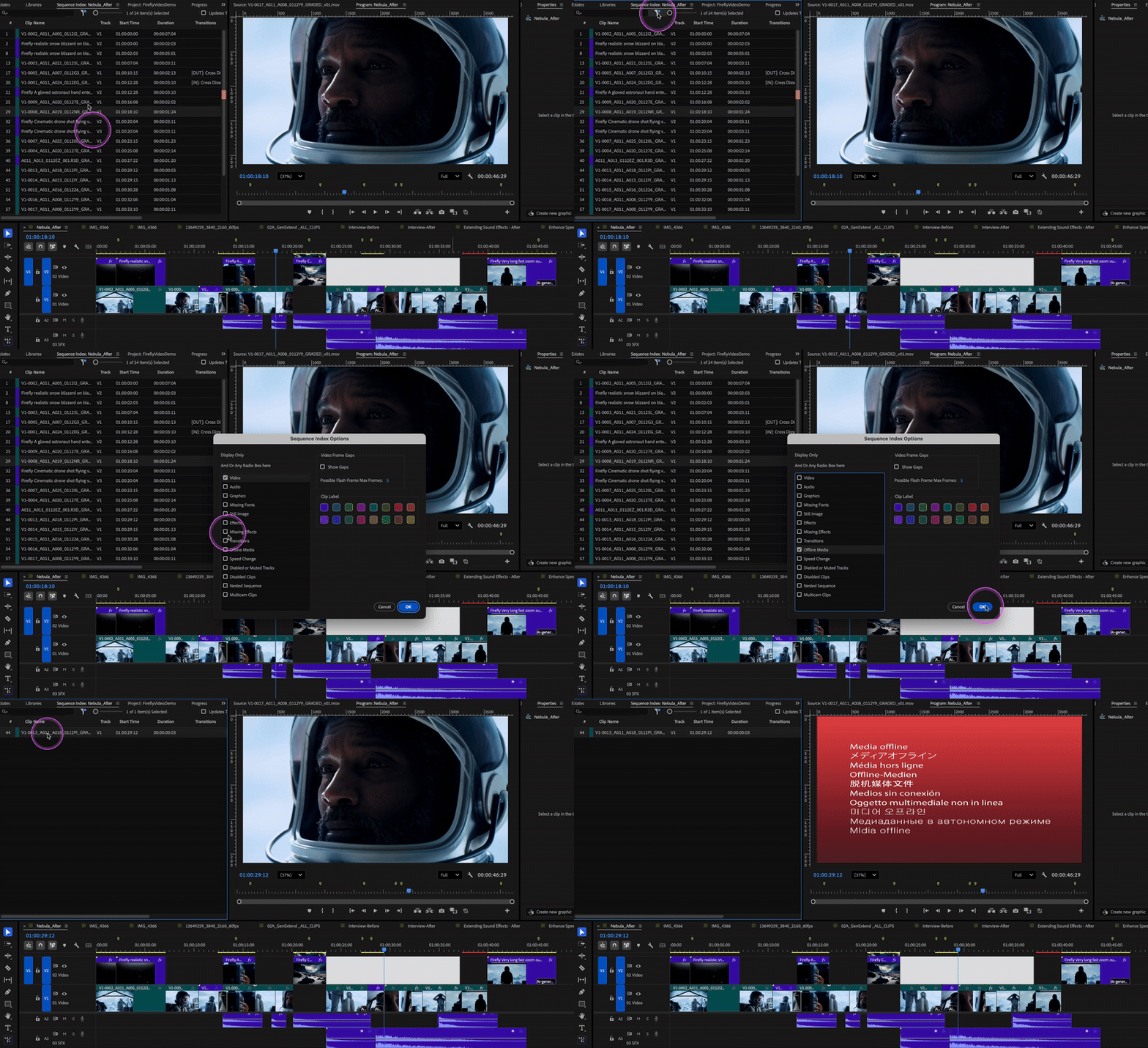
841397i1A2B5CE3BDB4390C.pngFilter clips in the Sequence Index by label color or properties such as media type, effects, or clip status to quickly locate specific items in complex timelines.
 

841398iCA6CACF08CB366E7.gif


Best Use Cases

  • Feature‑length timelines
  • Documentary editing
  • Projects with dense marker use

📎 Resources

Help documentation: Navigate timelines with Sequence Index


    2 replies

    Community Manager
    June 24, 2026

    Hi All,

    Here are some related posts you might be interested in:

    Articles and Social Media:

    How are you using Sequence Index? I hope these articles provide a fresh perspective on this hot new Premiere feature!


    Thanks,
    Kevin


    AHHOGUE
    Community Expert
    Community Expert
    June 23, 2026

    This is fantastic. I know at the core of Pr this capability has mostly been available through metadata, searching, columns etc- though a bit tedious to setup / find / utilize - this is so much better, more intuitive and the kind of features I want being focused on for updates in PR.

    As an individual who edits for a living - this makes my life easier and is really useful. Please continue to invest time and energy into these sorts of quality of (my) life upgrades. All the AI focus is nice and all, but a lot of the stuff out there doesn’t resonate with me on a daily basis as this sort of stuff does. Thanks for sharing!

    Community Manager
    June 24, 2026

    Hello ​@AHHOGUE,

    Thanks for the feedback. I’ll definitely pass along your sentiment to the team. Happy editing!

    Cheers,
    Kevin