


Francis-Crossman17221443
Community Manager
Principal Product Manager
August 23, 2024
Question

Now in Beta: Rounded corners in the timeline

  • August 23, 2024
  • 56 replies
  • 19351 views

Starting with Premiere Pro (Beta) version 25.0, build 32, all clips in the timeline have rounded corners!
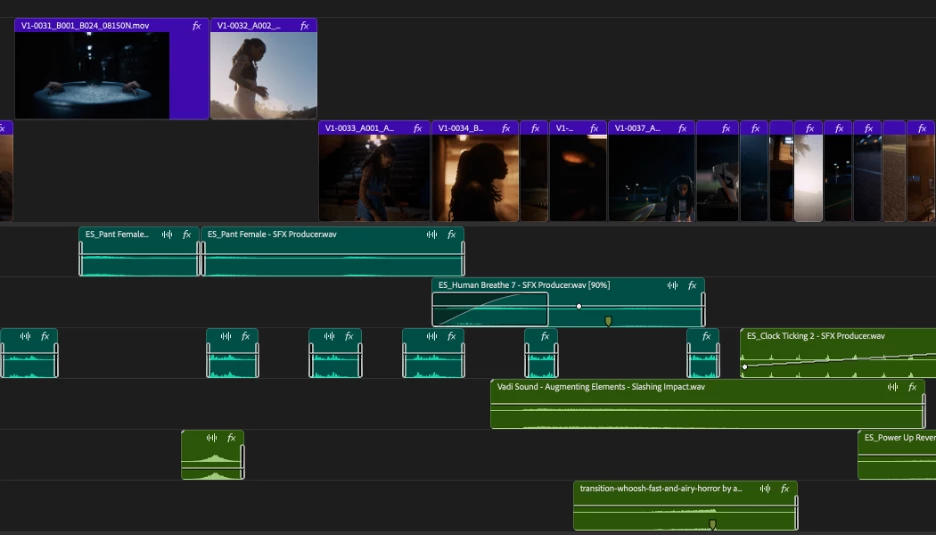


As part of the New Spectrum UI updates, we are now adding rounded corners to all of the clips in the timeline UI. Rounded corners are easier to look at all day long, require less cognitive load to parse and understand, make it easier to see the boundaries between clips, and are just plain friendlier! There is a lot of psychology behind rounded corners. Just look at any object within sight right now, and you will start to see rounded corners everywhere.


Here are a few interesting reads on Medium that explain the concept rather well.


Rounded edges are “friendlier”

The human brain is conditioned to process sharp objects as potentially harmful and dangerous. A human neuroimaging study has shown that it is natural behaviour to lean towards objects with curved contours compared to sharper objects.

(Benjamin Tey, The current obsession with rounded edges in user interfaces)


The Effect

A complete lack of sharp edges and sudden transitions eradicates the manufactured feel that we’re so used to in mass-produced goods. Instead of reminding us of industrial supply chains, automobile production, and chemical laboratories, these softer shapes evoke succulents, pine trees, and rocks that have tumbled through mountain streams. There’s an organic quality that just feels healthy and warm.

(Arthur Van Siclen, Rounded corners in the Apple Ecosystem)


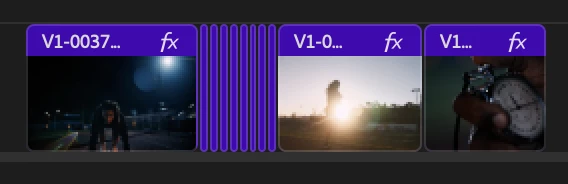
The radius will reduce as the clip gets very small to avoid the timeline looking too “bubbly” and there is a threshold width below which clips will revert to 90° angles entirely. We have tested with very large timelines and we are confident in our settings, but we want to know what you think.  We encourage you to post screenshots of your timeline if you wish.


We want to know what you think.  Please join the conversation below.

56 replies

Dom Grimard
Participant
December 12, 2024

I strongly dislike the rounded corners, It's the one thing I hated about Da Vinci resolves and this is identical. I'm always wondering if i'm leaving an empty frame between clips, always have to zoom in to confirm. Please bring back the sharp squared corners or at least let us have the option to chose. Cheers!


davef43726944
Inspiring
December 12, 2024

Truly the worst update to PP I've seen in many years. PlLease turn this crap off or allow it to be a preference. 


Now I have to go through and make sure these fake gaps on the timeline aren't actually gaps? You're just wasting my time.

christianb69160500
Participant
December 11, 2024

Adding to the voices calling for rounded corners to be an optional feature in future patches. I want to see where my frame joins are across multiple tracks. Rounded corners means I have to zoom in/squint at a detail that should look pixel-perfect at any scale. This is adding to cognitive load and making my work less time efficient.


Professional editors really don't mind how fuzzy and friendly the UI is, and I expect amateurs and learners would benefit from the clarity as well. Please by all means make it an option so those who do not like it can switch it off.

Participant
December 10, 2024

Horrible can it be switchable in prefs? Doesn't look precise or pro and has become iMovie looking. 

Participant
December 9, 2024

I hope there will be an option to turn this off. It's one of the few things I hate about Resolve, and it's the one thing you are copying?


I see rounded edges I see a phone app. It does not look serious, and makes me feel that the timeline is not frame accurate when I look at it.

Inspiring
December 9, 2024

I for one see the awesome benefit of this. I love it.

But I agree on obe thing, it would be awesome if we could choose the radius or at least have 3-4 different to choose from. I run 4k and its barely visible.


I see a lot of people refering to this change as some kind of anti-pro feature. For this kind of thought process I would recommend Avid Media Composer instead. Its famous for not changing anything since the 80s. And it looks horrible. It's like the definition of teaching an old dog to sit. That won't change. 


daVinci has become, no matter what you think, the new kid on the block with a fresh design that is more sutited for our brains today. Between these two giants we have Premiere fighting for the crumbs left after the giant Avid.


Premiere is pro, yes, but a lot of you are trying to make it sound like it's Avid. It's not. Premiere can be used on pro level, yes, but it is also for the larger group of consumers.  That's how adobe makes money. Volume. 


Avid goes for all-included and haven't left out a thing since the start. If you are a hot shot you can pay them to make a new function or plugin. Try asking adobe for this.

so, the rounded corners.  Love it. But if this makes your editing impossible, then maybe go to Avid or just give up. it's full of UI from the 80. You should love that. Such a PRO feeling!


It really shouldn't come down to that if an application is pro or not in terms of radius of the corner.


cheers everyone. And breathe for the love of god. It's not the end. It's just a new UI. 

Shebbe
Community Expert
Community Expert
December 9, 2024

You seem to cares more about the presentation of the package than it's contents. Premiere Pro as software is in many ways much better than Avid but objectively lacks in many areas. Why defend something that is evidently worse than it's previous state. The idea that UI needs to be updated because it's year xxxx is silly. It should only ever be improved if the improvement is actually meaningful or equal at best.


You mention Resolve as 'new kid on the block' but it has been around for many years already and they are far from perfect on many fronts. Regarding the clip appearance what they at least nailed is adaptive states to improve readability. When clips are too short and close together the rounded corners are removed. The shading of the clips are also more readable than how Premiere shades the edges. What Resolve doesn't do at all is show if a clip's in or out point is the end which removes part of the visual clutter but also information.


"But if this makes your editing impossible, then maybe go to Avid or just give up."
Highly condescending at not neccesary. Without any honest feedback from users to a company, there can never be any meaningful improvement.


"... it's full of UI from the 80. You should love that. Such a PRO feeling!"

Perhaps you are not actually dealing with large timelines and multiple projects on a daily basis. Video-editors and other creative professionals should favor readability over appearance any day. Otherwise you're only spending more time to process information.

FWIW the whole issue imo is not even specifically having rounded corners or not. It's simple the actual design of it that is not working. I have never had an issue with the clip presentation in Resolve which also has rounded corners. Neither with FCP X or Logic Pro X.

Inspiring
December 9, 2024

I'm glad my post got your attention and you got that out of you 🙂 Keep it up!


And also yes, the design working amazing with rounded corners. I'm spending less time looking for cuts. Just as intended. Changes can't please everyone. Maybe premiere is just going a way that you don't like. Or, as I said, not for your brain/perception.

Participant
December 8, 2024

Why not make it configurable? The new rounded corners create a very terrible look and make it hard for me to work with premiere pro. I have to downgrade to 25.0


You don't have to follow every new stupid UX trend. This is not some hobby software or game. Invest your money and time in actual bug fixing and new features that help me in my work and increase productivity.

Participant
December 7, 2024

Boooooooooooooo round corners are terrible!!!!!!!! 

Participant
December 7, 2024

This is absolutely terrible. Please change back.  

Participant
December 5, 2024

Nope, absolutely hate this. It's a nightmare on my current project. It would really make sense to have it optional in the appearance settings. Just have a checkbox in there for edge preference.