


Francis-Crossman17221443
Community Manager
Principal Product Manager
August 23, 2024
Question

Now in Beta: Rounded corners in the timeline

  • August 23, 2024
  • 56 replies
  • 19351 views

Starting with Premiere Pro (Beta) version 25.0, build 32, all clips in the timeline have rounded corners!
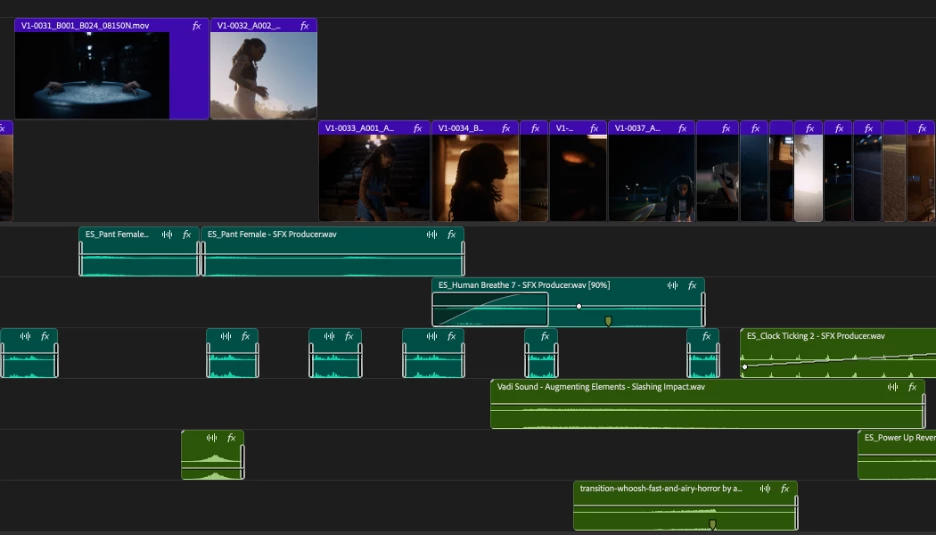


As part of the New Spectrum UI updates, we are now adding rounded corners to all of the clips in the timeline UI. Rounded corners are easier to look at all day long, require less cognitive load to parse and understand, make it easier to see the boundaries between clips, and are just plain friendlier! There is a lot of psychology behind rounded corners. Just look at any object within sight right now, and you will start to see rounded corners everywhere.


Here are a few interesting reads on Medium that explain the concept rather well.


Rounded edges are “friendlier”

The human brain is conditioned to process sharp objects as potentially harmful and dangerous. A human neuroimaging study has shown that it is natural behaviour to lean towards objects with curved contours compared to sharper objects.

(Benjamin Tey, The current obsession with rounded edges in user interfaces)


The Effect

A complete lack of sharp edges and sudden transitions eradicates the manufactured feel that we’re so used to in mass-produced goods. Instead of reminding us of industrial supply chains, automobile production, and chemical laboratories, these softer shapes evoke succulents, pine trees, and rocks that have tumbled through mountain streams. There’s an organic quality that just feels healthy and warm.

(Arthur Van Siclen, Rounded corners in the Apple Ecosystem)


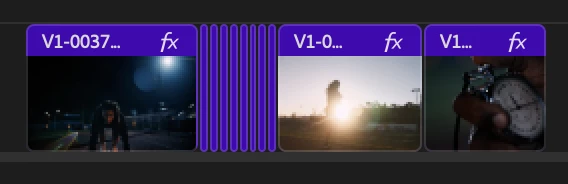
The radius will reduce as the clip gets very small to avoid the timeline looking too “bubbly” and there is a threshold width below which clips will revert to 90° angles entirely. We have tested with very large timelines and we are confident in our settings, but we want to know what you think.  We encourage you to post screenshots of your timeline if you wish.


We want to know what you think.  Please join the conversation below.

56 replies

Participant
December 5, 2024

Please get rid of this. This is supposed to be a professional software but it feels like iMovie. At least give us the option to change it to how we feel we want it?

Please keep your own identity and don't copy other free brands that do this. 

Known Participant
December 5, 2024

I posted in the main forum earlier after downloading 25.1, and just reverted back to 25.0. 


Please put bevels back on cuts between two clips, as they can barely be seen on shorter track heights at standard resolution on a mac monitor,  2560 x 1440.  

Shebbe
Community Expert
Community Expert
December 4, 2024

Hello developers,

I'm posting again to make you aware that the current state is still suffering. I believe some changes have been made in attempt to make it more consistent and readable? But it's not there yet.


Premiere 24.5 (our working build)

Minimum zoom level.

Here I can clearly see all edit points with about equal distinction quality regardless of clip color.


Premiere 25.2beta36

Minimum zoom level.

All the video clips have near disappearing lines. The audio on the other hand almost looks like there are gaps.

Why are they different in the first place?


Jumping up 1 zoom level fixes the discrepancy. But still hard to distinguish gaps from edits.


I think part of the issue is that start / end indicators do not 'merge' when next to eachother in the new design so it's always looking like there are frames between. This could be improved.


See comparison between old (top) and new (bottom).


Inspiring
December 4, 2024

I will say that the clip end indicators on minimized track heights is slightly more readable if you are using the default label colors which are quite dark, but almost impossible to see if you are using the vibrant label colors. Still this is a step backwards and we need at least a 1px black line between clips when the track height is fully minimized, this new faint double white line look is not working out! 

Inspiring
December 4, 2024

The faint white line on minimised track heights has been resolved in the latest beta. They caught the issue only after the 25.1 update started rolling out unfortunately.

Inspiring
November 15, 2024

edit points are still nearly impossible to see in 25.2.0.17 when track height is completely minimized and feels like it's a result of corner radius shenanigans given that it's trying to "hide" the rounded corners for some reason when track height is minimized

Inspiring
November 22, 2024

Ditto @Tom_edit Tom_edit,  when a track is fully minimized the edit points become near invisible. Not good. In fact, bad! 


These two half pixel lines are supposed to represent an edit point and I have to get about 6 inches from my screen to see them. 

When you nudge one level up the edit points come back.... need to be able to see edit points at all track height levels please. 


hellopaul4
Inspiring
November 15, 2024

It does seem, that with each release of the beta version, the rounded corners get progressively smaller, so on this latest release, the "rounded corner problem" has almost gone away completely! It also looks like those massive "1 frame of misleading nothingness" gaps between clips that in reality have no gaps between them at all has been removed (see this monstrosity from Adobe's first version of this rounded corners version): 


...so now we have this neat, almost-squared-corners, no-silly-gaps version (very similar to how it looked years before The Cornergate Debacle raised its ugly, rounded head!):

At last, some good news in this lunatic world!

Participating Frequently
November 6, 2024

Aono favorevole a questa novità.

Participant
October 22, 2024

Inspiring
October 22, 2024

Cut points between some label colours when a track is completely minimised seems to be next to impossible to see currently. (has been for a few builds but this is 25.1.0.55) (0x51B858 is the worst in my current setup).
I like the potential idea of clips next to each other not rounding, but we still need to be able to see where one clip ends and the next begins, and a faint white outline just isn't visable enough, especially once you zoom out a notch or two

as soon as you increase the track height it shows the cutpoint like normal


Known Participant
October 21, 2024

My first reaction was to think there's an unwanted 1 frame gap between 2 clips on V1 and V2.  The round corners are distracting!  These kinds of changes don't actually help and in fact are insulting since there's so many other little things that need fixing, dozens of which I requested all the way back in 2010 and have never been addressed!  PLEASE get your priorities in order and PLEASE make these distracting rounded corners OPTIONAL so that serious users can turn off this unserious nonsense.  Thank you!

Participant
October 18, 2024

I love it! Testing Premiere Pro Beta right now. Please bring it all to the stock version!