



Jessica Nuñez
Community Manager
Community Manager
February 10, 2023
Question

Now in Beta: Timeline Performance improvements during Editing

  • February 10, 2023
  • 17 replies
  • 8836 views

The timeline panel’s method of displaying content is now faster and smoother than ever.


We’ve made some under-the-hood changes to the way the timeline UI is displayed which is reflected in edits, drag/drops, and scrolling, especially on large panels. Dragging the playhead is more responsive.


The feedback on trimming, dragging transitions and effects will now draw a blue, shaded rectangle instead of using an inverted color.
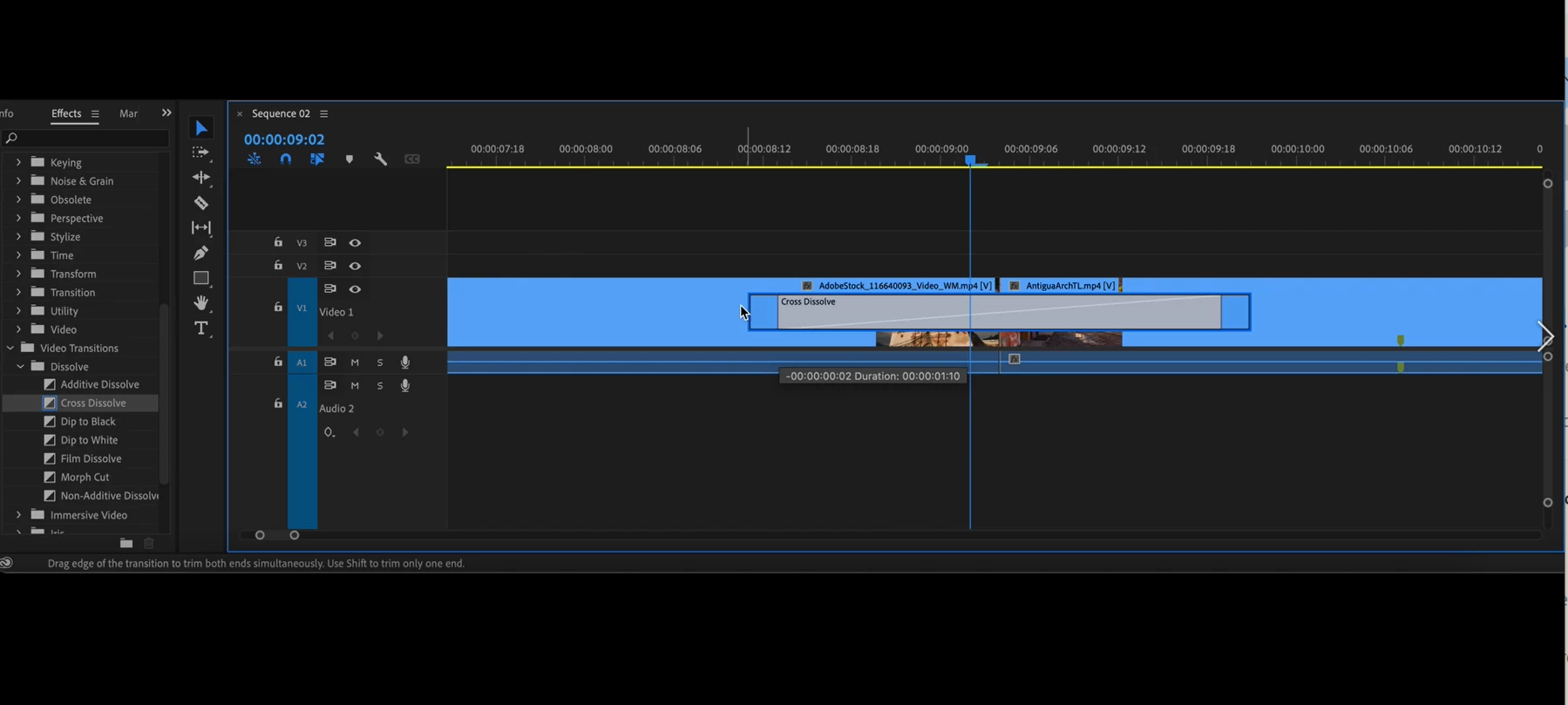
 

Auto scrolling when dragging the playhead or clips or during edits, is now variable speed and much smoother.


Please reach out if any have any issues, questions, or feedback.


We want to know what you think.  Please join the conversation below.  

This topic has been closed for replies.

17 replies

Shebbe
Community Expert
Community Expert
October 11, 2023

Hi,


We're more than half a year later into development. This feature made it into release, but the performance when locking tracks is still laughably bad. And it's very obvious this is a code/design issue with the way the UI is drawn. Similarly performance in the project panel when viewing lots of files and columns is equally bad.


Are there any plans ever to fix this? This vintage issue has been around for way too long and it's time to upgrade it. Resolve for comparison has zero performance loss when increasing the amount of info shown in their media panel. Always butter smooth and has been like that forever. Same for locking any amount of tracks in a timeline.

Inspiring
October 11, 2023

Yeah hoping they address wavform issues and general smoothness within bins. I think they gave the thumbnails a boost in beta recently, but there is no reason a spreadsheet can't be scrolled smoothly in year 2023.  

R Neil Haugen
Legend
September 21, 2023

I think most of us lock tracks on a rather frequent basis. This whole slow-down thing with locked tracks is not just annoying ... btw ... 

Everyone's mileage always varies ...
Inspiring
September 21, 2023

One thing that has come up is locking tracks still kills the timeline FPS refresh. 


https://community.adobe.com/t5/premiere-pro-bugs/locking-many-tracks-kills-performance/idc-p/14103143#M15069

Known Participant
September 16, 2023

Testing this in the latest beta (24.1 build 21) and the timeline is still lagging a huge amount if you lock any tracks, and the more tracks you locks the slower the update of the timeline becomes.
Drawing some crosshatched lines on top of a track doesnt seem like it should be such a slow process to do?

Inspiring
April 25, 2023

I haven't used a Mac in a long time, but I had to edit some stuff on laptop, and I have to say, Premiere's interface runs way better on OSX than it does on Windows. 


Can we bring Windows Premiere Pro up to parity with OSX? All the bin stuttering and other interface jank and lag was MUCH reduced. 

Inspiring
April 8, 2023

One thing that I'm still noticing is that having "selection follows playhead" wreaks havoc on timeline and scrub performance.


https://www.youtube.com/watch?v=C_FxzGqof7I


This is a timline of 1080p ProResLT. Scrubbing is reasonably smooth until you turn on "selection follows playhead"


Anyway to improve this? 


Windows 11 / Build 45 / AMD threadripper 3960x / 2080ti / Latest studio drivers etc. 

Jorge Jaramillo Hdz
Known Participant
March 13, 2023

Sorry, but I don't see any improvement at all, or maybe I'm missing something.

Attaching video.

I'm still seeing a lot of lag in the timeline.

Jessica Nuñez
Community Manager
Community Manager
March 13, 2023

Hey Jorge -- Confirming: Are you on the beta? If so, can you tell us more about your configurationa and what you're working on leading up to the lag? Or are you seeing the lag all the time?

Jorge Jaramillo Hdz
Known Participant
March 13, 2023

Hi.

Yes, Beta 23.4 

Intel(R) Core(TM) i7-10875H CPU @ 2.30GHz
32 GB RAM, Nvidia GeForce RTX 2070 | 8GB
Windows, one SSD for the OS, one SSD for the media.


The lag it's all the time, it doesn't matter if are h.264 or h.265 files.


Thanks


Inspiring
March 10, 2023

After using this for awhile I think there are a few more opportunities for improvement. 


I think the blue highlight is good, but the blue color is too dark. I think it should match the same blue color as the cursor or other interface elements that use the "tron blue." I'm not sure why this dark blue color was chosen it is probably too close to the dark grey interfeace background overall. Needs a bit more contrast. 


When tracks are enabled and I/O points are set, light color selected clips are still hard to see.


I/O points selected....white highlight pretty hard to see.

Looks ok when I/O range is not set. 


Maybe apply blue highlight when clips are selected not just while trimming?


Legend
February 25, 2023

This is a really great improvment! I love the responsiveness.

It would be great if the blue rectangle idea could also be implemented when we do Inserts and Overwrites in the timeline with drag-n-drop, so we can tell before we let go of the clip how things will look after the edit. This could let us discover issues with track targeting, track locking, sync locking etc. before doing the edit - saving us from lots of hitting Cmd/Ctrl+Z 🙂

Known Participant
February 26, 2023

Would this idea help with regards to what you're looking for Jarle?

https://community.adobe.com/t5/premiere-pro-ideas/visual-cues-in-timeline-to-avoid-overwriting-out-of-visual-bounds-media-by-mistake/idi-p/13605886

I think it would make it infinitely easier to drag & drop or move media around the Timeline with full confidence that nothing will ever get overwriten by mistake!

Legend
February 26, 2023

That's not what I'm looking for. I just want to see the result before I let go. Premiere Rush does this really well when moving clips around in a complex timeline. I I don't like what I see in Rush I can just hit Escape, and no harm is done.

Known Participant
February 24, 2023

Hi Jessica,


While you're focussing on the Timeline...

PLEASE change the color of the Toggle Sync Lock off icon to something that's actually easy to see (such as red):

The current Toggle Sync Lock off icon is ridiculously hard to spot, making it all too easy to screw things up when a user fails to spot it.  This is a fix that should take someone on your team about 1 hour or less to fix, so please fix this bad design choice that should have never gotten past QC in the first place.  Thank you!


A HUGE improvement that could be added to the Timeline is an indicator to let users know if they're about to overwrite media in the unseen portion(s) of the Timeline by mistake: https://community.adobe.com/t5/premiere-pro-ideas/visual-cues-in-timeline-to-avoid-overwriting-out-of-visual-bounds-media-by-mistake/idi-p/13605886


This is a much bigger project, but it would be so incredibly helpful (and would be an NLE first as far as I know) that it should be looked into asap.  It sure would be a lot more helpful than having a lot of the things that are currently being worked on in the Beta, such as CornerPin Effect & Center Split Transition GPU acceleration. 😉