
Inspiring
August 20, 2024

OCIO not loading in CMD - aerender
  • August 20, 2024
  • 20 replies
  • 3937 views


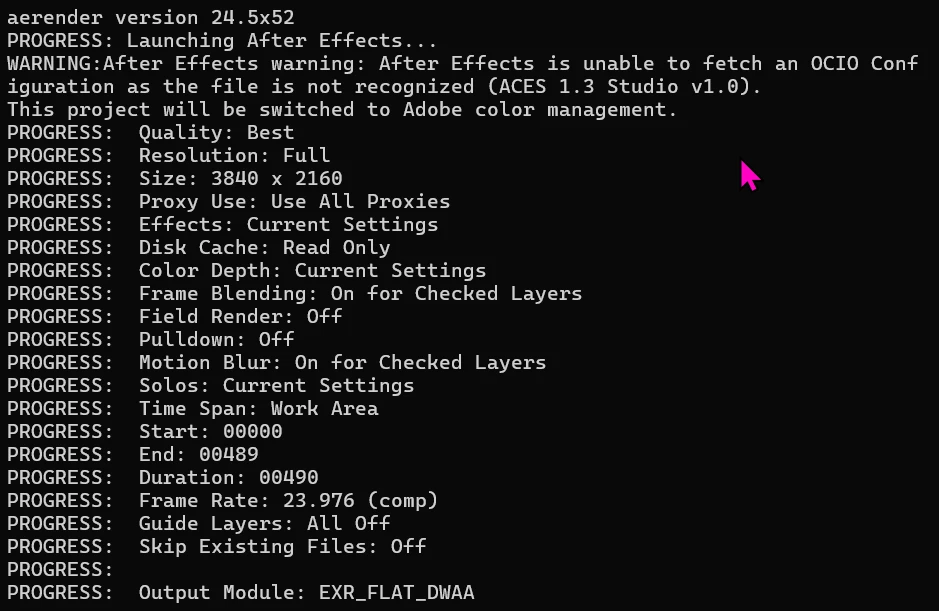
Aerender isn't able to see the default ACES configurations when rendering. I am not sure if this behavior is specific to AE 24.5, but I am fairly positive I have been able to render like this before.

Windows 11, AE 24.5

20 replies

JohnColombo17100380
Community Manager
Community Manager
October 15, 2024

Hi all,

Thank you again for your patience. The fix for aerender with OCIO was released this week with After Effects 2025 (version 25.0.0.53). It is not yet listed in the Fixed Issues, but will be added soon.


See https://helpx.adobe.com/after-effects/kb/fixed-issues.html for other fixed issues in After Effects 2025.


Thanks again for reporting this issue,

- John, After Effects Engineering Team 

Participating Frequently
October 15, 2024

aerender version 25.0x53 release version: *OCIO works for me with aerender.exe* (in Windows 10 Pro)

Somewhat unexpectedely, today's 2025 release version 25.0x53 within Adobe Teams Packager seems to be working for me. I wasn't expecting to see the patch until a release newer than 25.1x40 Beta came out. 

@JohnColombo17100380 please confirm that the patch seen in 25.1x40 BETA indeed made it into 25.0x53 RELEASE version?
@cbialk can you confirm if today's 25.0x53 RELEASE version also works for you?

cbialkAuthor
Inspiring
October 14, 2024

Yeah. FWIW, I've seen that "Genuine Intel" error mentioned before with Red Giant plugins. That's where I would first look.

Participating Frequently
October 14, 2024

25.1x40 beta works for me in AMD & Intel Windows 10 Pro systems, I'm *not* getting the OCIO failure in aerender.exe. And x40 doesn't present the crash I got in x36 on AMD. 

Summary of testing various recent versions, including latest betas as of 10/14/24:

(Note: OS Name: Microsoft Windows 10 Pro for Workstations, OS Version: 10.0.19045 N/A Build 19045)
aerender version 24.4.1x2 *works* (as @JohnColombo noted)
aerender version 24.5x52 (fails)
aerender version 24.6.1x2 (fails)
aerender version 24.6.2x2 (fails)
aerender version 25.0x29 beta (fails)
aerender version 25.1x9 beta (fails)
aerender version 25.1x36 beta Fatal crash for me on AMD, reports "Not genuine Intel". I'm unable to verify, but OCIO/aerender.exe works per @cbialk
aerender version 25.1x40 beta *OCIO works for me with aerender.exe*. This also seems to resolve the "Not genuine Intel" fatal crash I got on AMD Windows in x36, and it does not present the OCIO error in aerender.exe. 

Participating Frequently
October 10, 2024

@JohnColombo17100380 I may have spoken too soon on my verification of 25.1x36 on OCIO. While I didn't see the OCIO error immediately, which is positive, it is hanging for me at the command line now. And attempting to open the GUI I am getting an "After Effects (Beta) error: Crash in progress. Last logged message was: <26120> <IR.Initlpp> <5> ippInit warning: ippStsNonIntelCpu: The target CPU is not Genuine Intel". That error is a true statement, as my CPU is AMD Threadripper, but it's causing 25.1x36 to crash. So I suspect the OCIO is indeed fixed as reported, as I saw no error, but I neglected to notice AE crashed prior to the frame outputting in my haste to respond. 


Participating Frequently
October 10, 2024

@JohnColombo17100380 any chance we'll see a patch to 24.x, or will it only come with the release of 25.x at this stage? Thanks. 

Inspiring
October 10, 2024
Glad to see you’re working on it, thank you. I can’t upgrade to beta
software in the middle of delivering shots, so I’ll stick with my downgrade.
Participating Frequently
October 10, 2024

@JohnColombo, yes, I agree, the latest update to 25.1, 25.1x36 works, and does not present the error with aerender on OCIO config. I concur with @cbialk.
Note: the problem does exist in earlier 25.1 releases, like 25.1x9, that I'd tested on Sept. 17th. So be sure you're downloading the very latest 25.1x36+ (Adobe Packager for the Beta build won't necessarily recognize that a previous 25.1 package needs an update, so build a fresh one to be sure). 

Summary of testing various recent versions, including latest betas as of 9/17/24:

(Note: OS Name: Microsoft Windows 10 Pro for Workstations, OS Version: 10.0.19045 N/A Build 19045)
aerender version 24.4.1x2 *works* (as @JohnColombo noted)
aerender version 24.5x52 (fails)
aerender version 24.6.1x2 (fails)
aerender version 24.6.2x2 (fails)
aerender version 25.0x29 beta (fails)
aerender version 25.1x9 beta (fails)
aerender version 25.1x36 beta *works*(as @JohnColombo noted Oct 7th, and verified by @cbialk already)

cbialkAuthor
Inspiring
October 7, 2024

I can confirm. It works in the latest beta. I tested it with an external OCIO profile, and the render was successful.

JohnColombo17100380
Community Manager
Community Manager
October 7, 2024

Hi all,

Thank you for your patience with this issue. A fix is now available in the latest Beta builds of After Effects 25.1—please download the Beta build and let us know if you continue to experience the OCIO error with aerender.


Thanks again,

- John, After Effects Engineering Team 

Inspiring
October 7, 2024

This was mission-critical for us, so I rolled back to the last working version. Pretty crazy this hasn't been patched yet.