


Participating Frequently
June 1, 2023

Frequent Account sign-out, inability for CC to handle sessions correctly.
  • June 1, 2023
  • 13 replies
  • 360 views


Searched this issue on this forum and there are no solutions.  As a tech, I have seen this for years across various clients and I do not know why it has not been resolved.  However, as an issue it is insanity how much time and frustration is caused by this when you need to WORK and before you can read a PDF or work in any app you have to sign in... often and also sign out of the same device you're already technically signed into because Adobe doesn't want to bother to deal with how it handles sessions and identify devices.


  • I'm finding after installing updates or rebooting my system I'm promted to sign in much to often.  If it were once a month I could deal, but it can be multiple times a week.
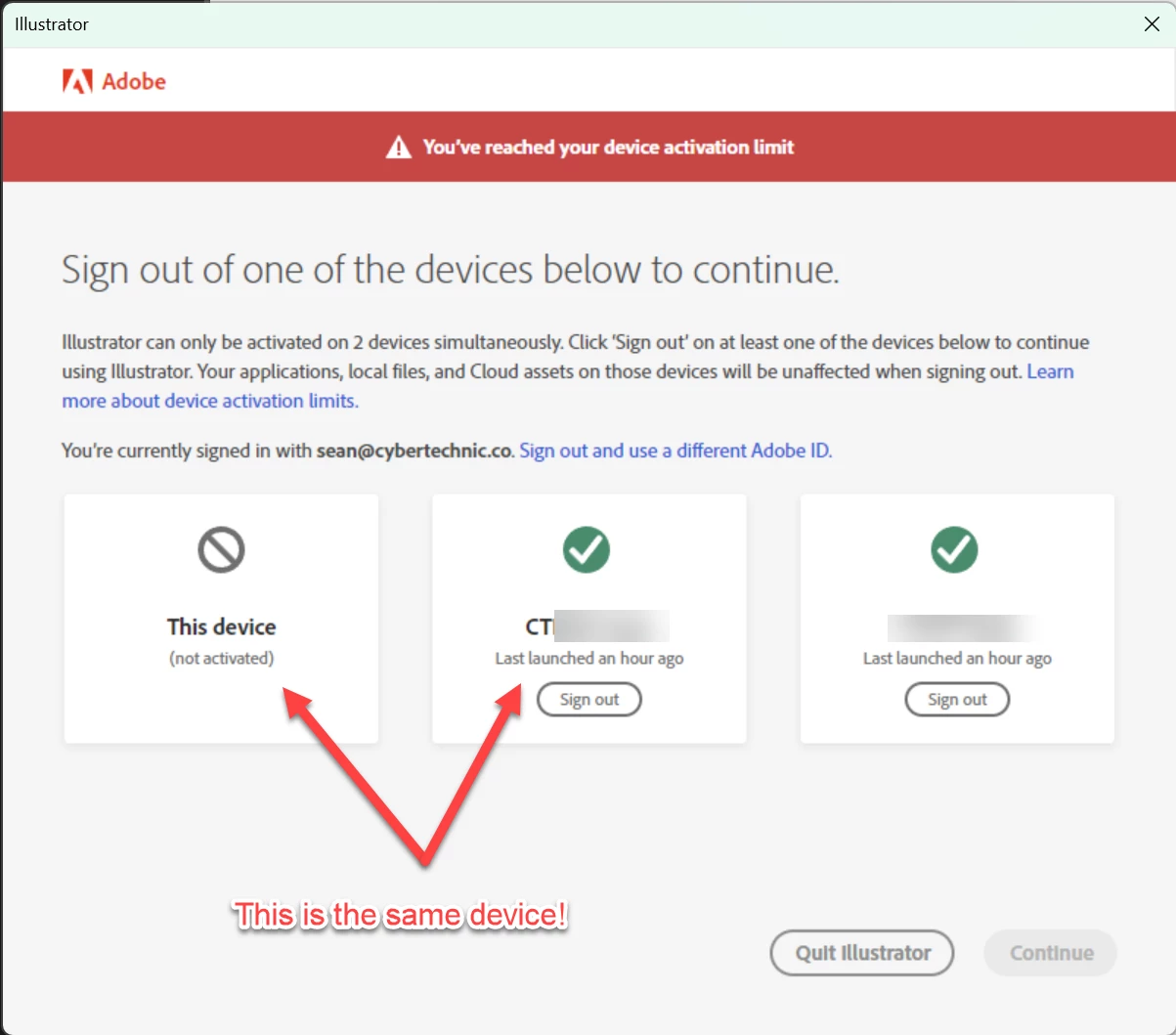
  • Once signed in I'm again prompted with a device activation limit, even though it's the same device that has already been signed in.


I'm going to keep this short.  These are professional products, with high monthly subscription fees, that people depend on to work.  It's bad enough the code is so bloated that these apps run as slow as a Win98 machine with 1 core and 8GB of ram from the late 90's not a modern 12 core running at 4+ Ghz with 256GB of ram.  Having your flow interupted to "sign in" because adobe wants us constantly paying for the same software each month is insult to injury.  Seriously, this is not OK.  Please Adobe put some urgency and money into this and figure it out.


I would also ask that some additional leeway be added to this device activation limit.  

  • Limit to actual product run time not device activation.  Allow for multiple devices to be registered, but limit apps to being open on two devices at the same time.  I get you're trying to prevent multiple end users from taking advantage, but most of us have more than two deevices!  You're already sending plenty of telemetry back, a little more isn't going to hurt.
  • Increase the device activation count to 3 at least.  Even MS has a 5 device limit.
  • Share what checks determine a device so end-users can make decisions about changes to their system which might trigger a login or device check.

13 replies

Participating Frequently
June 1, 2023

It's the same computer not a VM and nothing that would change the MAC.  I've seen this across a variety of systems, desktops laptops, home and corporate environments.


I've also seen poorly implemented device checks in other software.  For example I had an application clear a license as soon as I plugged my laptop into a docking station while traveling.  That company got an earfull too.   Without knowing the code, my guess is they have too many checks.  A Device name, MB serial number, CPU serial number all hashed should be enough.  Anything more that obvisouly triggers the check is too sensitive.

They don't have to divulge everything that is part of a device check, however the items that and end user might do while normally operating or maintaining their system that in combination would trigger a check could be revealed. IMO

kglad
Community Expert
Community Expert
June 1, 2023

to others,


this is bug report and (imo) it's appropriate. i've seen this myself (though not nearly as often as the op).

Legend
June 1, 2023

I share your frustration, but it seems clear these things will never happen. No company documents exactly how its licensing and device checking works, since that's the exact info needed by software pirates. But clearly you (and some others) are facing a particular problem. I think the problem "frequent need to sign in" and "device to deactivate is the same device" is just one problem. Adobe say (and, I believe, intend) that CC signs in, once, will run for several months, then reverify the license silently. Many/most people never have to do repeat sign ins unless they either sign out or want to use more than 2 physical devices.  

But what is happening? CC thinks this computer - the same computer - is actually not the same computer. Why might that be? I'm assuming it really is the same computer, and not a VM, and not a reimaged install. One possibility is that you have some security/identity app that keeps changing the MAC (network) address of your interfaces.