



Lightroom + MacBook Pro M5 Pro: brightness bug / rainbow screen
Hello,
I'm having an issue with Lightroom on a MacBook Pro M5 Pro with 48 GB of RAM, running Tahoe 26.4.1, with a display calibrated using a Spyder 5 Pro.
When I switch to the Develop module in Lightroom, the brightness often goes all the way up, even though Apple’s auto-brightness option is turned off and the brightness slider isn’t moving.
Sometimes, the screen also shifts a bit more toward red.
After doing some research, I found that the issue seems to have already been identified and that one solution is to disable GPU acceleration.
Sure enough, when I disable it, the problem in Lightroom seems to go away.
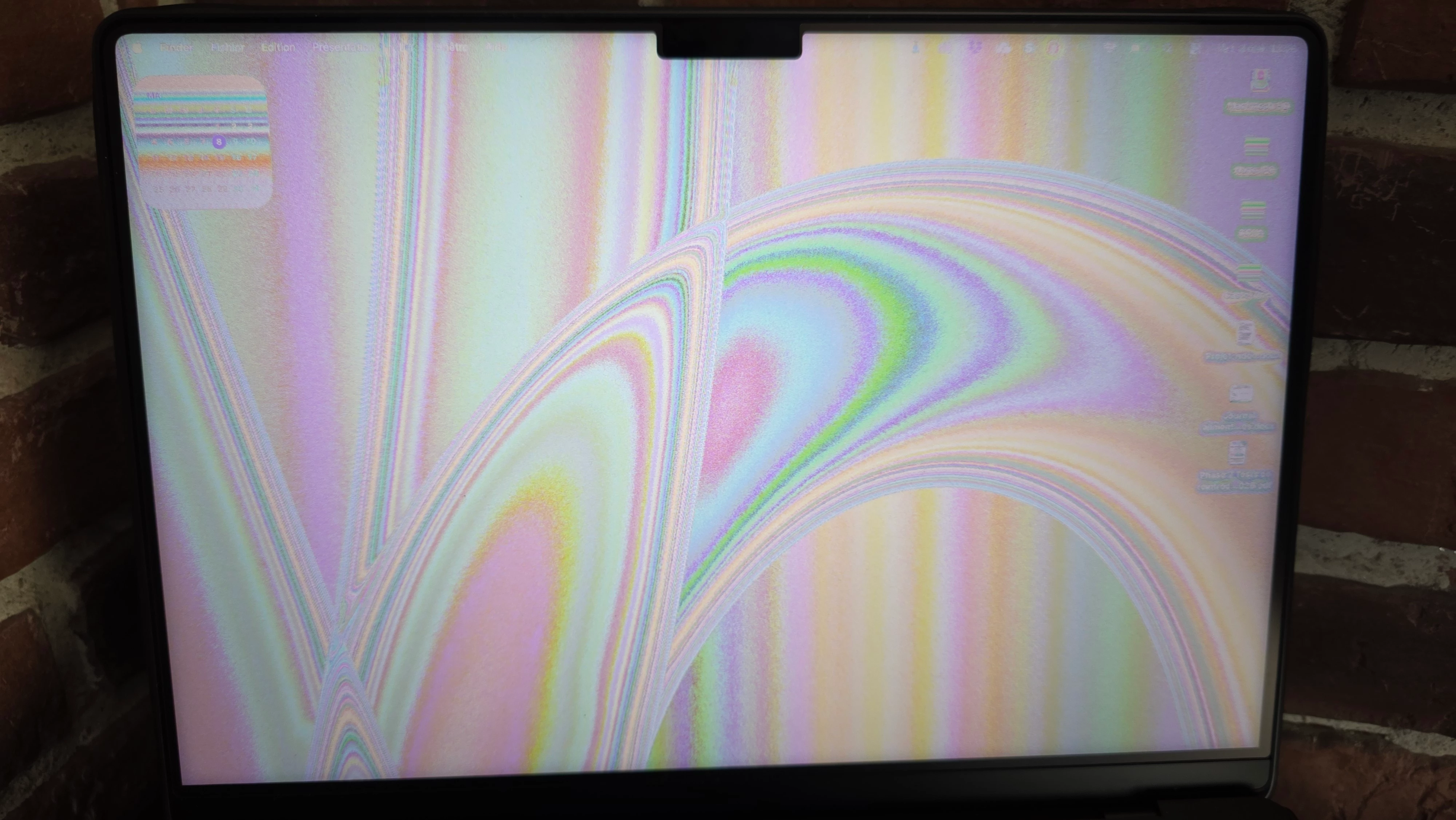
However, when I wake the Mac from sleep (black screen), the display turns rainbow-colored, a bit like a broken screen.
And as soon as I re-enable the GPU in Lightroom, this problem goes away.
Another detail: since I’ve had this issue, when my second monitor is connected, it doesn’t have any problems.
Has anyone else encountered this issue?
And more importantly, have you found a solution?
Thanks in advance.
 AdChoices