Participating Frequently
October 28, 2020

P: Copy/Sync Crop and Spot Removal wrong results at portrait photos

  • October 28, 2020
  • 46 replies
  • 1884 views

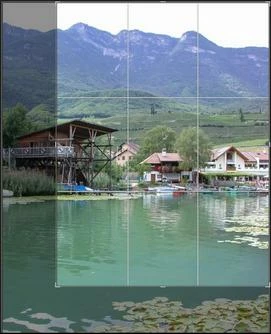
Copy or sync crop and spot removal develop settings causes wrong results at portrait photos. The crop and spot removal settings are wrong by 90° after copy/paste or sync.


Here an example photo to reproduce.

- Importing in Lightroom Classic 10

- Create a copy by edit in Photoshop 
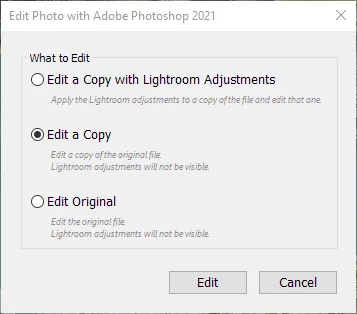
- Make a small edit, e.g. add text "Photoshop edit" and save.

- Add a crop and spot removal e.g.
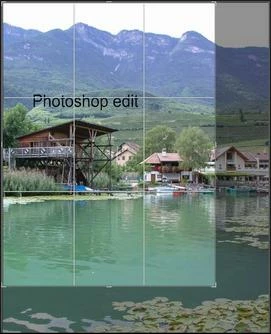
 

- Copy or sync the crop and spot removal develop settings to the same/original photo before the edit in Photoshop. But the result of the crop and spot removal is totally wrong:
This topic has been closed for replies.

46 replies

Participating Frequently
March 19, 2021

I just did more tests and found a new problem.

Steps to reproduce:

- reimport the same image (without metadata)

- rotated the image and added crop & spot removal

- now right click on the image -> Edit in -> Photoshop 2021 -> Edit a Copy

- In Photoshop 2021: File -> Save -> close Photoshop

Result: the copy (right) by Photoshop is completely different to the source (left) and also significantly distorted.

Participating Frequently
March 19, 2021

@Rikk 

I updated to Lightroom Classic 10.2 on Windows 10 and unfortunately the bug still occurs and is not solved.

Even if I check the option in Catalog Settings > Metadata > Automatically Write Changes Into XMP (John_R_Ellis has previously written it should works with it).

Steps to reproduce:

- Download my sample image from post1

- Removing all metadata from the image (because Lightroom has unfortunately added the rotation directly to the image).

- Import the image into Lightroom Classic 10.2

- rotate the image by: Photo -> Rotate Right (CW)

- right click on the image -> Edit in -> Photoshop 2021 -> Edit a Copy

- In Photoshop 2021: File -> Save -> close Photoshop

- Now, 2 times the same image is existing (imported and a copy from Photoshop). 

- goto develop tab
- crop the left image
- add spot removal to the left image (removes the boat on the left side)

- now we have:

- copy develop settings from from left image (spot removal + crop)
- paste develop settings to to the right image

- Now both images should have the same crop and spot settings, but the result is (grid view):

- Result in Develop Tab and show the crop:

Now you can see 3 bugs:

- crop is wrong

- spot removal is wrong (instead of removing the boat on the left, the plants in the water ( bottom) are changed

- lock for crop is wrong

Rikk Flohr_Photography
Community Manager
March 18, 2021

Either I am misunderstanding you or unable to reproduce what you are seeing. Can you post a screenshot of LrWeb and LrClassic showing the issue?

Rikk Flohr: Adobe Photography Org
Participating Frequently
March 18, 2021

Used a portrait photo as reference for sync, it messed up all 3 other photos.

Samples in JohnWacher.com LR Problem labeled Synced2_from_Portrait.

This has never been a problem in the past.

Participating Frequently
March 18, 2021

Further checking this morning seems to show the problem happens when you crop a landscape picture to portrait and later sync to a different aspect ratio. The sync seems to go back to landscape and uses the center section.

The sync was referenced to a landscape photo, have not checked for using a portrait photo as the starting point.

Basic editing routine

1 import photos to Lightroom

2 preliminary edits 

3 export as uncropped

4 crop  and export as full

5 Select all photos then convert 1st photo in group to 16x9 aspect.

6 Sync all the photos to 1st photo checking only Process Version and Aspect ratio.

 Samples are in JohnWacher.com LR Problem. 

Participating Frequently
March 17, 2021

Get 4 4x6 photos crop 2 as landscape and 2 as portrait.  Select all 4,  then using one of the landscape shots change it in develop to a 16x9 then sync with just process and aspect ratio.  At least the 2 portrait should be obviously wrong.  

I can give a step by step with more detail after the college double header I am shooting. 

Rikk Flohr_Photography
Community Manager
March 17, 2021

Can you give me step by step instructions for reproducing?

1.

2.

3.

4.

Rikk Flohr: Adobe Photography Org
Participating Frequently
March 17, 2021

Yes, was fine yesterday, automatic update this morning.  Also happens when going from 4x6 to 8x10.  Ran the windows 10 update, no change.

PECourtejoie
Community Expert
Community Expert
March 17, 2021

Thanks, Is this issue new/unique to this update of Lr?

Participating Frequently
March 17, 2021

Lightroom Classic 10.2 release Build 202103041821-226a1211

Windows 10 Home 20H2 OS build 19042.867

There is a Cumulative update KB5001567 that is available