erichschlaikjer
Known Participant
December 14, 2020

P: Listbox Leak on Windows

  • December 14, 2020
  • 11 replies
  • 1466 views

I recently imported to Lightroom a few thousand photos that I had scanned. Then I tagged faces in them. Lightroom slowed down until it started disappearing and reappearing. I noticed that the task manager could no longer display graphs.  These are symptoms of a handle leak, so I rebooted.


Having rebooted I restarted Lightroom and continued tagging faces. In Task Manager I kept an eye on the columns: Handles, Threads, User Objects, and GDI objects. This is how they looked at the beginning:

And this is how they looked after a lot of tagging:

All four counters have increased significantly. In particular "User Objects" has increased from 2,526 to 5,588 items. This indicates a Window leak.


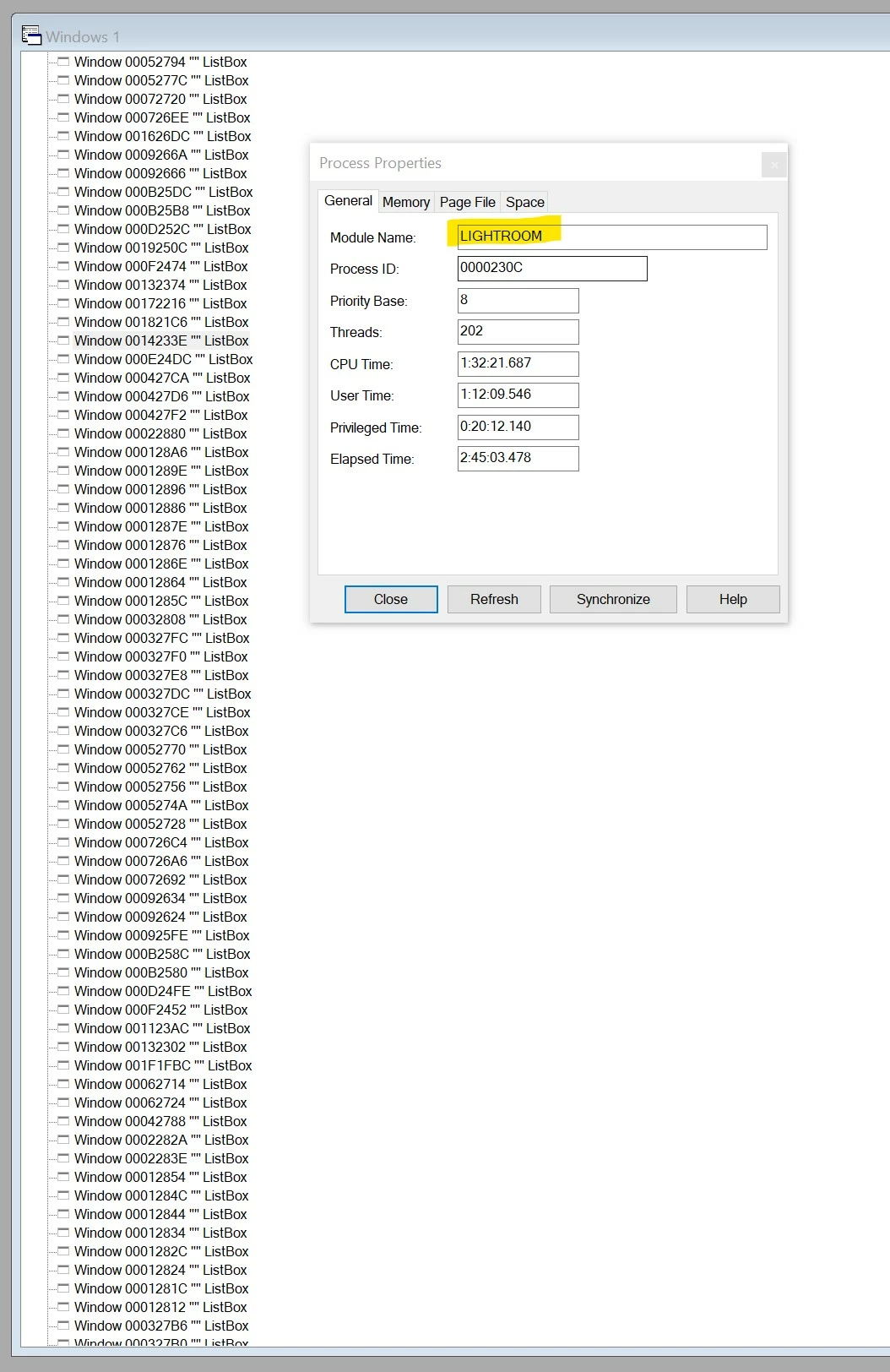
So I brought up Spy++ and looked at all the windows on the system.


There were hundreds and hundreds of top-level listboxes!
 
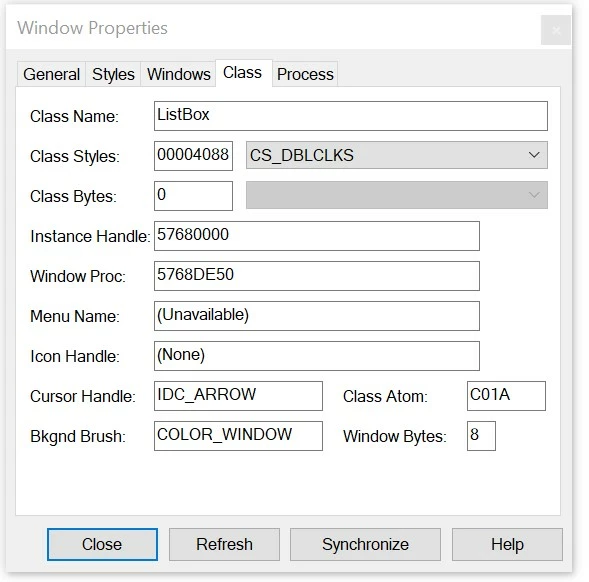
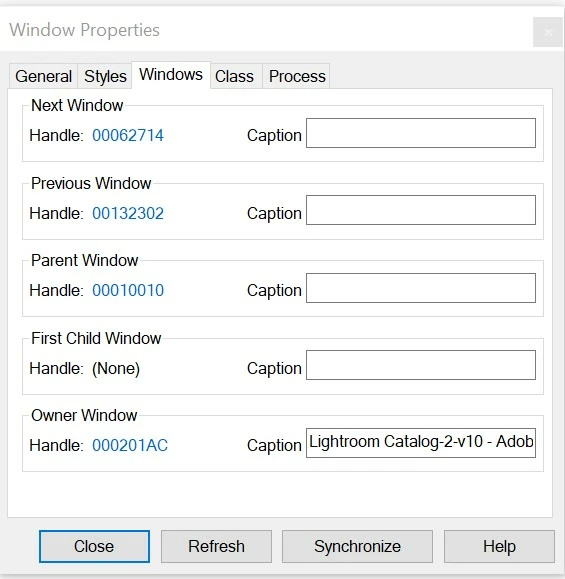
All these ListBoxes are owned by Lightroom, but it is not their parent. Their owner is "Lightroom Catalog-2-v10 - Adobe Photoshop Lightroom Classic - Library".
 
The ListBoxes are probably empty -- their size is "(0, 0)-(0, 4), 0x4".
 
In fact the Windows hierarchy is full of lots of little top-level windows owned by Lightroom, of very uncertain use.
These include Windows of type ComboLBox and tooltips_class32. Some of these have larger client areas.
 
I don't think I need to explain any more? Lightroom is leaking window handles. Eventually this corrupts the whole system.
 
Does Adobe actually test Lightroom on Windows? Checking for handle leaks is pretty easy -- I just showed you how.
 
Thanks
This topic has been closed for replies.

11 replies

Rikk Flohr_Photography
Community Manager
Community Manager
October 26, 2021

Greetings,


The Max 2021 Photography products updates have been released and include remedies for this topic.  The updates will be rolling out worldwide, October 26 and 27, 2021. If you do not see the updates in your Creative Cloud Desktop app, you can refresh the apps to see if the updates are available in your region.  The keyboard shortcut to refresh is [Cmd/Ctrl] + [Opt/Alt] + [ R ]. 


Note: iOS and Android updates may take up to a week to appear in your App Store.


Thank you for your patience.

Rikk Flohr: Adobe Photography Org
Adobe Employee
June 8, 2021

Thank you for the confirmation.

erichschlaikjer
Known Participant
June 8, 2021

The multiple selection window handle leak has been fixed in Lightroom Classic 10.3 June release!

https://helpx.adobe.com/lightroom-classic/help/whats-new/2021-3.html#other-enhancements

Faster Metadata Management
With this release, you will experience performance improvements while selecting and updating metadata for multiple images.

Nice! Thank you!

I ran my handle-checker program and there were no new windows after selection, multiple-selection, deselection, or arrowing around.

When I select a face in a picture, and type a name in the edit box that pops up, this does seem to leak one ListBox and one Edit window, but that is not a big deal. Arrowing to new pictures while in develop mode may leak one "BezelWindow" and one "tooltips_class32". However, when I cross reference to the GDI object count in the task manager, this seems to stay more or less constant, so perhaps those windows get freed in a delayed way.

I very much look forward to seeing how improved the whole user experience is over long periods!

I also look forward to installing the Apple silicon version, because yes I actually bought an M1 Mini to see if LRC performs better there. I'll tell that story in a different thread.

Thanks again. It is nice to know that you are listening! 😊

Participating Frequently
March 17, 2021

suspect it's a leftover from the creation of the universe initial lightroom development, same as old GDI leaks, listbox item count restrictions, etc. And Adobe is either too afraid to touch it or doesn't consider it a high enough priority (GDI leaks were unfixed for a looooong time)

erichschlaikjer
Known Participant
March 17, 2021

One might ask oneself why Lightroom *creates* the metadata dialog-box-type display windows every single time a photo is selected. This is one reason why photo selection is so slow! Why not create all these windows once only and then keep them around, repopulating their contents as the selection changes? Then it would not matter if the editable windows destroy themselves incorrectly and leak listboxes, because it would only happen as Lightroom shuts down.

Participating Frequently
March 17, 2021

@Rikk any news on this? has it at least been filed as a bug?

erichschlaikjer
Known Participant
March 17, 2021

FYI The Lightroom Classic update from 10.1.1 to 10.2 does not fix this window leak.


This bug may sound obscure but it is serious. Doing a lot of multiple-selecting means Lightroom becomes unusable after about 20 minutes and I have to restart.


I set a breakpoint on CreateWindowExW and can see list boxes being created while populating the Metadata information. For example, I can see listboxes being created right after "Label", "Title", "Caption", "User Comment", "GPS", "Altitude", "Direction", "Creator", "Job Title", etc etc. Often, but not always, these text fields have little buttons on the right. Perhaps it is not a coincidence that I count about 38-40 editable fields in the Metadata pane -- the same number of listboxes seem to get leaked with every multiple selection or deselection. Maybe every editable field creates a listbox and never destroys it?


I modified my "AdobeWatch" program to keep a list of extant windows so you can see what is newly created after every action. The output is below.


Finally, I tried collapsing the Metadata pane, and the leak goes away! That pretty much clinches that the leak is inside the metadata display code.


So a work-around is to keep the metadata pane collapsed. But then, uh, I can't see the metadata! I often select multiple images to set their metadata collectively.


Lightroom owns 202 new top-level windows
REM Change selection in grid mode
Lightroom: 00022302     ""      "tooltips_class32"
Lightroom owns 1 new top-level windows
REM again
Lightroom owns 0 new top-level windows
REM Select a second image with ctrl-mouseclick
Lightroom: 00012382     ""      "ListBox"
Lightroom: 00022312     ""      "ListBox"
Lightroom: 0002230E     ""      "ListBox"
Lightroom: 0002231A     ""      "ListBox"
Lightroom: 00032304     ""      "ListBox"
Lightroom: 002C1538     ""      "ListBox"
Lightroom: 00040EFE     ""      "ListBox"
Lightroom: 00040EF4     ""      "ListBox"
Lightroom: 00030834     ""      "ListBox"
Lightroom: 0003083C     ""      "ListBox"
Lightroom: 00030340     ""      "ListBox"
Lightroom: 00030B38     ""      "ListBox"
Lightroom: 00030B90     ""      "ListBox"
Lightroom: 00030C48     ""      "ListBox"
Lightroom: 00030C70     ""      "ListBox"
Lightroom: 00030C98     ""      "ListBox"
Lightroom: 00030CC0     ""      "ListBox"
Lightroom: 00030CC8     ""      "ListBox"
Lightroom: 00030D2C     ""      "ListBox"
Lightroom: 00030D5E     ""      "ListBox"
Lightroom: 00070728     ""      "ListBox"
Lightroom: 000302E0     ""      "ListBox"
Lightroom: 00030E82     ""      "ListBox"
Lightroom: 00030E2E     ""      "ListBox"
Lightroom: 00030E36     ""      "ListBox"
Lightroom: 00030E74     ""      "ListBox"
Lightroom: 00030E88     ""      "ListBox"
Lightroom: 00030E90     ""      "ListBox"
Lightroom: 000D0EB0     ""      "ListBox"
Lightroom: 00040EBA     ""      "ListBox"
Lightroom: 00030EBE     ""      "ListBox"
Lightroom: 00030EA0     ""      "ListBox"
Lightroom: 000401A4     ""      "ListBox"
Lightroom: 0002196E     ""      "ListBox"
Lightroom: 0002197E     ""      "ListBox"
Lightroom: 000219BC     ""      "ListBox"
Lightroom: 00040EEC     ""      "ComboLBox"
Lightroom: 000219D6     ""      "ComboLBox"
Lightroom owns 38 new top-level windows
REM select a third image
Lightroom: 00012392     ""      "ListBox"
Lightroom: 0001238A     ""      "ListBox"
Lightroom owns 2 new top-level windows
REM select a fourth image
Lightroom owns 0 new top-level windows
REM deselect these by single-clicking a new image
Lightroom: 000123DC     ""      "ListBox"
Lightroom: 000123D4     ""      "ListBox"
Lightroom: 000123CC     ""      "ListBox"
Lightroom: 000123BC     ""      "ListBox"
Lightroom: 000123B4     ""      "ListBox"
Lightroom: 000123AC     ""      "ListBox"
Lightroom: 000123A4     ""      "ListBox"
Lightroom: 0001239A     ""      "ListBox"
Lightroom: 00060F00     ""      "ListBox"
Lightroom: 000319E0     ""      "ListBox"
Lightroom: 000319D4     ""      "ListBox"
Lightroom: 000319C8     ""      "ListBox"
Lightroom: 000319C0     ""      "ListBox"
Lightroom: 000319B4     ""      "ListBox"
Lightroom: 000319A6     ""      "ListBox"
Lightroom: 0003199E     ""      "ListBox"
Lightroom: 00031994     ""      "ListBox"
Lightroom: 0003198E     ""      "ListBox"
Lightroom: 0003197A     ""      "ListBox"
Lightroom: 00031972     ""      "ListBox"
Lightroom: 000A18E6     ""      "ListBox"
Lightroom: 000914D6     ""      "ListBox"
Lightroom: 0004195E     ""      "ListBox"
Lightroom: 000517DE     ""      "ListBox"
Lightroom: 000417D4     ""      "ListBox"
Lightroom: 000417CA     ""      "ListBox"
Lightroom: 00040E1E     ""      "ListBox"
Lightroom: 000417BE     ""      "ListBox"
Lightroom: 000417B8     ""      "ListBox"
Lightroom: 000417A8     ""      "ListBox"
Lightroom: 00040E9E     ""      "ListBox"
Lightroom: 0004179E     ""      "ListBox"
Lightroom: 00040EC0     ""      "ListBox"
Lightroom: 000F0EB4     ""      "ListBox"
Lightroom: 00040C5C     ""      "ListBox"
Lightroom: 00040BCC     ""      "ListBox"
Lightroom: 000414AC     ""      "ListBox"
Lightroom: 00032310     ""      "ListBox"
Lightroom: 0006166C     ""      "ListBox"
Lightroom: 000123C4     ""      "ComboLBox"
Lightroom: 00022386     ""      "ComboLBox"
Lightroom owns 41 new top-level windows
REM select all
Lightroom: 000123E4     ""      "ListBox"
Lightroom: 0003238E     ""      "ListBox"
Lightroom: 00032388     ""      "ListBox"
Lightroom: 00042314     ""      "ListBox"
Lightroom: 00071668     ""      "ListBox"
Lightroom: 0004231C     ""      "ListBox"
Lightroom: 00070EE4     ""      "ListBox"
Lightroom: 000F0786     ""      "ListBox"
Lightroom: 00070EF8     ""      "ListBox"
Lightroom: 00050840     ""      "ListBox"
Lightroom: 00050838     ""      "ListBox"
Lightroom: 000A14D8     ""      "ListBox"
Lightroom: 00050C36     ""      "ListBox"
Lightroom: 00050CA8     ""      "ListBox"
Lightroom: 00060D1A     ""      "ListBox"
Lightroom: 00050D02     ""      "ListBox"
Lightroom: 00050D34     ""      "ListBox"
Lightroom: 00050D66     ""      "ListBox"
Lightroom: 00080754     ""      "ListBox"
Lightroom: 00050E86     ""      "ListBox"
Lightroom: 00050E30     ""      "ListBox"
Lightroom: 00050E72     ""      "ListBox"
Lightroom: 00050E8C     ""      "ListBox"
Lightroom: 00090368     ""      "ListBox"
Lightroom: 000E0EB6     ""      "ListBox"
Lightroom: 000601B4     ""      "ListBox"
Lightroom: 000517A6     ""      "ListBox"
Lightroom: 000419A2     ""      "ListBox"
Lightroom: 000419AE     ""      "ListBox"
Lightroom: 000419CA     ""      "ListBox"
Lightroom: 000223B6     ""      "ListBox"
Lightroom: 000223D0     ""      "ComboLBox"
Lightroom owns 32 new top-level windows
REM deselect
Lightroom: 00012476     ""      "ListBox"
Lightroom: 0001246E     ""      "ListBox"
Lightroom: 00012466     ""      "ListBox"
Lightroom: 00012456     ""      "ListBox"
Lightroom: 0001244E     ""      "ListBox"
Lightroom: 00012446     ""      "ListBox"
Lightroom: 0001243E     ""      "ListBox"
Lightroom: 00012434     ""      "ListBox"
Lightroom: 0003242C     ""      "ListBox"
Lightroom: 000323DE     ""      "ListBox"
Lightroom: 000323CE     ""      "ListBox"
Lightroom: 000323C2     ""      "ListBox"
Lightroom: 000323BA     ""      "ListBox"
Lightroom: 000323AE     ""      "ListBox"
Lightroom: 000323A0     ""      "ListBox"
Lightroom: 00032398     ""      "ListBox"
Lightroom: 000519DE     ""      "ListBox"
Lightroom: 000519D0     ""      "ListBox"
Lightroom: 000519C4     ""      "ListBox"
Lightroom: 000519B8     ""      "ListBox"
Lightroom: 00061982     ""      "ListBox"
Lightroom: 0005198A     ""      "ListBox"
Lightroom: 0005196C     ""      "ListBox"
Lightroom: 000801A2     ""      "ListBox"
Lightroom: 00081946     ""      "ListBox"
Lightroom: 0007194A     ""      "ListBox"
Lightroom: 000617E2     ""      "ListBox"
Lightroom: 000617CE     ""      "ListBox"
Lightroom: 00060E26     ""      "ListBox"
Lightroom: 000617C8     ""      "ListBox"
Lightroom: 000617AC     ""      "ListBox"
Lightroom: 00060E9C     ""      "ListBox"
Lightroom: 00061798     ""      "ListBox"
Lightroom: 00060E92     ""      "ListBox"
Lightroom: 00070EF2     ""      "ListBox"
Lightroom: 00070F02     ""      "ListBox"
Lightroom: 00052320     ""      "ListBox"
Lightroom: 000223FC     ""      "ListBox"
Lightroom: 00022410     ""      "ListBox"
Lightroom: 00012426     ""      "ListBox"
Lightroom: 0001241E     ""      "ListBox"
Lightroom: 00012416     ""      "ListBox"
Lightroom: 00012406     ""      "ListBox"
Lightroom: 000123FE     ""      "ListBox"
Lightroom: 000123F6     ""      "ListBox"
Lightroom: 000123EE     ""      "ListBox"
Lightroom: 0001245E     ""      "ComboLBox"
Lightroom: 0002241A     ""      "ComboLBox"
Lightroom owns 48 new top-level windows
REM

erichschlaikjer
Known Participant
January 8, 2021

Better to change _tcsnccmp(_TEXT("Lightroom"), text, 9) to _tcscmp(_TEXT("AgWinMainFrame"), classname)

erichschlaikjer
Known Participant
January 8, 2021

Using the simple program above, I find that multiple selection in Lightroom grid mode increases the number of top level windows by about two dozen each time! Deselecting creates just as many windows again.

erichschlaikjer
Known Participant
January 8, 2021

// AdobeWatch.cpp : This file contains the 'main' function. Program execution begins and ends there.
//

#include <stdio.h>
#include <tchar.h>
#include <windows.h>

DWORD photoshop_process = 0;
DWORD lightroom_process = 0;

int photoshop_count = 0;
int lightroom_count = 0;


BOOL CALLBACK find_adobe(HWND hWnd, LPARAM lParam)
{
    TCHAR text[800], classname[800];

    *text = '\0';
    GetWindowText(hWnd, text, ARRAYSIZE(text));

    *classname = '\0';
    GetClassName(hWnd, classname, ARRAYSIZE(classname));

    if (0 == _tcsnccmp(_TEXT("Lightroom"), text, 9))
    {
        GetWindowThreadProcessId(hWnd, &lightroom_process);
        _tprintf(_TEXT("Lightroom process is %x\n"), lightroom_process);
    }
    if (0 == _tcscmp(_TEXT("Photoshop"), classname))
    {
        GetWindowThreadProcessId(hWnd, &photoshop_process);
        _tprintf(_TEXT("Photoshop process is %x\n"), photoshop_process);
    }

//    _tprintf(_TEXT("%p\t\"%s\"\t\"%s\"\n"), hWnd, text, classname);
    return(true);
}

BOOL CALLBACK count_adobe(HWND hWnd, LPARAM lParam)
{
    DWORD process = 0;

    GetWindowThreadProcessId(hWnd, &process);

    if (process == lightroom_process)
        ++lightroom_count;

    if (process == photoshop_process)
        ++photoshop_count;

    return(true);
}

int main()
{
    EnumWindows(find_adobe, 0);
    EnumWindows(count_adobe, 0);

    _tprintf(_TEXT("Lightroom owns %d top-level windows\n"), lightroom_count);
    _tprintf(_TEXT("Photoshop owns %d top-level windows\n"), photoshop_count);

}