


Participating Frequently
June 22, 2020

P: Magenta Cast on Export (Mac only)

  • June 22, 2020
  • 47 replies
  • 1264 views

I just did, but the exported photos are wrong again in version 3.3.
Uninstalled and installed a few times now.
For reference I run MacOS Catalina 10.15.5 on a 2017 5K 27 inch iMac with 3.4 GHz Intel I5 and a Radeon Pro 570 graphics card. I tried disabling GPU acceleration, but nothing works.If there is anything I can test let me know, going back to 3.2.1 again now.

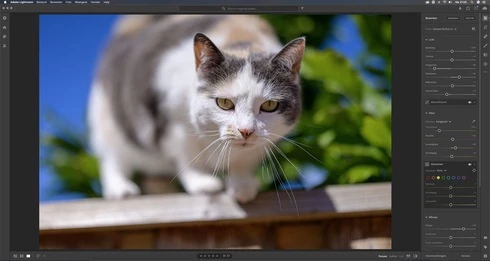
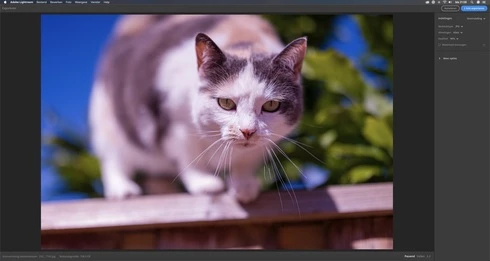
Let me share 2 screen grabs, 1 of the development window, and another one of the export preview window. Without making any edits. (Camera Nikon Z 6)

Maybe my info helps.


This topic has been closed for replies.

47 replies

Rikk Flohr_Photography
Community Manager
Community Manager
November 3, 2021

Setting status to fixed

Rikk Flohr: Adobe Photography Org
Rikk Flohr_Photography
Community Manager
Community Manager
August 17, 2021

Good catch. This was fixed in the 3.4 time frame. 

Rikk Flohr: Adobe Photography Org
Victoria Bampton LR Queen
Community Expert
Community Expert
August 17, 2021

@Rikk this bug is still marked as Acknowledged, should it be closed or is it ongoing? 

Victoria - The Lightroom Queen
Participant
October 2, 2020

Magenta cast on export from Light room cc to Jpeg. Please advise if there is a software upgrade to solve this problem. 

Inspiring
August 18, 2020
I've just seen after refreshing... 🙂
Doh....
Rikk Flohr_Photography
Community Manager
Community Manager
August 18, 2020
The Mac store version was pushed live last night. 
Rikk Flohr: Adobe Photography Org
Inspiring
August 18, 2020
Great news, hopefully it won't be long until it gets pushed to the Mac Store version to be updated 🙂
Rikk Flohr_Photography
Community Manager
Community Manager
August 18, 2020
Updates to Camera Raw, Lightroom Classic, and the Lightroom Ecosystem were released yesterday evening and contain a fix for this issue.  Please install the appropriate update and see if it solves this problem. 

Thank you for your patience.
Rikk Flohr: Adobe Photography Org
Participant
August 18, 2020
As mentioned a few days ago for me personally, I tried this workaround and this did not work for me. What has been working fine for me is simply using version 3.2. Not ideal but it's working for now.
Participating Frequently
August 18, 2020
Rikk added a workaround as a comment earlier. Here are the instructions from his comment. 

Until this a fix for this issue is released, here are some workarounds you can use to get things working correctly again:

You can install Photoshop or Bridge
or
You can install the Adobe DNG Converter (Free)
or
You can follow this procedure.
  1. Locate the profiles inside Lightroom.
    1. In Applications, go into Adobe Lightroom CC folder
    2. Right-click Adobe Lightroom.app and choose Show Package Contents
    3. Open Contents, then Resources folder
    4. Copy the folder called CameraProfiles
  2. Paste into /Library/Application Support/Adobe/CameraRaw. (If the folder doesn’t exist, create it first.)
  3. Go back to the Lightroom app and do the same for the LensProfiles folder. 
  4. You should now see:
    1. /Library/Application Support/Adobe/CameraRaw/CameraProfiles and 
    2. /Library/Application Support/Adobe/CameraRaw/LensProfiles
  5. Relaunch Lightroom and try exporting again.
Note that the Library folder mentioned in step 2 is not the /Users/yourusername/Library/... . You need to be in just plain /Library/ in the drive's root...

Can you try these steps and verify if it works for you?