


1mpala
Participant
March 23, 2026

P: Recommended Presets Not Working

  • March 23, 2026
  • 208 replies
  • 5079 views

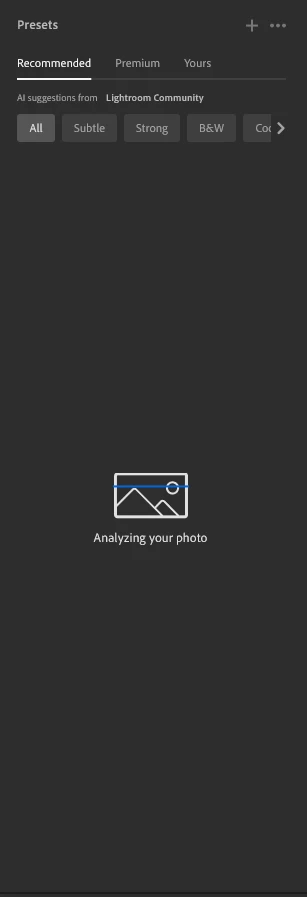
The recommended presets aren't loading anymore; it says they're being analyzed, but nothing happens. It used to work before—how can I fix this?
 

208 replies

Charlotte Towle
Participant
April 2, 2026

When i click a photo it says analysing and then nothing shows, when will this be fixed?

Srishti_Bali
Legend
April 2, 2026

Hi ​@David27513790p4tw 


Thanks for reaching out! I’d be happy to help. Could you please share a few more details so I can better understand the issue?

  • Your operating system and the version of the Lightroo you’re using.
  • A screenshot of your screen (similar to the example)


Also, could you try resetting your preferences and let us know if that helps? You can follow the steps shared below:

  1. Quit Lightroom Classic.

  2. macOS: Press and hold the Shift + Option keys.

    Windows: Press and hold the Shift + Alt keys.

  3. While holding down the keys, launch Lightroom Classic. There, you will get the option to reset Preferences to defaults.

Let us know how this goes. Looking forward to your update so we can assist you further!


Regards,

Srishti


ABSorensen
Participant
April 5, 2026

Same problem here. When (or how) will “recommended presets” be back? The steps above doesn’t work...

David27513790p4tw
Participant
April 2, 2026

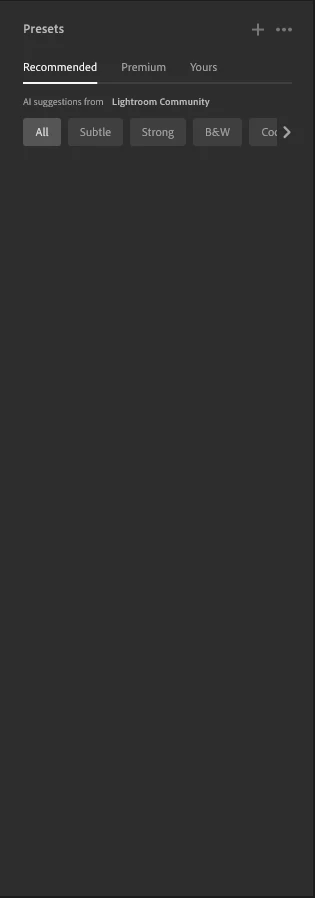
In Lightroom, under Presets, the recommended presets are no longer appearing.  I have the latest updates for LR, I have not changed my computer at all.  I can still seem my personal presets but the AI recommended ones don’t show up anymore.

Participant
April 2, 2026

Since the issue here happens only on desktop version, I am applying preset in mobile version (if needed), and continue working on desktop later. I contacted Adobe, and their suggestion was to monitore this topic.....

wise_heartB831
Participant
April 1, 2026

After contacting customer care they emailed me this im unable to see if it makes a diffrance  due to no internet till tomorrow im sure it won't seems like it a full cache fix or graphic card fix not a bad 

Software update. Im sure it saw something like this on the help page.

Please follow these steps for Preset issue in Lightroom - 

1. Close Lightroom.

Navigate to: C:\Users\[YourUsername]\AppData\Local\Adobe\Lightroom CC\Data

(Note: AppData is a hidden folder; you may need to check "Hidden items" in File Explorer's View tab.)

2. Look for a folder named with a long string of numbers/letters (your user ID).

3. Inside, look for a folder named cr_cache or sensei_cache and rename it to old_cache.

4. Relaunch Lightroom and wait 30–60 seconds on a single photo to see if "Analyzing" completes.  

Go to Edit > Preferences > Performance.

Try setting Use Graphics Processor to Off temporarily.

If the presets suddenly appear, your GPU driver needs an update to support the 2026 AI features.


stilltone
Participant
April 1, 2026

Followed this, reinstalled all drives, graphic card, usb hubs, BIOS update and still doesn’t work

JAgostinho
Participating Frequently
April 1, 2026

If this feature works on the mobile version, why ​@adobe  still don’t know how to fix it on the pc? Where is the feedback, the ETA??? We pay for the full service. 

DavidediPaola
Participant
April 1, 2026

Semplicemente non si aprono le opzioni di raccomandati

Eringzo
Participant
April 1, 2026

This is an issue for a lot of us. While not a critical feature, it does provide inspiration for those of us that use it. Can we get an update or some kind of response to let us know of the progress and set an expectation for a time to resolution? Many thanks. 

stilltone
Participant
April 1, 2026

Any update on this? 

Cade_Lansou0033
Participant
April 1, 2026

The “Recommended” presets are not showing up. It shows that my photo is being analyzed but no presets appear. This is only on the desktop version, whereas on the mobile version the recommended presets pop up.
