


1mpala
Participant
March 23, 2026

P: Recommended Presets Not Working

  • March 23, 2026
  • 208 replies
  • 5096 views

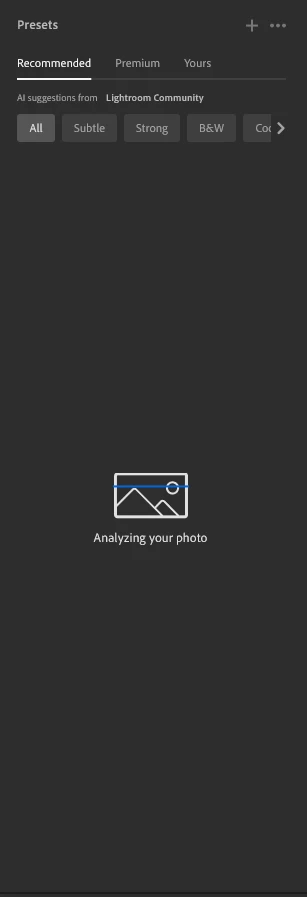
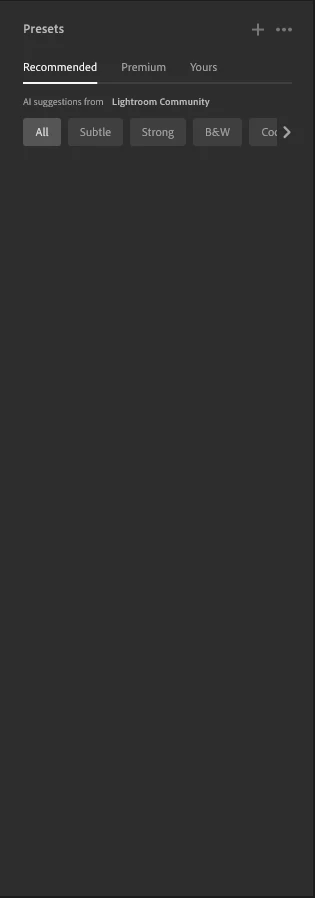
The recommended presets aren't loading anymore; it says they're being analyzed, but nothing happens. It used to work before—how can I fix this?
 

208 replies

Incredible_mind5D94
Participant
March 28, 2026

Adobe, why aren’t you fixing this?

Claire H.
Community Manager
Community Manager
March 27, 2026

Hi ​@fotogrl, thanks for reaching out to the Lightroom Community Forums! Let’s try a few basic troubleshooting steps:

  • Check for Updates: Ensure that your Lightroom app is updated to the latest version.
  • Restart the App: Close the Lightroom app completely and then reopen it. This can help refresh the application and resolve minor glitches

If neither of these steps works, we would like a few more details. Can you send your system info, a screenshot or screen recording of what you’re seeing, and a numbered list of the exact steps needed to replicate the issue? You can find your system info by going to Help > System Info, copying and pasting it into a text file, and attaching it here. Thanks! ^CH

fotogrl
Participant
April 5, 2026

I bring up a photo and click on the presets icon. Click on recommended. The program attempts to analyze but stops. Nothing comes up.  I have checked for updates. I have closed and restarted the program many times. Nothing corrects this issue. If I click on updates nothing shows up for Lightroom. I have not seen an update for Lightroom in a very long time.

Following is the system info:


Lightroom version: 9.2 x64 [ 20260217-0314-dfbaf86 ] (Feb 16 2026)
NGL Version: 1.42.0.5
WF Version: 8.2 5e8f3ad
VF Version: 1.0.164
HIL Version: 40501
CAI Version: c2pa-c/0.6.0 c2pa-rs/0.46.0
PH Version: 5.2.3
Adobe GSDK Version: 1.4.0.171
CR Version: 29.0.0.202506270808_710830c

Operating system: Windows 11
OS Version: Windows 11 Home (2009)
Application architecture: x64
System architecture: x64
Computer model: ASUSTeK COMPUTER INC. ProArt Studiobook H7604JV_H7604JV / 13th Gen Intel(R) Core(TM) i9-13980HX
Logical processor count: 32
Processor speed: 2.4 GHz
Real memory available to Lightroom: 16012.7 MB
Real memory used by Lightroom: 1802.7 MB (11.2%)
Virtual memory used by Lightroom: 3890.2 MB
Memory cache size: 0.0 MB

Internal Camera Raw version: 18.2 [ 2482 ]
Maximum thread count used by Camera Raw: 17
Camera Raw SIMD optimization: SSE2,AVX,AVX2
Camera Raw virtual memory: 427MB / 5958MB (7%)
Camera Raw real memory: 429MB / 16012MB (2%)

Display: 3200x2000
System DPI setting: 144 DPI (high DPI mode)
Dark Mode: No
Desktop composition enabled: Yes
Input types: Multitouch: Yes, Integrated touch: Yes, Integrated pen: Yes, External touch: No, External pen: No, Keyboard: No

Graphics Processor Info: DirectX: NVIDIA GeForce RTX 4060 Laptop GPU (32.0.15.6607) - 8 GB
Graphics Processor Detail: loaded: Yes, supported: Yes, compute: Yes, init: I4_GPU4, hard: success, soft: success, al: Yes, dl: No
OS Media Capability: true

Application Folder: C:\Program Files\Adobe\Adobe Lightroom CC
Settings Folder: C:\Users\cshep\AppData\Roaming\Adobe\Lightroom CC
Library Folder: C:\Users\cshep\AppData\Local\Adobe\Lightroom CC\Data
 

fotogrl
Participant
March 27, 2026

Won't analyze photos, no filters show up. This seems like a problem other people are also having. Should we not be getting everything we have paid for?

jessec47208855
Participant
March 27, 2026

same here as well.

Sharon_Zerihem6775
Participant
March 27, 2026

Preset Recommended doesn’t work for me either. While the creators try to solve the problem

Here is my temporary solution: Switch to Lightroom Web, it will work. Choose your presets from the community, click save. Then go back to your desktop App and continue to work.

Hope it will help some 


nate64963867
Participant
March 27, 2026

at least its a current workaround - great tip!

yosshiy32322571k6a8
Participant
March 27, 2026

ウインドウズ11 クラウド版での使用でプリセットアイコンを押したあと左のタブ、おすすめのかなのプリセットがすべて表示されない


JezRiggs
Participant
March 27, 2026

Has happened before - normally a restart has brought the recommended presets back again - but not this time. PUTA

Dalesman80
Participant
March 27, 2026

When I'm on my presets menu, the symbol will appear to say 'analyzing photo' and suddenly disappear, without showing me any presets.

This is the same no matter which tab I click on, warm, cool, cinematic etc…

It's happening with new photos added and all of my older photos.

This happens on my PC, and my laptop version of lightroom, but not in the mobile app.


Any tips?

PabloMG0704
Participant
March 27, 2026

Device: iPad Air M2
Lightroom version: 11.2.2 (build 0A0E34/233)
File type: Apple ProRAW

Description of the issue:
After the latest update (where Geometry tools were integrated into the Crop tool), I’m experiencing a consistent issue where the assigned profile resets when entering/exiting the Crop tool.

Specifically, if I set the image profile to “Adaptive”, using the Crop tool causes Lightroom to revert the profile back to “Apple ProRAW” automatically.

Steps to reproduce:

  1. Import an Apple ProRAW image

  2. Apply “Adaptive” profile 

  3. Open the Crop tool

  4. Make any adjustment (crop, rotate, or geometry)

  5. Exit the Crop tool

Result:
The profile resets to “Apple ProRAW”

MSMacedo
Participant
March 27, 2026

Same here.
This is deeply disappointing for software that has been on the market for over a decade and is explicitly positioned as a professional tool for photographers.
Professionals depend on reliability, yet this software too often fails at critical moments, effectively sabotaging real‑world workflows. It’s especially troubling that features which have functioned reliably for years can suddenly break without warning. That points to serious issues with testing, quality control, and update management. A professional‑grade product should inspire confidence, not hesitation.

When can users expect these regressions to be properly acknowledged and fixed?
