


1mpala
Participant
March 23, 2026

P: Recommended Presets Not Working

  • March 23, 2026
  • 208 replies
  • 5106 views

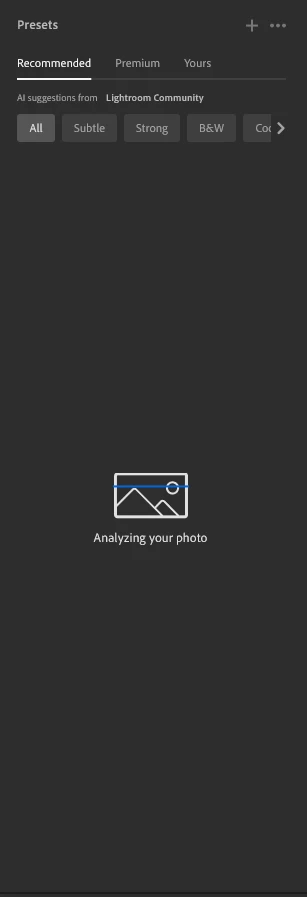
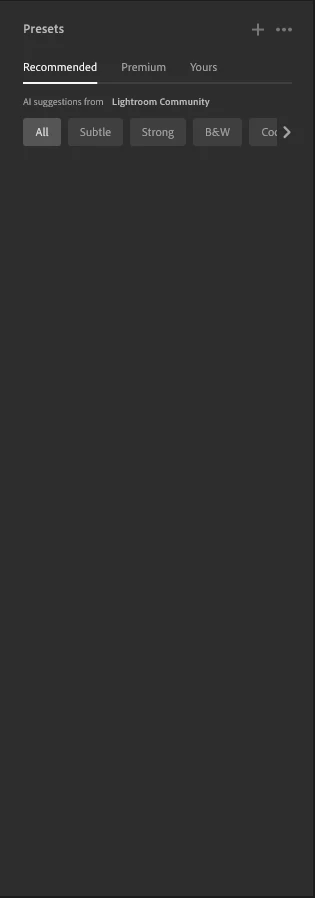
The recommended presets aren't loading anymore; it says they're being analyzed, but nothing happens. It used to work before—how can I fix this?
 

208 replies

Blessed lend by Amanda
Participant
March 24, 2026

Im using Lightroom not lightroom Web, The recommended presets are not loading at all

Lushfaded
Participant
March 24, 2026
black suggestions

I have tested this on mobile and desktop, on the mobile version, i am able to see presets suggestions but on the desktop version, i have been unable to see presets suggestions, i have tried uninstalling and reinstalling same version, and also unisntalling and installing a previous version,  updating graphic drivers, reboot myu desktop, tried on my laptop, it did not work


MassC
Legend
March 24, 2026

@Lushfaded 

Thanks so much for sharing the screenshot and the steps you’ve already tried—that’s really helpful. To get a clearer picture of what’s going on, could you also let us know which version of Lightroom Mobile you’re using? You can find this by going to Lightroom icon > About Lightroom.

If you’re on Desktop,  go to Help > System Info. Copy and paste everything into a text file and share as an attachment. 

^CMass

FITA00
Participant
March 24, 2026

Thanks a lot.

Here my system info for same error on pc

landvickroosta777
Participant
March 24, 2026

Ugggh

Participant
March 24, 2026

90 % It is a real bug problem. I chat with agent and i am waiting to fix them 

Sim'
Participant
March 24, 2026

Bonjour, les paramètres prédéfinis recommandés ne fonctionnent plus sur mon PC. En effet, “analyse de votre photo” apparaît deux secondes, puis disparait sans faire aucune proposition, et ce sur toutes les photos. 

83stef
Participant
March 24, 2026

depuis quelques jour cette fonctionnalité ne fonctionne plus, je clique sur “TOUT” Lightroom v9.2 indique “analyse de votre photo” quelques secondes et puis rien :
 pas de vignette d affichée en suggestion,
même si je change d onglé  “subtil” ou “N&B” =il se passe rien pas de suggestion de vignette.

j ai essayé sur un 2 pc même problème (windows11)
il y a que sur la version mobile ou cette fonction fonctionne correctement.

la fonction PREMIUM elle indique bien des vignettes en suggestion
merci


Izek_M567576
Participant
March 24, 2026

same thing started happening to me last night, i tried to load a preset and it never loaded so i reset the app and when i loaded it back up same exact issue. glad to know its not just me dealing with this problem but does any one know a fix to this haven't been able to find one after 6+ hours or troubleshooting and trying to look up a solution

Izek_M567576
Participant
March 24, 2026

anytime i try and load presets on Lightroom (not LrC) and try to use the recommended presets tab that uses suggestions from the Lightroom community it loads but stays blank and no presets show up, I can load my premium and personal presets fine but not the recommended tab


on newest version of Lightroom V9.2 and i have no idea what happened? i was looking at presets to edit and they loaded perfectly fine then went i swapped pictures my pc took longer than usual to load then next thing i know my community presets just not load and stay grey.


i will also add when i go to the WEB version or the APP on my phone the community presets load perfectly fine with no problem!


in the screenshot you can see the presets tab is open and just shows grey with no presets showing

MassC
Legend
March 23, 2026

Hey @ErnestoGRA,

Thank you for reaching out! Could you please let me know which version of Lightroom you’re currently using?

I also noticed that a new subscription was started today—are you still experiencing the issue after that update? If so, could you share a screenshot of what you’re seeing, along with any error messages? That will help us take a closer look and assist you more effectively.


^CM

ErnestoGRA
Participant
March 24, 2026

Hola. La versión 9.2 .  Sí, me sigue dando el mismo error después de la nueva suscripción. No me da ningún mensaje de error, simplemente no carga. Te adjunto captura de pantalla. Muchas gracias.

ErnestoGRA
Participant
March 24, 2026

Desinstale y volví a instalar y me sigue pasando lo mismo. 

Participant
March 23, 2026

Hello!
Had this issue recently but restarting the app fixed it, today the presets tab gets to ‘analyzing your photo’ then loads nothing.

Tried reset, reinstall, Installed different versions. All have the same issue.
All photo formats, same photos to work fine on Web and Android.
Thanks
