


1mpala
Participant
March 23, 2026

P: Recommended Presets Not Working

  • March 23, 2026
  • 208 respuestas
  • 5108 visualizaciones

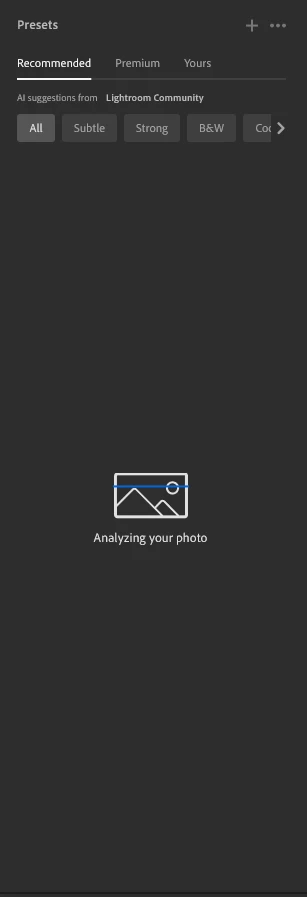
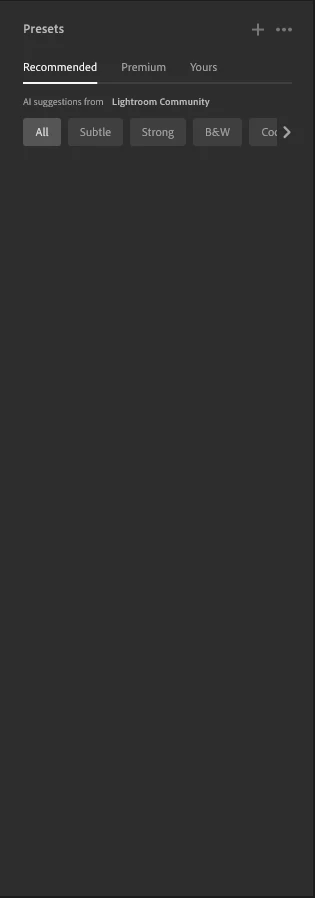
The recommended presets aren't loading anymore; it says they're being analyzed, but nothing happens. It used to work before—how can I fix this?
 

208 respuestas

Participant
March 23, 2026

Same for me. Only recently started happening. Since the latest update I think

Participant
March 23, 2026

For the last couple of weeks (I think since the latest update) presets in Lightroom are not working properly. You have the options, All, Strong or Subtle, Lightroom “analyses” the picture but it no longer diuplays any suggested presets. A bug introduced by theupdate?

1mpala
1mpalaAutor
Participant
March 24, 2026

It happened to me even before the update

K4D1N
Participant
March 23, 2026


ErnestoGRA
Participant
March 23, 2026

Los ajustes recomendados por IA no me cargan. Tengo suficiente espacio, he desinstalado e instalado el programa… y nada. 

LiamGod
Participant
March 23, 2026

Same issue worked fine before last update. i click them it says analyzing your photo pops up for about a seconds then nothing.

Robin5CC3
Participant
March 23, 2026

This bug is also happening to me.
If i remember correctly i encountered the problem about 3 weeks ago → updated LR to Version 9.2→ Issue still there → forgot about it

Recommended Presets work for me on the Mobile App(Android) and in the Browser based Version.

Only seems to be happening on the Desktop Version (tested with CR2, ORF and JPG Files).

Here are my System Specs:

1mpala
1mpalaAutor
Participant
March 23, 2026

It’s been about a month for me too. I didn’t have any issues before. I tried switching to older versions, but it didn’t fix the problem. Is there anyone who can help? I think it’s related to Creative Cloud—it seems like it can’t connect to the internet.

1mpala
1mpalaAutor
Participant
March 23, 2026

Lightroom version: 9.2 x64 [ 20260217-0314-dfbaf86 ] (Feb 16 2026)
NGL Version: 1.42.0.5
WF Version: 8.2 5e8f3ad
VF Version: 1.0.164
HIL Version: 40501
CAI Version: c2pa-c/0.6.0 c2pa-rs/0.46.0
PH Version: 5.2.3
Adobe GSDK Version: 1.4.0.171
CR Version: 29.0.0.202506270808_710830c

Operating system: Windows 10
OS Version: Windows 10 Pro (2009)
Application architecture: x64
System architecture: x64
Computer model: CASPER BILGISAYAR SISTEMLERI A.S CASPER NIRVANA / Intel(R) Core(TM) i7-9700F CPU @ 3.00GHz
Logical processor count: 8
Processor speed: 3,0 GHz
Real memory available to Lightroom: 16332,0 MB
Real memory used by Lightroom: 1993,6 MB (12,2%)
Virtual memory used by Lightroom: 4653,1 MB
Memory cache size: 3413,6 MB

Internal Camera Raw version: 18.2 [ 2482 ]
Maximum thread count used by Camera Raw: 5
Camera Raw SIMD optimization: SSE2,AVX,AVX2
Camera Raw virtual memory: 364MB / 6118MB (5%)
Camera Raw real memory: 365MB / 16332MB (2%)

Display: 1920x1080
System DPI setting: 96 DPI
Dark Mode: Yes
Desktop composition enabled: Yes
Input types: Multitouch: No, Integrated touch: No, Integrated pen: No, External touch: No, External pen: No, Keyboard: No

Graphics Processor Info: DirectX: NVIDIA GeForce GTX 1060 3GB (32.0.15.7283) - 3 GB
Graphics Processor Detail: loaded: Yes, supported: Yes, compute: Yes, init: I4_GPU3, hard: success, soft: success, al: Yes, dl: No
OS Media Capability: true

Application Folder: C:\Program Files\Adobe\Adobe Lightroom CC
Settings Folder: C:\Users\Administrator\AppData\Roaming\Adobe\Lightroom CC
Library Folder: C:\Users\Administrator\AppData\Local\Adobe\Lightroom CC\Data


I didn’t have this problem before; it started later. I thought maybe it would be fixed, so I checked to see if there were any updates and installed them, but it still didn’t work. I think it’s visible here, but it won’t let me click on it or do anything else because when I minimize it, it looks like it’s visible here, or when I switch between tabs Sometimes the photo gets stuck while it's being analyzed

nikunj.m
Legend
March 23, 2026

Hi, thanks for reaching out!

Please go to the Help menu in Lightroom, then System Info, and copy the text. You can share the info with us by either pasting it as a reply here or by sending a link to the text file. 

Does this happen with all images, or only when working with files of a specific format? Did this start happening after the latest update?


We're here to help, just need some more information.

Thanks,
Nikunj

1mpala
1mpalaAutor
Participant
March 23, 2026


I didn’t have this problem before; it started later. I thought maybe it would be fixed, so I checked to see if there were any updates and installed them, but it still didn’t work. I think it’s visible here, but it won’t let me click on it or do anything else because when I minimize it, it looks like it’s visible here, or when I switch between tabs Sometimes the photo gets stuck while it's being analyzed 


Lightroom version: 9.2 x64 [ 20260217-0314-dfbaf86 ] (Feb 16 2026)
NGL Version: 1.42.0.5
WF Version: 8.2 5e8f3ad
VF Version: 1.0.164
HIL Version: 40501
CAI Version: c2pa-c/0.6.0 c2pa-rs/0.46.0
PH Version: 5.2.3
Adobe GSDK Version: 1.4.0.171
CR Version: 29.0.0.202506270808_710830c

Operating system: Windows 10
OS Version: Windows 10 Pro (2009)
Application architecture: x64
System architecture: x64
Computer model: CASPER BILGISAYAR SISTEMLERI A.S CASPER NIRVANA / Intel(R) Core(TM) i7-9700F CPU @ 3.00GHz
Logical processor count: 8
Processor speed: 3,0 GHz
Real memory available to Lightroom: 16332,0 MB
Real memory used by Lightroom: 1544,2 MB (9,4%)
Virtual memory used by Lightroom: 2224,3 MB
Memory cache size: 0,0 MB

Internal Camera Raw version: 18.2 [ 2482 ]
Maximum thread count used by Camera Raw: 5
Camera Raw SIMD optimization: SSE2,AVX,AVX2
Camera Raw virtual memory: 391MB / 6118MB (6%)
Camera Raw real memory: 392MB / 16332MB (2%)

Display: 1920x1080
System DPI setting: 96 DPI
Dark Mode: Yes
Desktop composition enabled: Yes
Input types: Multitouch: No, Integrated touch: No, Integrated pen: No, External touch: No, External pen: No, Keyboard: No

Graphics Processor Info: DirectX: NVIDIA GeForce GTX 1060 3GB (32.0.15.7283) - 3 GB
Graphics Processor Detail: loaded: Yes, supported: Yes, compute: Yes, init: I4_GPU3, hard: success, soft: success, al: Yes, dl: No
OS Media Capability: true

Application Folder: C:\Program Files\Adobe\Adobe Lightroom CC
Settings Folder: C:\Users\Administrator\AppData\Roaming\Adobe\Lightroom CC
Library Folder: C:\Users\Administrator\AppData\Local\Adobe\Lightroom CC\Data
 

Eugenio35236184duse
Participant
March 23, 2026

Hello, I have the same exact problem. It applies to all photos. I have tried everything (clearing cache, updating, reinstalling etc.) but it doesn’t work.


Lightroom version: 9.2 x64 [ 20260217-0314-dfbaf86 ] (Feb 16 2026)
NGL Version: 1.42.0.5
WF Version: 8.2 5e8f3ad
VF Version: 1.0.164
HIL Version: 40501
CAI Version: c2pa-c/0.6.0 c2pa-rs/0.46.0
PH Version: 5.2.3
Adobe GSDK Version: 1.4.0.171
CR Version: 29.0.0.202506270808_710830c

Operating system: Windows 11
OS Version: Windows 11 Pro (2009)
Application architecture: x64
System architecture: x64
Computer model: LENOVO 21DK / AMD Ryzen 5 5625U with Radeon Graphics         
Logical processor count: 12
Processor speed: 2,2 GHz
Real memory available to Lightroom: 14188,0 MB
Real memory used by Lightroom: 1602,0 MB (11,2%)
Virtual memory used by Lightroom: 2085,1 MB
Memory cache size: 3287,4 MB

Internal Camera Raw version: 18.2 [ 2482 ]
Maximum thread count used by Camera Raw: 7
Camera Raw SIMD optimization: SSE2,AVX,AVX2
Camera Raw virtual memory: 740MB / 5046MB (14%)
Camera Raw real memory: 741MB / 14188MB (5%)

Display: 1920x1080
System DPI setting: 144 DPI (high DPI mode)
Dark Mode: No
Desktop composition enabled: Yes
Input types: Multitouch: No, Integrated touch: No, Integrated pen: No, External touch: No, External pen: No, Keyboard: No

Graphics Processor Info: DirectX: AMD Radeon (TM) Graphics (31.0.21024.9001)
Graphics Processor Detail: loaded: Yes, supported: Yes, compute: Yes, init: I3_GPU4, hard: success, soft: success, al: No, dl: No
OS Media Capability: true

Application Folder: C:\Program Files\Adobe\Adobe Lightroom CC
Settings Folder: C:\Users\EugenioQuintieri\AppData\Roaming\Adobe\Lightroom CC
Library Folder: C:\Users\EugenioQuintieri\AppData\Local\Adobe\Lightroom CC\Data
