
Participant
September 15, 2023

Can't change the weight of variable fonts after update to 25.0

  • September 15, 2023
  • 42 replies
  • 24511 views

When I try to change the font weight, only a few letters have their weight replaced. First, this happened on Photoshop Beta version, but I updated both of the versions at the same time, and after trying it in the current Photoshop version (v25.0), the same problem happens.
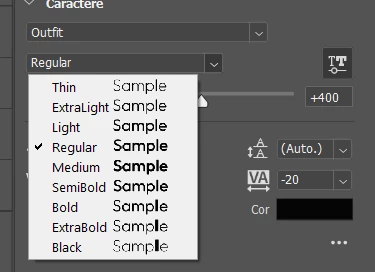


Even the font preview shows it bugged. (Only the L in "Sample" changing weight)

 

The letters affected change when I try it on the canvas, but it's still the same problem. I didn't test a lot of fonts, but the fonts that have this problem are Raleway and Outfit, both from Google Fonts. From what I've seen from other people's posts, a lot of people using fonts from Google Fonts are having this problem. We really need a way to fix this.

42 replies

Participant
November 7, 2023

I have had this issue for several months and it's significantly hindering my work. Some letters are appearing bolder than others in Photoshop (I've had this issue with InDesign as well). I'm on the lastest version 25.1.10. I've seen in other threads trying to go back a few versions but that did not help. I cannot do my work and need a fix. Please help!! See screenshot attached. 

Kevin Stohlmeyer
Community Expert
Community Expert
November 7, 2023

Hi @Laura250897853svv this is a known issue with Variable fonts.


Participant
November 1, 2023

Deleting the variable fonts and reinstalling the static versions fixed the problem for me, thanks so much for this!

Kevin Stohlmeyer
Community Expert
Community Expert
November 1, 2023

@Kristine Joyce 5505 I moved your post to the main thread regarding Variable fonts. See the posts above for current updates.

Participant
November 1, 2023

I'm working with very simple text layers in Photoshop, and I can't figure out why only certain letters turn bold when I set the font style to bold. Changing it to other font weights work fine, but the program refuses to change the text consistently when anything heavier than semibold is chosen. How can I fix this?


Font: Montserrat (downloaded from Google Fonts)

* Same issue experienced using other fonts like Rockwell

Participant
October 28, 2023

This exact issue is happening for me with Lexend and Montserrat.


The time added to projects because of this bug is absurrrrrrrd!


Weight will not change. Sometimes some letters are a bigger weight. Tried in Photoshop '24 and '23 - same problems.

The font is working just fine in Illustrator. So far.


Redownloading and reinstalling Lexend didn't work.


Glad the subscription price hike is bringing us such rad improvements!!! Grrrr 


Participant
October 25, 2023

I contacted Adobe support to report that Photoshop is not allowing the transformation of just one character of the 'League Spartan' font to 'Bold.' It only allows the use of 'Medium' for that particular character, while all the other characters work, and in Illustrator, the correction is made automatically.


After reaching out to support, their suggestion was that I 'change the font of the company's visual identity to a similar one from Adobe,' which I believe to be somewhat irrational, especially since the font works correctly in Illustrator, and we are dealing with an established visual identity in the market.


In conclusion, my suggestion is to fix this bug rather than change an entire design and system structure.


Sincerely,

Carla - Zouti's Designer

Legend
October 25, 2023

I am not seeing this on Windows 10 Pro, Bold works fine. Try the steps listed here:

https://helpx.adobe.com/photoshop/kb/troubleshoot-fonts-photoshop.html


Participant
October 22, 2023

I am also not able to change my text to bold weight, it still stays in the light weight font.

League spartan font is not wokring properly in Photoshop.


Please Resolve this Problem Adobe Team.

Known Participant
October 21, 2023

Since version 24.7 (also v25), the variable font feature has had a problem with some fonts. Heavy (weight) appears as thin! I have no problem with this font in other apps! This font had no problem in previous versions (before v24.7).

(see the video attachment)


davescm
Community Expert
Community Expert
October 21, 2023

Is it just that font? I've just tried several variable fonts here (not the one you are using) and they are working as expected


Dave

Rag and Bone
Community Expert
Community Expert
October 13, 2023

BTW, the issue also exists in InDesign. See here.

BreakEven
Participant
October 11, 2023

Having this issue with Spartan.