
Participant
September 15, 2023

Can't change the weight of variable fonts after update to 25.0

  • September 15, 2023
  • 42 replies
  • 24511 views

When I try to change the font weight, only a few letters have their weight replaced. First, this happened on Photoshop Beta version, but I updated both of the versions at the same time, and after trying it in the current Photoshop version (v25.0), the same problem happens.
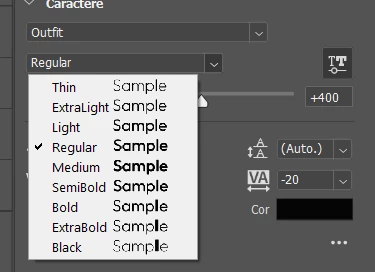


Even the font preview shows it bugged. (Only the L in "Sample" changing weight)

 

The letters affected change when I try it on the canvas, but it's still the same problem. I didn't test a lot of fonts, but the fonts that have this problem are Raleway and Outfit, both from Google Fonts. From what I've seen from other people's posts, a lot of people using fonts from Google Fonts are having this problem. We really need a way to fix this.

42 replies

Participant
October 5, 2023

I found something that solved the problem for me.

I needed to clear the font cache in the Adobe folder and the fonts started working normally again. But before that, I reinstalled the fonts that were causing the problem a few times and tested other ways to solve the problem, perhaps this had some impact on the result. The folder is in "C:\Users\YourName\AppData\Roaming\Adobe\Adobe Photoshop 2024" and you must delete the "CT Font Cache" folder.

Adobe Employee
October 5, 2023

If you find this issue with a variable font, look for the static (non-variable) version of the font. Chances are you can find it on-line. Montserrat font has static version of the font available for download. Adobe is aware of the issue and working on the fix. It may take sometime to ensure the quality of the fix. Thanks again for your patience.

Participant
October 5, 2023

Same problem here with v25, but with Montserrat font from Google Fonts. 


Just needed to fix one typo of a project, and now I have to install a previous version just to do that. Reinstalling the font didn't help me.


Shame, Adobe!

Participant
October 4, 2023

Hello, I tried your solution and it also works for me so thank you.

Inspiring
October 3, 2023

I've been going back and forth with Adobe on this variable font issue regarding a Monotype variable font for many weeks and they finally closed the case saying that there's nothing wrong with PS and that the type foundry needs to update the font in order to work within the new versions of PS. Not sure if I 100% believe it, but thought I'd share what I heard with you all.

Participant
October 2, 2023

I was just having this same issue with Montserrat in Photoshop. I uninstalled the font from Adobe Fonts, and deleted it from Font Book, then re-downloaded it from Google Fonts, added it to Font Book, but only the static version, not the variable font version. And now it works!

Participant
September 26, 2023

Bonjour, j'écris ce message, car j'ai un problème sur l'une de mes police. J'utilise la police Outfit et avant elle fonctionnait normalement mais maintenant dès que j'augmente la graisse, certaines lettre deviennent plus grasse et d'autre devienne toute fine. Étrangement, sur Illustrator la police et toute ses graisse fonctionne très bien.

Je vous mets deux capture d'écran une sur illustrator et l'autre sur photoshop.

Je serais ravi si vous avez une solution.

Merci d'avance


Hello, I am writing this message because I have a problem with one of my fonts. I use the Outfit font and before it worked normally but now as soon as I increase the weight, some letters become bolder and others become very thin. Strangely, on Illustrator the font and all its weights work very well.

I have provided you with two screenshots, one in Illustrator and the other in Photoshop.

I would be delighted if you have a solution.

Thanks in advance

Adobe Employee
September 26, 2023

Hi, Photoshop 25.0 has an issue with some variable fonts. Adobe is aware of the issue and working on the fix. In the meantime, please use static (non-variable) version of the font. Thank you for your support and patience.

Adobe Employee
September 22, 2023

@J E L Yes, I confirmed Sculpin Variable font has the issue. Adobe team is working on the issue now. In the meantime, please use static version of the Sculpin fonts that are available from Adobe Fonts. Thanks for your patience.

Participating Frequently
September 21, 2023

Until Adobe fixes the bug, reinstall version 24.7 to fix the issue. Do not install version 24.7.1. That version is also bugged.

Ged_Traynor
Community Expert
Community Expert
September 21, 2023

@J E L I can confirm this as well, Photoshop v25.0 on Windows 11